The only part of the installation process that requires you to enter your Adobe ID details is here:
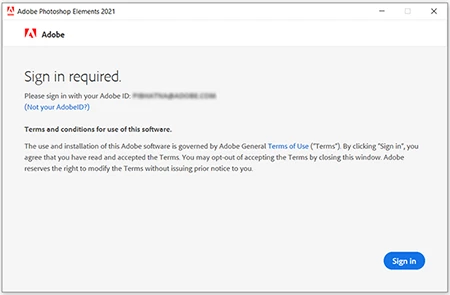
Any other time you are prompted to enter your username and password, it is macOS asking for your macOS account username and password. You just need to check whether it asking for your Standard user macOS account details, or whether it asking for your Administrator macOS account details. If you are the only user of the laptop, you may well be using an Administrator account already.
For more details on the differences between macOS user accounts:
Set up users, guests and groups on Mac
I'm not a Mac user, but I was under the impression that normally, Standard users have permission to install applications. It may be that some Mac applications require installing files to areas which need Administrative privileges, and that is why you might be asked occasionally for the Administrator account details - I'm not sure if Adobe Photoshop Elements is one of those apps.

 AdChoices