

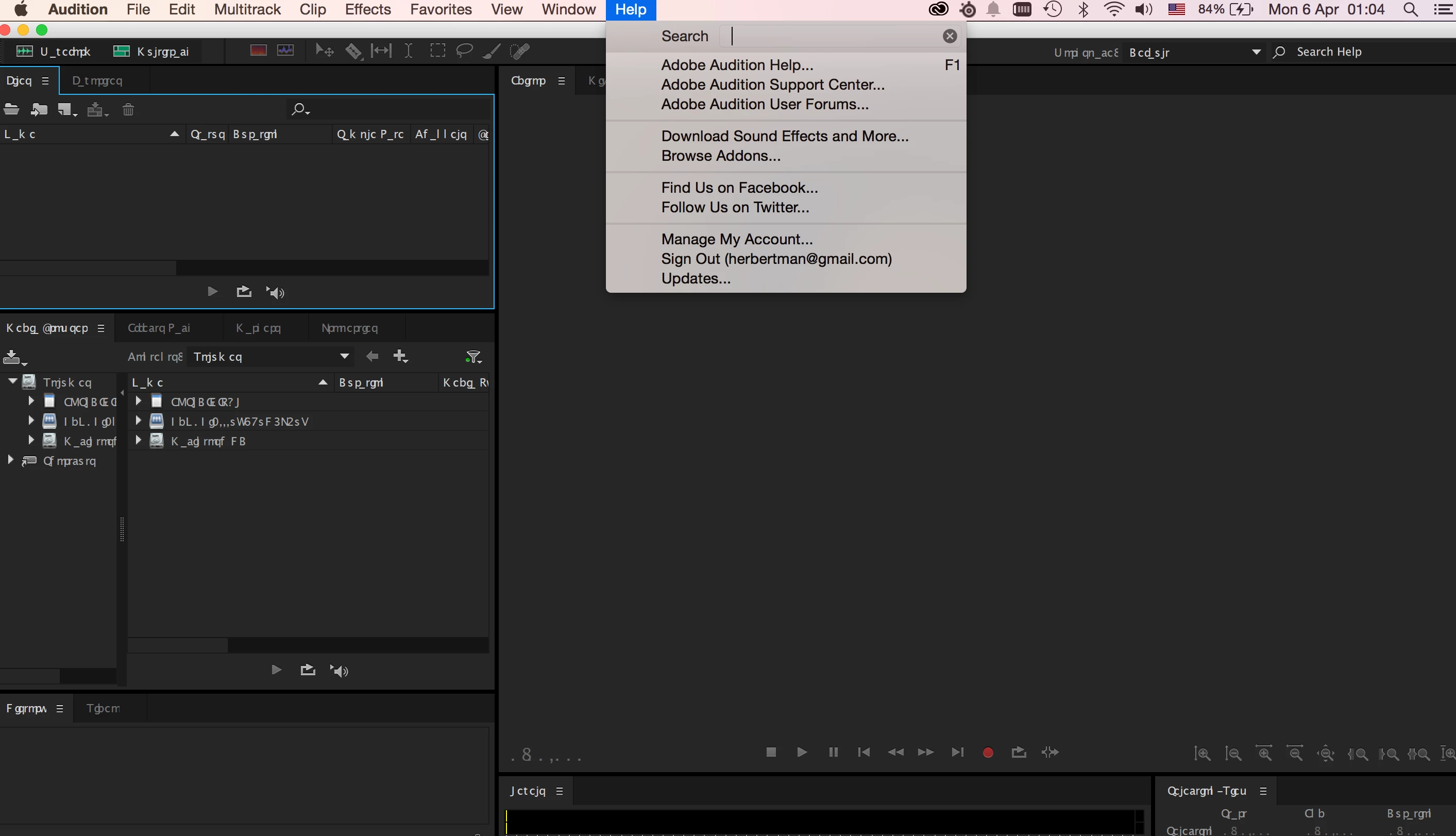
Problem with Audition CC (2014) with abnormal text display
Hi all,
Environment:
- MacOS 10.10.2
- Audition CC (2014) - I cant read what version of CC(2014). It should the latest one.
I am a user of Adobe CC, when i install the Audition CC 2014 in my MacBookPro with MacOS 10.10.2.
I encounter the following problem only with my Audition CC 2014. Other Adobe CC software are installed and worked as normal (such as Photoshop / Premiere Pro/ Dreamweaver ...)
The abnormal text display of Audition CC 2014 is as following screen capture. All text in workspace become some "symbols".
I tried change my Language setting in my MacOS, both before installation and after installation.
I also tried change the App Language in Adobe Creative Cloud, uninstall the Audition CC and reinstall the correct Language one which matched with my OS.
However, the Audition CC 2014
I am using English in MacOS, and US(international) in Adobe Creative Cloud.
I'd be interested if anyone could help on this problem.
Thanks,
Herbert
 AdChoices