Donald Cottam
Participant
April 15, 2020
Answered

Question about Adobe Spark and adding logo to projects

  • April 15, 2020
  • 2 replies
  • 1952 views

I'm just starting to play with using Adobe Spark to touch up videos/photos for social media, and I love the idea of being able to add our logo.  Our logo is of a mexican girl, and I'd like to figure out how to use only the outline of the girl as our logo on photos/videos, and not include the background (white space).  Is that possible?  If so, any pointers would be much appreciated!


TIA

=D

 

This topic has been closed for replies.
Correct answer Nancy OShea

Optimize web graphics in Photoshop before you bring them into your online projects (Spark, Portfolio, etc...)


1. In Photoshop, place logo on a transparent background layer -- denoted by a checkerboard pattern.


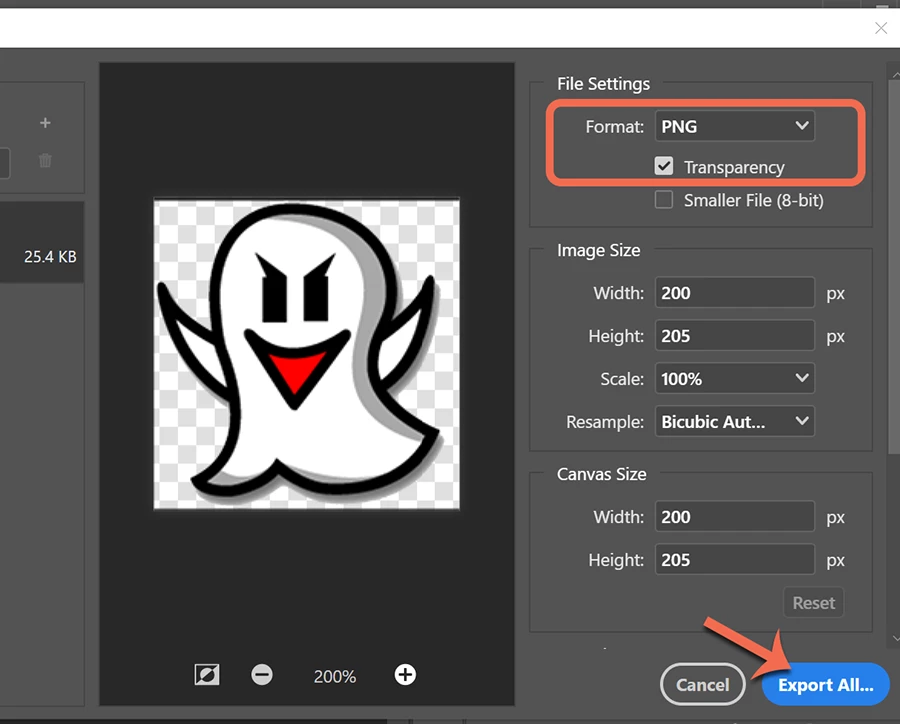
2. Go to File > Export > Export As > PNG with transparency checked.   See screenshot. 


2 replies

Nancy OShea
Community Expert
Nancy OSheaCommunity ExpertCorrect answer
Community Expert
April 15, 2020

Optimize web graphics in Photoshop before you bring them into your online projects (Spark, Portfolio, etc...)


1. In Photoshop, place logo on a transparent background layer -- denoted by a checkerboard pattern.


2. Go to File > Export > Export As > PNG with transparency checked.   See screenshot. 


Nancy O'Shea— Product User & Community Expert
Donald Cottam
Participant
April 16, 2020

Thank you, Nancy!


=D

John T Smith
Community Expert
Community Expert
April 15, 2020
Donald Cottam
Participant
April 15, 2020

Thanks, John.  I had already been through relevant support articles and guides.  Turns out this is relatively simple to do, but requires using the Quick Select tool in Photoshop to isolate the image from the background, saving that layer as a separate file, and then loading that layer file as the logo image in Spark.  Now I can add the "Bella's Girl" logo to a Spark project without adding the white background.  Just what I wanted!


=D