


New Participant
August 14, 2020
Answered

A simple Dreamweaver question

  • August 14, 2020
  • 1 reply
  • 276 views

Hi all. I've been working in an old DW version for years. Now in the new one! Question, I am in File view looking at my local server file list. I simply cannot figure out how to sort my file list by Type, Modified, Size, etc. !!!! Shouldn't those be listed across the top beside Local Files? How do I add those, or can I? They are in my older version as soon as I open the site and select Files. Thanks for any help on this.
    This topic has been closed for replies.
    Correct answer BenPleysier

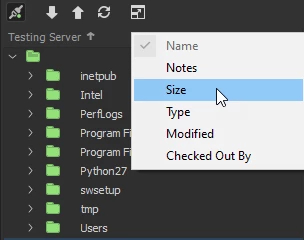
    Right click next to the server label (in my case Testing Server) and choose the columns you wish to have/sort on.


    1 reply

    BenPleysier
    BenPleysierCorrect answer
    Community Expert
    August 15, 2020

    Right click next to the server label (in my case Testing Server) and choose the columns you wish to have/sort on.


    Wappler is the DMXzone-made Dreamweaver replacement and includes the best of their powerful extensions, as well as much more!
    New Participant
    August 15, 2020

    Perfect! Thank you, Ben!