


dmarshak2020
Participant
April 16, 2017
Answered

Angular JS files not displaying in Related Files despite being linked.
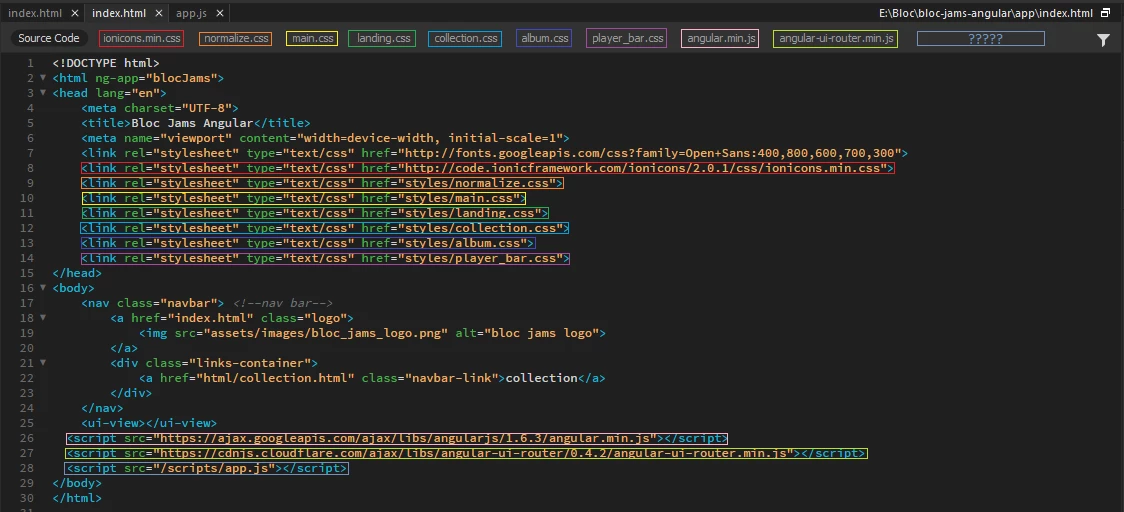
  • April 16, 2017
  • 2 replies
  • 545 views

This image pretty much sums it up. I've got 10 (now 11) source links in this HTML source code. First one is for a google font. Next is for web icons. Next 6 are for CSS styles sheets. At the bottom I have three AngularJS files linked to. The first is the minifed version of Angular then a link to the Angular UI Router. Last one shown here is to my app.js file but it doesn't show up in the Related Files at the top. I've since added another AngularJS file which deals with some elements of a specific view.

Neither of these Angular JS files are reflected in the Related Files section. As such I have to open them up specifically. Not a huge inconvenience but if I can get them to open with the other files, that would be easier.

Any suggestions/ideas as to why this is?

I'm using the most up to date version of DreamWeaver CC 2017 on a PC running 64 bit Win10 Home OS.

Thanks!

This topic has been closed for replies.
Correct answer dmarshak2020

Actually, those aren't the files I'm talking about and I can actually open the external files in Dreamweaver. I just can't edit them.

And I also just figured out what the problem was.

I could see the app.js file, which was in the scripts folder, because I had a forward slash before the scripts name.

In other words, I had <script src="/scripts/fixtures.js"></script> when I should have had <script src="scripts/fixtures.js"></script>.

2 replies

Nancy OShea
Community Expert
Community Expert
April 16, 2017

Maybe I'm dense but files hosted on CDNs can't be opened in Dreamweaver.  

Looks to me like your Anugular JS is on GoogleApi and Cloudflare CDNs.

Nancy

Nancy O'Shea— Product User & Community Expert
dmarshak2020
dmarshak2020AuthorCorrect answer
Participant
April 16, 2017

Actually, those aren't the files I'm talking about and I can actually open the external files in Dreamweaver. I just can't edit them.

And I also just figured out what the problem was.

I could see the app.js file, which was in the scripts folder, because I had a forward slash before the scripts name.

In other words, I had <script src="/scripts/fixtures.js"></script> when I should have had <script src="scripts/fixtures.js"></script>.

pziecina
Legend
April 16, 2017

It could be because they are externally hosted js files!

That is only a guess though, but i think, (and that is only think, not certain) that i read about this problem durring the open beta last year. I do know that there have been a number of users asking for better angular.js support, so it may be worth adding your name to the list -

help menu - feature request /bug report.