Exit
  • Global community
    • Language:
      • Deutsch
      • English
      • Español
      • Français
      • Português
  • 日本語コミュニティ
  • 한국 커뮤니티
0

Bootstrap, can't change text colour

Explorer ,
Mar 24, 2023 Mar 24, 2023

Hello,


I have a page made in Dreamweaver, on the navbar there is text for links but for the life of me I cannot figure out how I change text colour. I could just do an inline style but surely I must be able to change it.


Thanks for any help.


http://www.victorianrailways.net/service%20stock/service%20stock%20pages/wk/wk.html

717
Translate
Report
Community guidelines
Be kind and respectful, give credit to the original source of content, and search for duplicates before posting. Learn more
community guidelines

correct answers 1 Correct answer

Community Expert , Mar 25, 2023 Mar 25, 2023

To change the color of your text in the navigation menu, you just have to add the following rule, what you already did  :


.navbar-inverse .navbar-nav > li > a {
    color: red
}


But however, there would be some remarks to certainly correct beforehand :


...
Translate
Community Expert ,
Mar 25, 2023 Mar 25, 2023

To change the color of your text in the navigation menu, you just have to add the following rule, what you already did  :


.navbar-inverse .navbar-nav > li > a {
    color: red
}


But however, there would be some remarks to certainly correct beforehand :


  • you are using a version 3.4 of Bootstrap https://getbootstrap.com/docs/3.4/components/#navbar-default, today we are at version 5.+, you should eventually consider upgrading your site, especially since it seems that you are only at the beginning of its implementation.
  • you use spaces in your access paths, these are shown by the presence of the %20 character which replaces them in the code, here too you should make sure you only use characters compatible with the sensitivity of the servers, even if there must be better and dedicated to the pure server, this reading can help you https://learn.microsoft.com/en-us/windows/win32/fileio/naming-a-file 
  • you use an http protocol to load your page, but you only refer to links to pages "embedded" from https... hence the errors of pages that do not load (bootstrap, jquery, to name a few...)
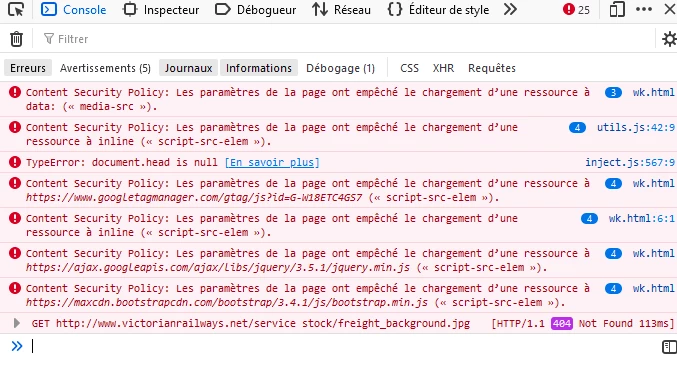
 

error-loading-https.png


In conclusion, if the rule doesn't work to change the color, it's certainly because the code it contains is not interpreted, and that, just because the referent libraries are not loaded.

To verify it, just open the console (ctrl shift k) of your browser and copy and paste this following fragment


var css = '.navbar-inverse .navbar-nav > li > a {color: red;}';
var style = document.createElement('style');

if (style.styleSheet) {  style.styleSheet.cssText = css;} else {  style.appendChild(document.createTextNode(css));}

document.getElementsByTagName('head')[0].appendChild(style);


You will see that in plain JavaScript, without using jquery, it works, which demonstrates the loading problems related to the use of https,


First modify your requests by removing the s from https ( within the HEAD tag, for each SCRIPT and LINK tags)

Reaload you page, and it should work (of course, if you have added the rule quoted at the very beginning of this comment in your personal STYLE tag)


But then , second, think about adding a certificate to your page and use HTTPS

 

Translate
Report
Community guidelines
Be kind and respectful, give credit to the original source of content, and search for duplicates before posting. Learn more
community guidelines
LEGEND ,
Mar 25, 2023 Mar 25, 2023

All good points but why the overkill of using javascript to append a css selector to the head section of the page just to test, surely it's far simpler just to write it directly to the head and l don't understand why css has anything to do with the Bootstrap js files, the css would be coming from the Bootstrap css file and the console errors in the uploaded image don't suggest that is coming from an external https source, maybe there are additional css links which are prefixed with https, l haven't looked at the code but even so you don't need to use javascript to test a css selector.

Translate
Report
Community guidelines
Be kind and respectful, give credit to the original source of content, and search for duplicates before posting. Learn more
community guidelines
Community Expert ,
Mar 25, 2023 Mar 25, 2023

Yes, you’re right and that's exactly the rule I'm indicating at the beginning of my first comment, which should be added to the code in the STYLE tag, the one added by @gunzelguy  :

.navbar-inverse .navbar-nav > li > a {
    color: red
}


So not having access to the page code, in order to demonstrate it directly from the console, I had to use a plain vanilla, because jquery is not loaded by the page.

Maybe I was clumsy in explaining it... youps, I’m sorry...

Translate
Report
Community guidelines
Be kind and respectful, give credit to the original source of content, and search for duplicates before posting. Learn more
community guidelines
LEGEND ,
Mar 25, 2023 Mar 25, 2023
quote

Yes, you’re right and that's exactly the rule I'm indicating at the beginning of my first comment, which should be added to the code in the STYLE tag, the one added by @gunzelguy  :


.navbar-inverse .navbar-nav > li > a {
    color: red
}


So not having access to the page code, in order to demonstrate it directly from the console, I had to use a plain vanilla, because jquery is not loaded by the page.

Maybe I was clumsy in explaining it... youps, I’m sorry...


By @L e n a


Right well you've confused me because its nothing to do with js it's to do with a css file. If for any reason the css file was not being loaded as a result of mixed content there's no need to use vanilla javascript to append the style tag and selector to the page to prove it is a problem with the style sheet either not loading or a  badly formed selector stopping the  cascade, you could simply embed the css selector without using javascript to test for potential problems with the css file.


Ýour first bit of advice was correct, all it needed was wrapping in style tags, assuming one was performing a test and the OP would have access to the code.

Translate
Report
Community guidelines
Be kind and respectful, give credit to the original source of content, and search for duplicates before posting. Learn more
community guidelines
Community Expert ,
Mar 25, 2023 Mar 25, 2023

Look at Bootstwatch Themes.  There are 25 different themes available.

Simply replace current Bootstrap CSS with your desired Bootswatch Theme.

If you like red, you might like the Journal Theme.


<!--Replace Bootstrap CSS with Bootwatch Theme-->

<link href="https://cdnjs.cloudflare.com/ajax/libs/bootswatch/5.2.3/journal/bootstrap.min.css" rel="stylesheet">


Bootswatch Examples

https://bootswatch.com/


Bootswatch Libraries on CDN

https://cdnjs.com/libraries/bootswatch


Hope that helps.


Nancy O'Shea— Product User, Community Expert & Moderator
Translate
Report
Community guidelines
Be kind and respectful, give credit to the original source of content, and search for duplicates before posting. Learn more
community guidelines
Community Expert ,
Mar 25, 2023 Mar 25, 2023
LATEST

To add to what @Nancy OShea has said, this is early stage of the redevelopment of the site, why not go straight for Bootstrap v5?


Have I said that the current creation of the site is a vast improvement on the previous version?


Ben

Mount Eliza VIC

Wappler is the DMXzone-made Dreamweaver replacement and includes the best of their powerful extensions, as well as much more!
Translate
Report
Community guidelines
Be kind and respectful, give credit to the original source of content, and search for duplicates before posting. Learn more
community guidelines

