


Participant
September 26, 2017
Answered

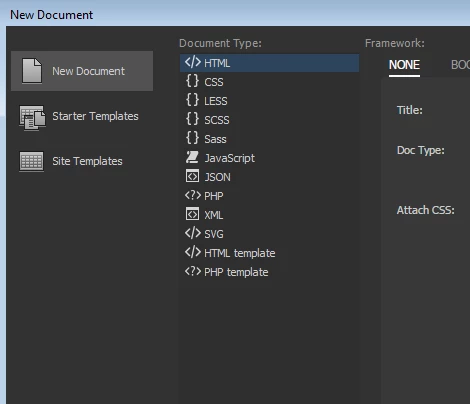
Can you add another document type to File, New?

  • September 26, 2017
  • 2 replies
  • 947 views

My web site is set up so I use the *.aspx file extension.  We have some things we load on every page on our web site.

I would like to build a custom *.aspx page that most of the page in our site will be based on.  I would like for this to appear as a choice in the new document list, when my team chooses, File, New.  Is this possible?  Thanks!
    This topic has been closed for replies.
    Correct answer Jon Fritz

    I don't know how to add to that exact list, but I do know how to add your own options under the Starter Templates header if you're interested in that.

    Basically, instead of clicking on New Document, you would click Starter Templates > Your Custom Page

    I made some instructions for that over here: [CC2017] How to create custom starter templates ?

    2 replies

    B i r n o u
    Community Expert
    Community Expert
    September 27, 2017

    sorry for being later on that one.

    well depending on the DW version that you drive, the process can be different, but more or less... there are two principal use case, you want to modify an existing filetype document, or you want to add a brand new one.

    in both case, you'll have to modify the MMDocumentTypes.xml located in your configuration roaming folder.

    then all the new reference of document template should be added in a NewDocuments folder located in the same root than the previous file. Don't forget to make the file attribut to point at the new document added.

    if that was the feature that you was looking for, and if I'm not clear enought, please, don't hesitate, let me know I could write a specific article on that one to help you handling it correctly.

    pziecina
    Legend
    September 27, 2017

    Hi Birnou,

    Nice to see you back in the forum again .

    Back in november when Dw2017 was release, I and another forum user found that simply adding to the MMDocumenTypes file did not enable the correct code hinting and completion for the new document type added to Dw.

    It is necessary for one of the 'Brackets' files in the Dw folder to also be modified in order to add those.

    Unfortunatly due to an error earlier this year, all the information we posted has been deleted, so I am unable to post which 'Brackets' file it is that also requires modifying.

    Just thought the information may help if you have the same problem when adding new file extension to Dw's list.

    B i r n o u
    Community Expert
    Community Expert
    September 27, 2017

    hello Paula,

    Nice to see you too...

    woaw I didn't remark that the code hint was not folowwing... are you talking about using an existing language (reformating a default existing files)... or by creating a new language template ?

    Jon Fritz
    Community Expert
    Jon FritzCommunity ExpertCorrect answer
    Community Expert
    September 26, 2017

    I don't know how to add to that exact list, but I do know how to add your own options under the Starter Templates header if you're interested in that.

    Basically, instead of clicking on New Document, you would click Starter Templates > Your Custom Page

    I made some instructions for that over here: [CC2017] How to create custom starter templates ?

    dwblandAuthor
    Participant
    September 26, 2017

    Perfect, this is extremely helpful.  Thank you so much!