


Carolina Surfcaster
New Participant
May 12, 2018
Answered

Cannot open reinstalled Dreamweaver
  • May 12, 2018
  • 1 reply
  • 706 views

Hard drive failure required that I reinstall Dreamweaver to a new drive from the original, licensed with serial numbered disk.

Running OS X High Sierra 10.13.4 on an iMac.

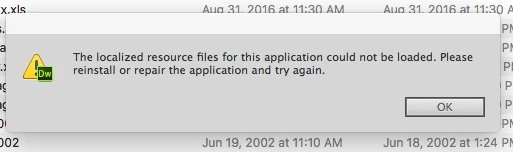
Have been unable to open Dreamweaver since the reinstall. Always receive the error message shown.

Subsequently have attempted multiple attempts to fix including booting in Safe mode, running Disk Warrior, Disk Utility, creating and attempting to open in new account, and finally reinstalling the OS. Also reinstalled legacy Java Runtime in response to an error message.

No luck.

Still get the same error message.

Anyone have any suggestions?

This topic has been closed for replies.
Correct answer Carolina Surfcaster

Can you try doing  a clean uninstall using the Creative Cloud cleaner, Use the CC Cleaner Tool for installation issues, reinstall the software and let us know if you are still facing issues?

Thanks,

Preran


In the process of downloading Creative Cloud Cleaner I noticed that Dreamweaver had not been uninstalled the last time I tried to I used the Uninstaller again - and it still did not uninstall. Used a third party utility to remove everything associated with it and reinstalled it. Appears to be opening properly now. Not sure what the magic fix was but thanks to Preran and Melissa for responding

1 reply

New Participant
May 12, 2018

What version of Dreamweaver are you using?

New Participant
May 12, 2018

If you are working with an Adobe Disk then I think there is an requirement that has to be "ok'd" by Adobe ... and it used too be able to be accessed on their site somehow ... they kept changing things around a lot over the years ... but have to get some sort of finalization pass in order for it to work.

Preran
Community Manager
Community Manager
May 14, 2018

Melissa,

I apologize for any misunderstanding. The check with Adobe appeared to work during the install but I still can not open the application.


Can you try doing  a clean uninstall using the Creative Cloud cleaner, Use the CC Cleaner Tool for installation issues, reinstall the software and let us know if you are still facing issues?

Thanks,

Preran