


Inspiring
June 2, 2017
Answered

Cannot update an SSI and a related .php file

  • June 2, 2017
  • 2 replies
  • 1147 views

I'd like your help understanding what's in front of me with DW CC 17.

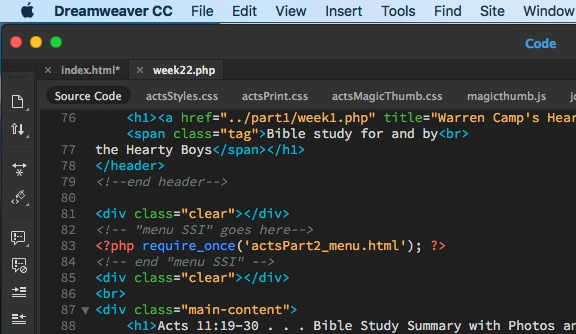
I've updated a .php page having an SSI. The page is in the "Acts" directory; it's titled "week22.php." Both can be seen here:
I also updated the SSI's dated menu item itself. It's titled "actsPart2_menu.html" and here's its screen shot.
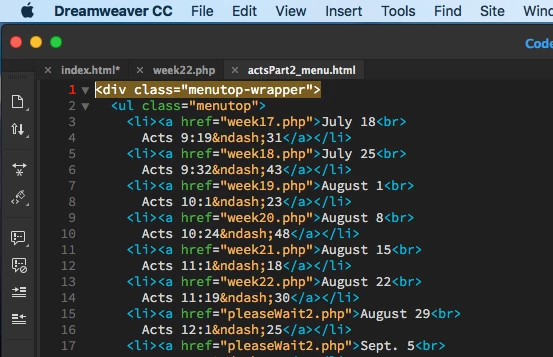
On line 13 (shown above) I've entered the updated "week22.php" menu item that goes with August 22 in the "Acts" directory.

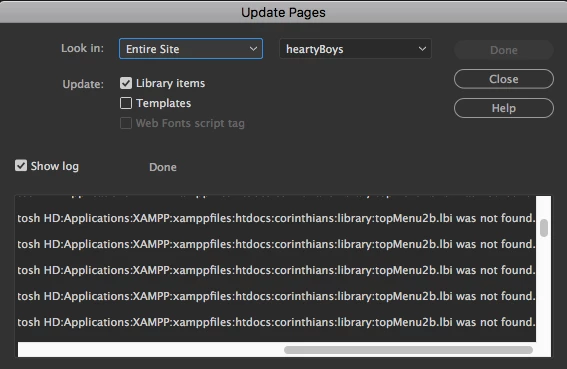
With both pages updated and uploaded, and the "week22.php" page open, I went to Tools > Library > Update pages. The following window opened up.
For no apparent reason, . . .

1.  After activating Update Pages, none of my "Acts" directory files that use that SSI get updated, especially my newly updated "week22.php" page. Am I to do something differently to update pages that have an SSI that's been modified?

2.  Further, while none of my "Acts" directory files appear in the Update Pages widow (despite the fact that I've updated them), I see 100+ files names in that window related to two other directories: "Corinthians" and "Luke."  There are numerous "Corinthian" and "Luke" entries stating that each file "was not found." Yet, I'm pretty sure that I see them inside my XAMMP folder in the Apps folder.

•••   Add to that the fact that in the "Corinthian" and "Luke" directories, there are NO SSIs and NO .php pages!

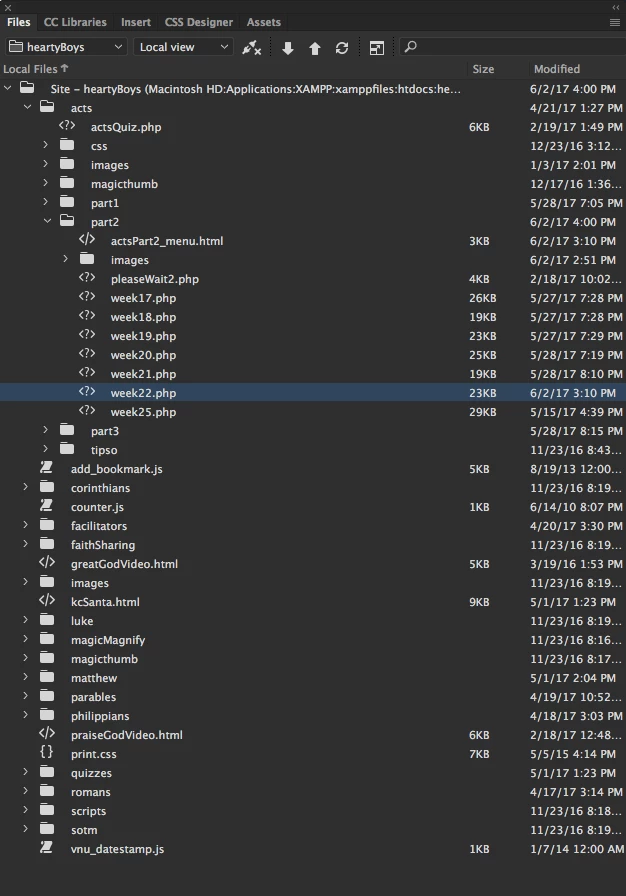
Here's a screen shot of my Local Files window showing those three directories and others, along with the before-mentioned SSI and "week22.php" page from within the "Luke" directory.
Can one of you see what I'm failing to do or understand? I need to upload that one .php page with an updated SSI menu change, however, I cannot get the change to appear online.     (  ; - (

Please enlighten me as to the process updating of SSIs and .php pages.

I'll very much appreciate your help learning sorting this out. Thanks.

Warren

    This topic has been closed for replies.
    Correct answer Nancy OShea

    [I don't know what you mean by Update Pages feature.]

    Update Pages is found in Tools > Library > Update Pages. I've been using that approach before you started me on PHP and SSIs. Is your "Bada bing!" expression suggesting that I need only put the modified files and that I no longer need to use the Update Pages feature with .php pages?

    If that's the case, great!!!! I'll see how that process works, going forward.

    Please lemmeeeenodat, okay? Thanks.

    Warren


    A resounding YES!

    Library Items, fagetabout-it!  You don't need them for PHP includes.

    Nancy

    2 replies

    Nancy OShea
    Community Expert
    June 3, 2017

    Library Items?!?  NO.

    Server-Side Includes replace the need for Library Items.  Remove Library Items from your workflow.

    Server-side includes are relative to the parent document in which the include statements occur.   It's easier if everything is in the same folder.

    Nancy

    Nancy O'Shea— Product User & Community Expert
    wcampAuthor
    Inspiring
    June 4, 2017

    Hello, Nancy!

    I'm unsure of your e-reply's suggested fix. Before I spend a great deal of time making changes that might not be needed, let me ask you to clarify a few concens.

    1.  You introduced me to SSIs and PHP code half a year ago. At that time, I'd begun to create pages in my then-current "Acts" directory. Up until this week's problem with the Update Pages feature, every time I added a page and changed the dated menu accordingly, the Update Pages feature worked flawlessly.

    2.  The other directories within my parent directory (called "heartyBoys," are static sites and pages; there won't be any changes made to them

    3.  Are you suggesting that I, nevertheless, convert all of my 100+ HTML pages in the other static directories to .php pages that have an SSI in each. even though I don't plan to change anything on those 100+ pages?

    Please explain fully what you suggest that I do, now that you know more details about about how my parent directory has subdirectories that are predominantly static HTML pages, with only the "Acts" directory being filled with an ever-changing SSI on its .php pages.

    Thanks for your understanding, Nancy.

    Warren

    The Hearty Boys Bible Study and Summary of Luke's "Book of Acts" | Part 2 | Acts 11:19–30

    Nancy OShea
    Community Expert
    June 4, 2017

    Only pages containing PHP code need a .php extension.

    What happens when you upload week22.php and your updated menu to your remote server & test it?

    What errors are you seeing?

    When something that had worked suddenly stops working, it's usually code or path related errors.

    Nancy

    Nancy O'Shea— Product User & Community Expert
    BenPleysier
    Community Expert
    June 3, 2017

    index.html contains PHP code and should therefore have a PHP extension such as index.php

    Wappler is the DMXzone-made Dreamweaver replacement and includes the best of their powerful extensions, as well as much more!
    wcampAuthor
    Inspiring
    June 3, 2017

    Hello, Ben:

    I hadn't referenced an "index.html" page in my post. Please tell me which "index.html" page you're looking at that has PHP code page and needs to be given a ".php" extension.

    Thank you.

    Warren

    BenPleysier
    Community Expert
    June 3, 2017

    My bad, when I saw this I came to the wrong conclusion, apologies.

    Also the library bit confused me as this is not required for an include file.

    Basically, when the interpreter hits an include 'foo.html'; statement, it opens the specified file, reads all its content, replaces the "include" bit with the code from 'foo.html'.

    Wappler is the DMXzone-made Dreamweaver replacement and includes the best of their powerful extensions, as well as much more!