


Jim_Palik
Inspiring
November 15, 2016
Answered

CC 2017 - PHP files all contain a ? in the files panel

  • November 15, 2016
  • 2 replies
  • 542 views

I just upgraded to CC 2017. In the files panel all the PHP files display a ? The links did not update. I can open the file by right clicking and selecting open. How can I update the entire files panel to re-link the php files so that I can open them by double clicking like I did before the upgrade?
This topic has been closed for replies.
Correct answer Nancy OShea

Just to be clear, you're clicking on files in your DW Files Panel, right?

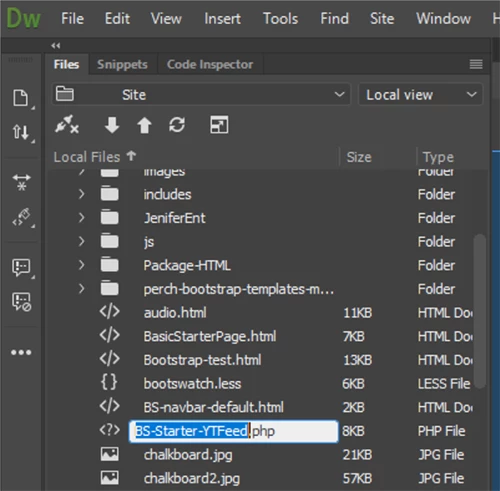
I've found if you click too slowly, the rename option comes up which can make it difficult to select a file.

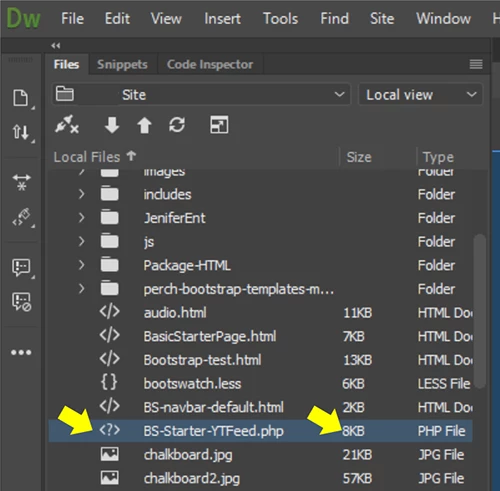
I find it works best to click or double-click on either side of file name.

One-click, prompts for a file rename:

Click on either side to select.  Or double-click to open:

Failing that, Restore Preferences.

https://helpx.adobe.com/dreamweaver/kb/restore-preferences-dreamweaver-cs6-cc.html

Nancy O.

2 replies

BenPleysier
Community Expert
Community Expert
November 15, 2016

<?php and ?> are part of the PHP code. Simplifying this to <?> makes sense when showing PHP files in a directory.

Wappler is the DMXzone-made Dreamweaver replacement and includes the best of their powerful extensions, as well as much more!
Community Manager
November 15, 2016

Hi James,

We did change icons for file types. Below is the PHP icon in files panel in DW CC 2017.

You can check links within site and fix those if those are broken using Site Menu

Site  > Site options > Check links sitewide

Hope this helps.

thanks,

Lalita

Jim_Palik
Jim_PalikAuthor
Inspiring
November 16, 2016

Dear Lalita

I did your suggestion and it did not correct the problem. I cannot open php files by clicking or double clicking. I can only open them by right clicking and selecting open.

How do I fix this site-wide.

Jim

[please refrain from PII and 3rd party URLs in this area - Moderator]
Nancy OShea
Community Expert
Nancy OSheaCommunity ExpertCorrect answer
Community Expert
November 16, 2016

Just to be clear, you're clicking on files in your DW Files Panel, right?

I've found if you click too slowly, the rename option comes up which can make it difficult to select a file.

I find it works best to click or double-click on either side of file name.

One-click, prompts for a file rename:

Click on either side to select.  Or double-click to open:

Failing that, Restore Preferences.

https://helpx.adobe.com/dreamweaver/kb/restore-preferences-dreamweaver-cs6-cc.html

Nancy O.

Nancy O'Shea— Product User & Community Expert