

Known Participant
May 4, 2020
Question

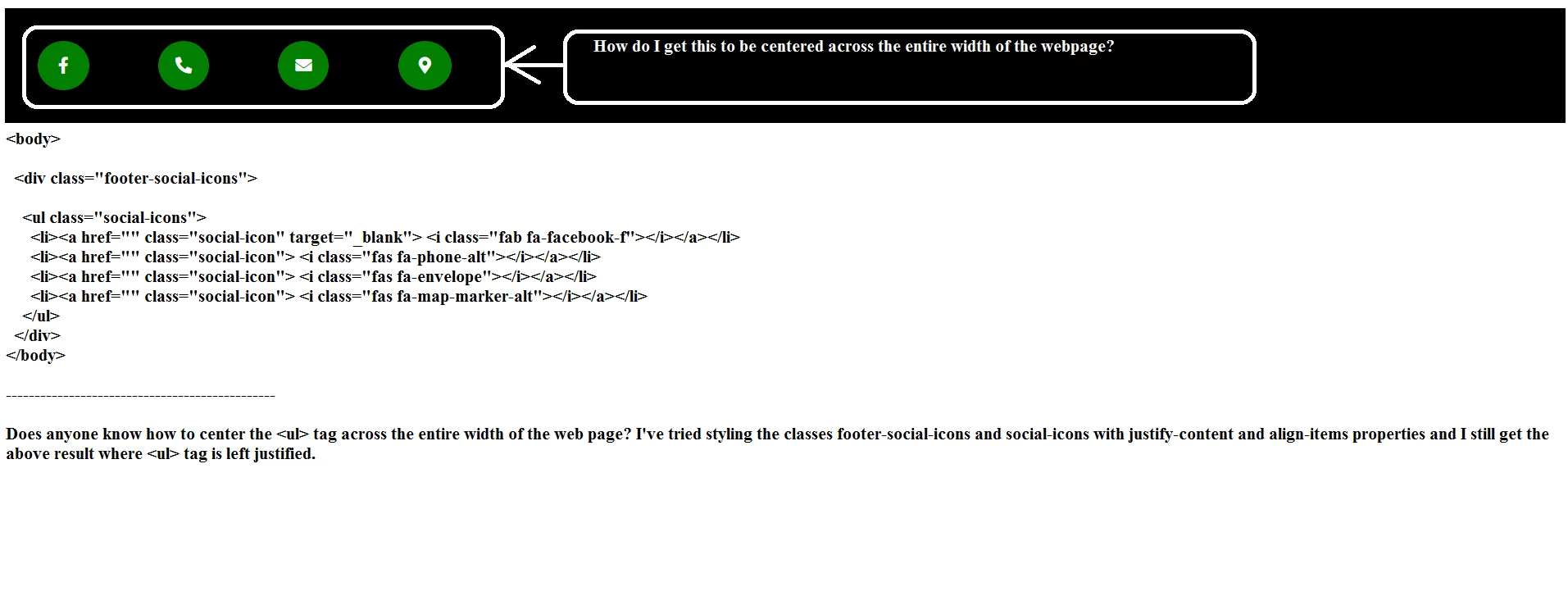
Centering Div Across Entire Width of Web Page?
  • May 4, 2020
  • 2 replies
  • 985 views

Can someone give me guidance on the above issue? Thank You

This topic has been closed for replies.

2 replies

Nancy OShea
Community Expert
Community Expert
May 4, 2020

There are several ways to center depending on which responsive framework or CSS layout approach you use.  Without seeing your entire code and CSS, it's unclear which approach you're using.


Mx-auto in Bootstrap 4:

https://www.codeply.com/go/FeYASlofiC/bootstrap-4-center-content


Justified flex content in Bootstrap 4

https://getbootstrap.com/docs/4.0/utilities/flex/

<div class="d-flex justify-content-center">...</div>
<div class="d-flex justify-content-between">...</div>
<div class="d-flex justify-content-around">...</div>


Nancy O'Shea— Product User & Community Expert
Eugenio.NYC
Participating Frequently
May 4, 2020

.footer-social-icons ul{
display: flex;
}
.footer-social-icons li{
flex: 1;
}


if that work let me know

Take care

E

Known Participant
May 4, 2020

This did not work. It did give me a different result. Anyway, maybe it would help if I displayed my entire code:


index.html:


<body>

<div class="footer-social-icons">

<ul class="social-icons">
<li><a href="" class="social-icon"> <i class="fab fa-facebook-f"></i></a></li>
<li><a href="" class="social-icon"> <i class="fas fa-phone-alt"></i></a></li>
<li><a href="" class="social-icon"> <i class="fas fa-envelope"></i></a></li>
<li><a href="" class="social-icon"> <i class="fas fa-map-marker-alt"></i></a></li>
</ul>
</div>
</body>


Style.css

body {
font-family: 'Lato', sans-serif;
color: #FFF;
align-items: center;
justify-content: center;
}
a {
text-decoration: none;
color: #fff;
}

ul {
padding:0;
list-style: none;

}
.footer-social-icons {
width: 100%;
background: black;
margin: 0 auto;

}

.social-icon {
color: #fff;
}
ul.social-icons {
margin-top: 10px;
}
.social-icons li {
vertical-align: top;
display: inline;
height: 50px;
}
.social-icons a {
color: #fff;
text-decoration: none;
}
.fa-facebook-f {
margin: 40px 40px;
padding:20px 25px;
-o-transition:.5s;
-ms-transition:.5s;
-moz-transition:.5s;
-webkit-transition:.5s;
font-size: 20px;
transition: .5s;
border-radius: 50%;
background-color: #027F01;
}
.fa-facebook-f:hover {
transform: scale(1.2,1.2);
}

.fa-phone-alt {
margin: 40px 40px;
padding:20px 21px;
-o-transition:.5s;
-ms-transition:.5s;
-moz-transition:.5s;
-webkit-transition:.5s;
font-size: 20px;
transition: .5s;
border-radius: 100%;
background-color: #027F01;
}
.fa-phone-alt:hover {
transform: scale(1.2,1.2);
}

.fa-envelope {
margin: 40px 40px;
padding:20px 21px;
-o-transition:.5s;
-ms-transition:.5s;
-moz-transition:.5s;
-webkit-transition:.5s;
font-size: 20px;
transition: .5s;
border-radius: 50%;
background-color: #027F01;
}
.fa-envelope:hover {
transform: scale(1.2,1.2);
}

.fa-map-marker-alt {
margin: 40px 40px;
padding:20px 24px;
-o-transition:.5s;
-ms-transition:.5s;
-moz-transition:.5s;
-webkit-transition:.5s;
font-size: 20px;
transition: .5s;
border-radius: 50%;
background-color: #027F01;
}
.fa-map-marker-alt:hover {
transform: scale(1.2,1.2);
}