

Exit
  • Global community
    • Language:
      • Deutsch
      • English
      • Español
      • Français
      • Português
  • 日本語コミュニティ
  • 한국 커뮤니티
0

Centering text

New Here ,
Nov 12, 2016 Nov 12, 2016

How do I find the centering of text?

Earlier Dreamweaver CC 2017 have a symbol or a place to click in the menu. Left, midle or right, for text.

Cant find it anymore.

Dag

TOPICS
How to
12.2K
Translate
Report
Community guidelines
Be kind and respectful, give credit to the original source of content, and search for duplicates before posting. Learn more
community guidelines

correct answers 1 Correct answer

Community Expert , Nov 12, 2016 Nov 12, 2016

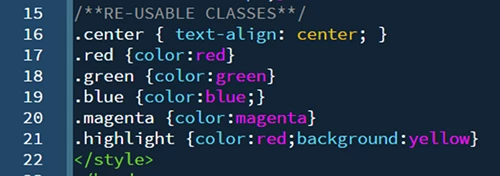
The workflow now is to create re-usable CSS classes in your stylesheet.
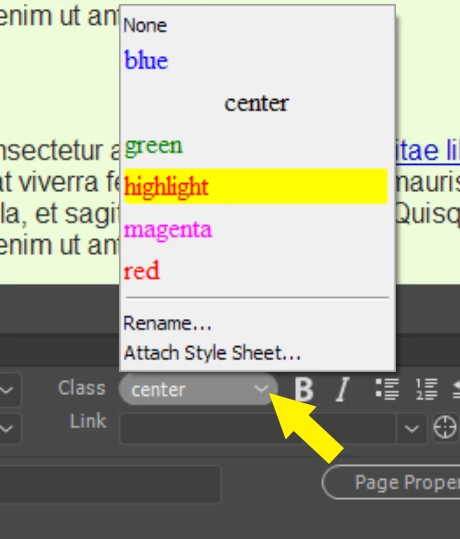
From the Properties panel (Ctrl+F3), add classes from the drop-list.
Nancy O.

Translate
LEGEND ,
Nov 12, 2016 Nov 12, 2016

Eikaberg wrote:

How do I find the centering of text?

Earlier Dreamweaver CC 2017 have a symbol or a place to click in the menu. Left, midle or right, for text.

Cant find it anymore.

Dag

These buttons were removed a long time ago so you were using a very old version of DW.

These days people use CSS code and it goes something like this:

.this_is_centered {

text-align: center;

}

However, if you have just a line or two to center then you could still use the old fashioned deprecated code such as this:

<p align="center">Center this text</p>

You will benefit most if you start using CSS in your web design.

Translate
Report
Community guidelines
Be kind and respectful, give credit to the original source of content, and search for duplicates before posting. Learn more
community guidelines
Community Expert ,
Nov 12, 2016 Nov 12, 2016

The workflow now is to create re-usable CSS classes in your stylesheet.

From the Properties panel (Ctrl+F3), add classes from the drop-list.

Nancy O.

Nancy O'Shea— Product User, Community Expert & Moderator
Translate
Report
Community guidelines
Be kind and respectful, give credit to the original source of content, and search for duplicates before posting. Learn more
community guidelines
New Here ,
Nov 07, 2017 Nov 07, 2017

RE: Centering Text

If this is the case, then you can use this method for different types of text including headings. Use the following code to achieve the results.

<center> Type text here </center>

This way is not that complicated.

*This would be a temporary immediate solution for a slight change in code. I stand corrected that it cannot be used in the far future and that it would probably not even work anymore

Translate
Report
Community guidelines
Be kind and respectful, give credit to the original source of content, and search for duplicates before posting. Learn more
community guidelines
Community Expert ,
Nov 07, 2017 Nov 07, 2017
LATEST

fernius  wrote

<center> Type text here </center>

This way is not that complicated.

The <center> tag is *deprecated and has been since HTML4. 

<center> - HTML | MDN

*Deprecated

This feature has been removed from the Web standards. Though some browsers may still support it, it is in the process of being dropped. Avoid using it and update existing code if possible to CSS.  Be aware that this feature may cease to work at any time.  Use at your own risk.

Nancy O'Shea— Product User, Community Expert & Moderator
Translate
Report
Community guidelines
Be kind and respectful, give credit to the original source of content, and search for duplicates before posting. Learn more
community guidelines