


debrasue b1626899
Participating Frequently
June 30, 2020
Answered

Child Pages not updating from Template

  • June 30, 2020
  • 1 reply
  • 798 views

Hi All, 

I am trying to make a change to my site from the template page, and for some reason it isn't updating any of the child pages that are linked to it. It seems to allow me the option to update other templates I have in the site Template file (my backups), but won't allow access to the child pages in the site. Hope that makes sense.


I have tried 'Recreating the Site Cache' and saving the file again in case it somehow became corrupt. Could this be related to the recent Dreamweaver update that came from Adobe? I haven't changed any of my settings and normally it works very smoothly. Any suggesitons are greatly appreciated! Kindly, Debra
    This topic has been closed for replies.
    Correct answer BenPleysier

    Hi Ben, 

    That was definitely my error. It was at the top of a few pages, but not all of them. I removed it on all of them, but none of the child pages are updating from the template. Could it be something else?

    Kindly, Debra


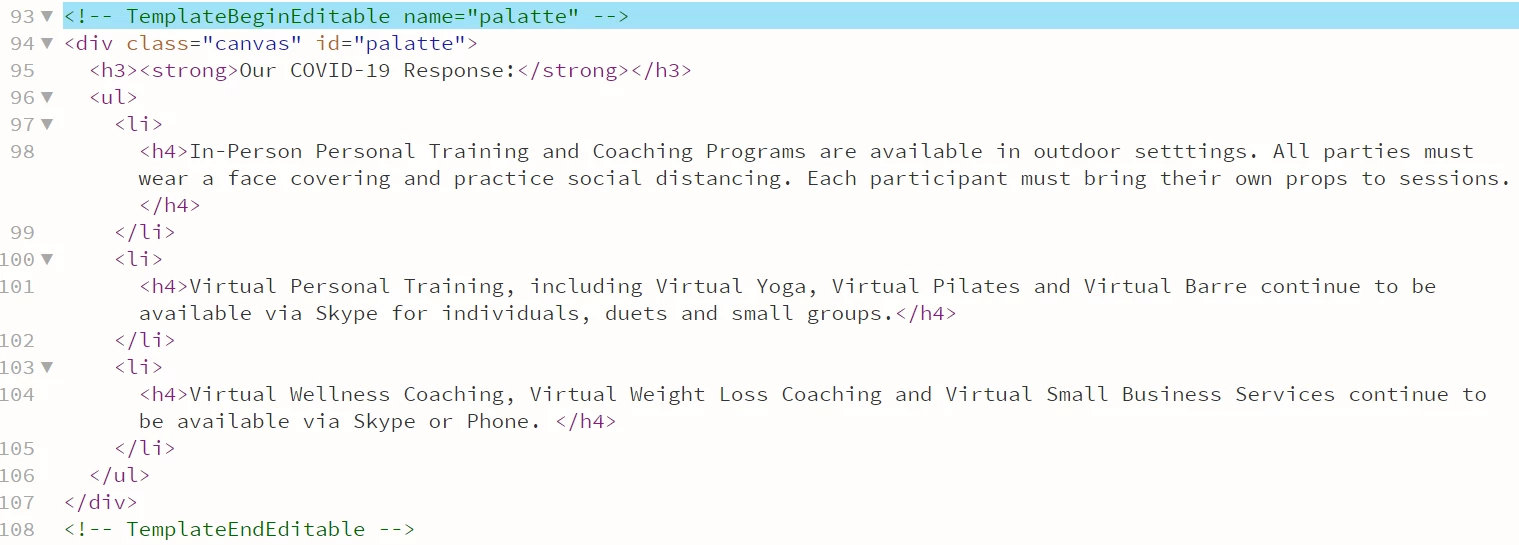
    I am assuming that you are referring to the Covid-19 message.


    In the Template, you have placed this in an editable region.

    Templated content should always be placed outside of editable regions. To fix your problem, move the message to above line 93

    1 reply

    BenPleysier
    Community Expert
    Community Expert
    June 30, 2020

    Please give us a link to the remote site. That way we may be able to replicate the problem and come up with a solution.

    Wappler is the DMXzone-made Dreamweaver replacement and includes the best of their powerful extensions, as well as much more!
    debrasue b1626899
    Participating Frequently
    July 1, 2020

    Hi Ben, 


    Sorry about that. My site is: www.coreharmony.com.  I downloaded the code from the template page and am attaching it. If it is helpful to see the code from one of the child pages, too, let me know and I will post it as well.


    Thank you for trying to help!! 


    Kindly, Debra


    BenPleysier
    Community Expert
    BenPleysierCommunity ExpertCorrect answer
    Community Expert
    July 1, 2020

    Hi Ben, 

    That was definitely my error. It was at the top of a few pages, but not all of them. I removed it on all of them, but none of the child pages are updating from the template. Could it be something else?

    Kindly, Debra


    I am assuming that you are referring to the Covid-19 message.


    In the Template, you have placed this in an editable region.

    Templated content should always be placed outside of editable regions. To fix your problem, move the message to above line 93

    Wappler is the DMXzone-made Dreamweaver replacement and includes the best of their powerful extensions, as well as much more!