



tuilorraine
Inspiring
May 21, 2018
Answered

css to make image change on hover that does not blow layout apart.

  • May 21, 2018
  • 5 replies
  • 4188 views

First off, I'm using the DW starter template called "Responsive About page" So most of the css came with the template.

There is a big circular graphic (called .profilePhoto in the Css) on the left side of the page with text alongside on the right.

I have three pages all with the same layout and the same size circular picture in the same place on each page.

But, I've made the circular pic on the index page link through to another one of the pages. It's the only one of the three pages where that circular image is actually a live graphical link to somewhere else.
But I want that index page one only, to change on hover to a different graphic to make it obvious that it is a live link.

I've created the graphics I need.
I've tried various things suggested by various css websites. Some of them even work. But nothing works without blowing the layout of the page part. The text on the right disappears from its place.

I'm thinking there must be something in the css I don't understand. I'll post the css that relates and maybe someone here could tell me how to change it so that I could use it to make just the index page behave differently to the other pages.It's here:

header .profilePhoto {

    background-color: rgba(237,237,237,1.00);

    width: 259px;

    border-radius: 50%;

    height: 259px;

    clear: both;

}

And the html that relates to it is here:

<div class="profilePhoto">

    <!-- Profile photo -->

    <a href="pagefiles/tivo.html"><img src="images/tivocircle.png" alt="Tivo"></a>

    <p><a href="pagefiles/tivo.html">Tivo Upgrades</a></p>

  </div>

This is what the page looks like
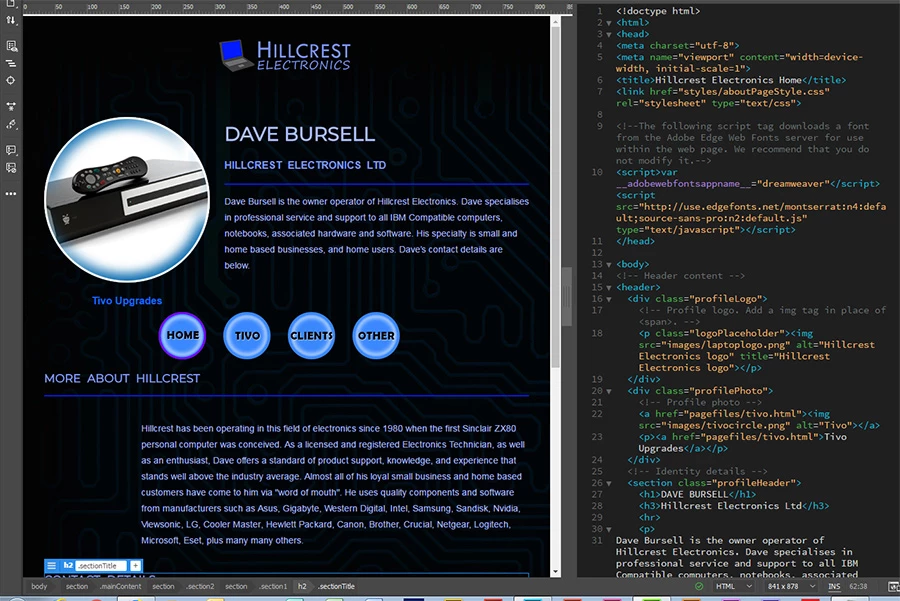
This topic has been closed for replies.
Correct answer osgood_

If you don't have jquery linked to the page, which would be unusual these days, then you can use the pure/vanilla (whatever people like to address it as) javascript below to achieve the same effect and to be honest if you don't need jQuery for anything else it would be overkill just to swap an image out.

<script>

// Append element to varaible

var listen = document.querySelector(".swapImage");

// Function

function swapImg() {

var imgSrc = document.querySelector(".swapImage").getAttribute("src");

if (imgSrc === "images/tivocircle.png") {

document.querySelector(".swapImage").src = "images/tivocircle_2.png";

}

else {

document.querySelector(".swapImage").src = "images/tivocircle.png";

}

}

// Event Listeners

listen.addEventListener('click',  swapImg);

listen.addEventListener('mouseover', swapImg);

listen.addEventListener('mouseout',  swapImg);

</script>

5 replies

pziecina
Brainiac
May 21, 2018

One possible solution would be to apply the second image as a background-image to the div. Then apply opacity on hover to the original image itself.

An added improvment would be to apply a css transition to the hover opacity change effect.

This does ignore touch devices.

ALsp
Brainiac
May 21, 2018

Take Ben's advice (or mine for that matter) or you risk having your brain blow apart instead of just your layout. Sometimes innocuous post and requests for help on this forum go way off track... which seems to be happening now

pziecina
Brainiac
May 21, 2018

ALsp  wrote

Take Ben's advice (or mine for that matter) or you risk having your brain blow apart instead of just your layout. Sometimes innocuous post and requests for help on this forum go way off track... which seems to be happening now

Not really AL. It is not just mobile devices with touch screens now, and if the OP wishes to use a hover effect on such devices/laptops/monitors, then the best method is pointerevents. Admittedly that leaves iOS devices 'out in the cold', but it is better to have just iOS than all touch devices/monitors with no 'hover'.

ALsp
Brainiac
May 21, 2018

We're way off track here, but I just wanted to say that we have been there/done that and a simple look at our code should make it obvious that we employ solutions that work for iOS, android, and Windows touch in three separate ways: for Edge (easy), for Firefox (not so easy), and for Chrome/Opera.

But be that as it may, I just wanted to address the OP's question, not spawn a debate/discussion out in left field.

osgood_Correct answer
Brainiac
May 21, 2018

If you don't have jquery linked to the page, which would be unusual these days, then you can use the pure/vanilla (whatever people like to address it as) javascript below to achieve the same effect and to be honest if you don't need jQuery for anything else it would be overkill just to swap an image out.

<script>

// Append element to varaible

var listen = document.querySelector(".swapImage");

// Function

function swapImg() {

var imgSrc = document.querySelector(".swapImage").getAttribute("src");

if (imgSrc === "images/tivocircle.png") {

document.querySelector(".swapImage").src = "images/tivocircle_2.png";

}

else {

document.querySelector(".swapImage").src = "images/tivocircle.png";

}

}

// Event Listeners

listen.addEventListener('click',  swapImg);

listen.addEventListener('mouseover', swapImg);

listen.addEventListener('mouseout',  swapImg);

</script>

Brainiac
May 21, 2018

Do you already have the jquery library framework linked to the page?

If you do and you're not interested in supporting mobile onhover then you could use the below bit of jquery to swap the images on hover (note your second image would have the name - tivocircle_2.png

<script>

$(document).ready(function(){

$(".swapImage").hover(function(){

var imgSrc =  $(this).attr('src');

if(imgSrc === "images/tivocircle.png") {

$('.profilePhoto').find('img').attr('src','images/tivocircle_2.png');

}

else {

$('.profilePhoto').find('img').attr('src', 'images/tivocircle.png');

}

});

});

</script>

Add the class 'swapImage' to your img tag:

<img class="swapImage" src="images/tivocircle.png" alt="Tivo"/>

BenPleysier
Community Expert
May 21, 2018

This will give you an idea How To Create Image Hover Overlay Effects

How do you think this will work on touch screens? See How to deal with :hover on touch screen devices

Wappler is the DMXzone-made Dreamweaver replacement and includes the best of their powerful extensions, as well as much more!
WolfShade
Brainiac
May 21, 2018

Just curious.  How does one 'hover' on a touchscreen?

V/r,

^ _ ^

ALsp
Brainiac
May 21, 2018

WolfShade  wrote

Just curious.  How does one 'hover' on a touchscreen?

You don't. You use JavaScript to either change the element or change the CSS behind the element. Have a look at our Class Switcher, a free tool that allows you to set up such scenarios from within a user interface:

CSS Class Switcher for Dreamweaver