lukas-h
Participating Frequently
January 30, 2019
Answered

Design view invisible elements icons invisible in dark app theme

  • January 30, 2019
  • 1 reply
  • 741 views

I'm wondering if anyone has a fix for the missing invisible elements from the design view window when you have chosen to view invisible elements? If I choose either of the two dark app themes the icons are invisible. They're visible on the two lighter app themes. I saw a question from June last year but it was marked as answered but the problem still persists. Any ideas? Is there are way to edit the UI ourselves or make our own app themes? I know I can create custom code colouring but what about app themes?
    This topic has been closed for replies.
    Correct answer Nancy OShea

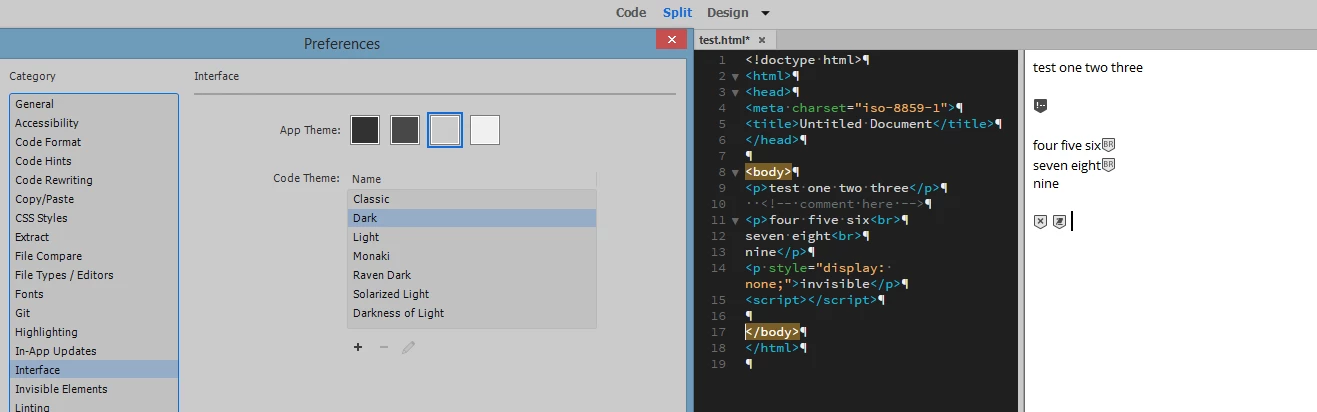
    Here's the app in a light app theme with a split screen showing the invisibles.

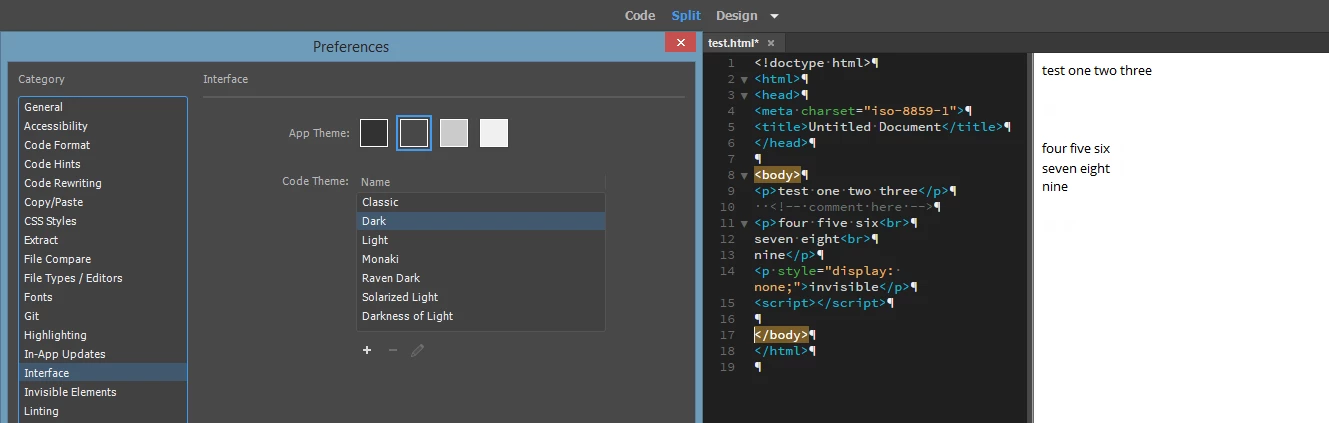
    Here's the app in a dark app theme with a split screen showing the invisibles are invisible. Funnily, there are blank placeholders there where the icons should be so it seems like they meant to create a different icon set but didn't bundle it with the app.


    Here is my test code:

    <!doctype html>

    <html>

    <head>

    <meta charset="utf-8">

    <title>Invisible Elements Test</title>

    </head>

    <body>

    <a name="section1"><h1>Heading 1</h1></a>

    <!--THIS IS A COMMENT-->

    <p>Lorem ipsum dolor sit amet, consectetur adipisicing elit. Fuga pariatur, adipisci <br>neque tempore illum molestiae laborum officiis aspernatur, quis deserunt nihil, esse ab amet veniam provident! Maxime, <br>

    dolorum aspernatur provident.</p>

    <!--THIS IS A COMMENT-->

    <table>

    <tr>

    <th>Table Heading</th>

    </tr>

    <tr>

    <td>something</td>

    <td>something</td>

    <td>something</td>

    </tr>

    </table>

    <script>

    This is a script

    </script>

    </body>

    </html>

    View > Design View Options > Visual Aids (all items checked).

    And this is Design View with a dark interface.  I'll admit, some icons are faint but even these tired old eyes can see them.

    1 reply

    Nancy OShea
    Community Expert
    Community Expert
    January 30, 2019

    See screenshot from CC 19.01

    Nancy O'Shea— Product User & Community Expert
    lukas-h
    lukas-hAuthor
    Participating Frequently
    January 30, 2019

    That doesn't do anything. It certainly doesn't fix the issue. I know where those menu options are. I'm trying to view "invisible elements" not CSS Layout Backgrounds.

    Nancy OShea
    Community Expert
    Community Expert
    January 30, 2019

    Show us a screenshot of what you're seeing please.

    Nancy O'Shea— Product User & Community Expert