
Participant
January 27, 2015
Resuelto

Dreamweaver CC: How to change color of selected text

  • January 27, 2015
  • 2 respuestas
  • 31510 visualizaciones

Possibly a stupid question, but I can't seem to figure it out, even with web searches.  I want to change the color of a single word in my HTML document.  Can someone offer guidance?

I can change certain styles of selected text (bold, italic, etc), but can't seem to figure out color.

Also, I know how to change the color of different elements using CSS.  But for selected text within an element, is CSS the simplest solution here?

Thanks in advance.
Este tema ha sido cerrado para respuestas.
Mejor respuesta de Nayan_Kankariya

I know that Frotpage is discontinued. I also have Expression Web which may also be discontinued.
My point is that it is so easy to change color and other attributes to selected text in FP ans EW. CSS does not make it that easy. 
If you just want to display a page where you highlight some text  you should not use DW.
Why can I in DW easy change text to bold but not its color? Perhaps I can do that in DW 2022 ...


Hi @Ivar220738998689,


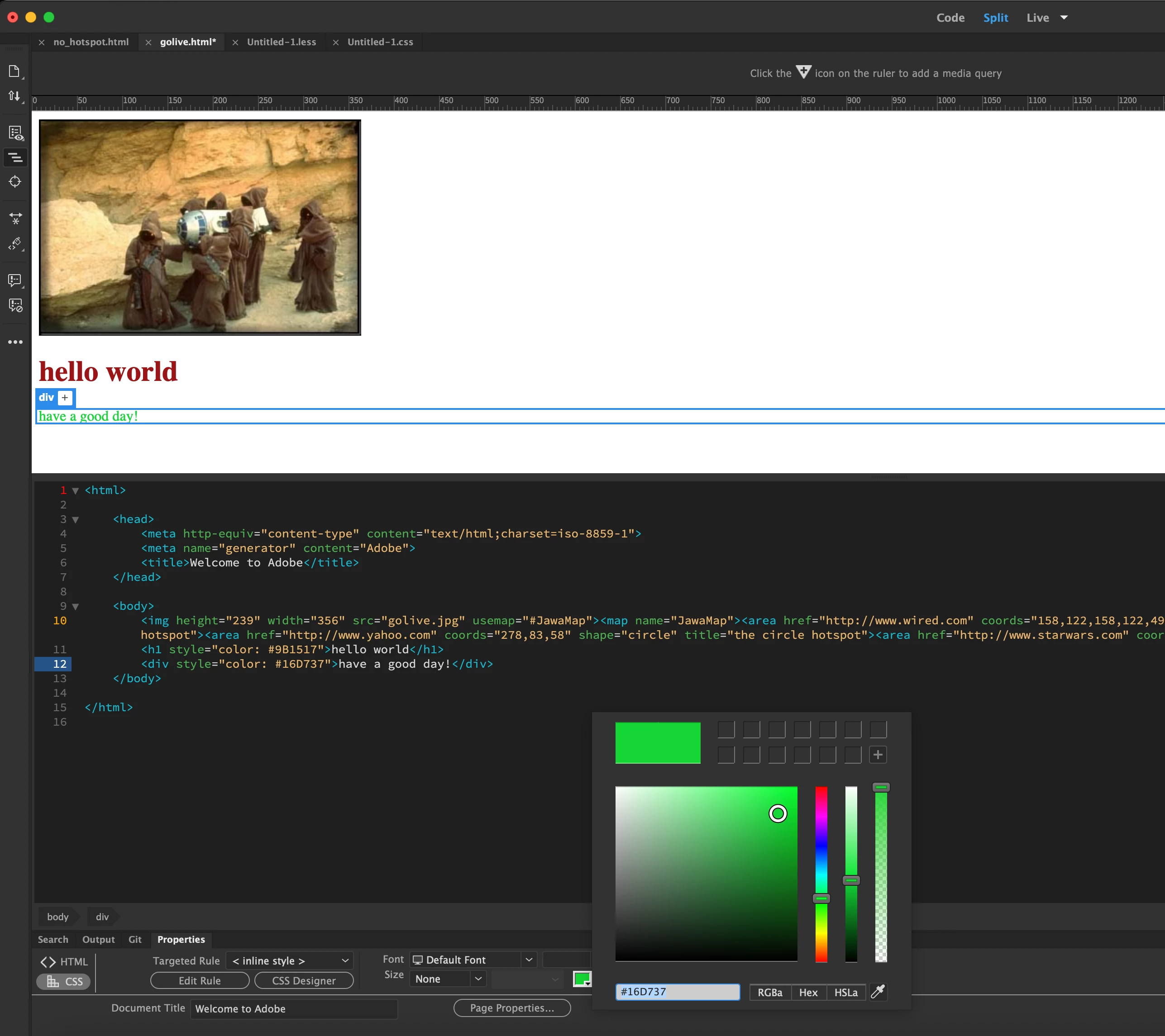
Thanks for writing to us and trying out all the above provided suggestions. We have an option of setting the text color from CSS tab of the Properties panel which can be invoked via Window menu -> Properties. Please try clicking on required text in any of the views Code/Live and set the required color of the text via Properties panel. Please try the same and let us know if this option works for you.


Screenshot:

Have a pleasant day!


Regards,

Nayan

Dreamweaver Team


2 respuestas

Participant
December 3, 2021

This must be stupid.
I am used to Microsoft Frontpage from 2003. There I can change text color and background color just as in any wordprocessor. But I cannot do it DW 2021 !
Now I edit the colors i Frontpage and anything eles in DW

B i r n o u
Legend
December 3, 2021

Well,@Ivar220738998689  in fact Frontpage must be discontinued since 2006... and was replaced by Expression Web.

So at that time (2003) CSS wasn't used as it is right now... are you using CSS ? I do'nt think that the Frontpage color editor acts on CSS, but on HTML attribute

if that is the case, we no longer use Tag attribute as it use to be, we 're relying hevaly on CSS.


if that is not the case, and f you are using CSS , from DW are you using CSS designer ? (Windows > CSS Designer, or MAJ F11)

Participant
December 3, 2021

I know that Frotpage is discontinued. I also have Expression Web which may also be discontinued.
My point is that it is so easy to change color and other attributes to selected text in FP ans EW. CSS does not make it that easy. 
If you just want to display a page where you highlight some text  you should not use DW.
Why can I in DW easy change text to bold but not its color? Perhaps I can do that in DW 2022 ...

mytaxsite
Inspiring
January 27, 2015

It depends on whether you have just one word to change or multiple words to change.  Assimung multiple words to change then a css like this would work:

.red {

color: red;

}

And your text (all your text that needs to have red color) might look something like this:

<p>This is <span class="red">called</span> a line with a red word</p>

If you have just one word to change then something like this would work:

<p>This is <span style="color: red;">called</span> a line with a red word</p>

So to answer your question, yes you need to use CSS of some kind to make the necessary changes.

Hope this helps.

Participant
January 27, 2015

Thanks for the reply.  I should have been more specific in my original post.  Is there a solution that does not require any coding?  For example, I can change a single word of text to bold from the design window by highlighting the word, right clicking, and selecting style-->bold.  Is there a similar method for color that does not involve the code window?

I personally understand the method(s) you described.  But I am teaching students how to use HTML for the first time, and that is a bit beyond our scope.  The program we used to use, Amaya, has the functionality I'm seeking, so it strikes me that Dreamweaver does not.

mytaxsite
Inspiring
January 27, 2015

There is a feature but it is not intuitive but see if this helps:

1) Change your editor to Design view

2) Select the word that you need to change color of;

3) Go to: Format >> Color

4) Pick a color you want to use

5) Click OK

6) In the next window that opens, give an suitable name

7) Click OK and you are done.

See these pictures if they are of any help:

Hope this proves helpful.