


durban1960
New Participant
May 17, 2022
Answered

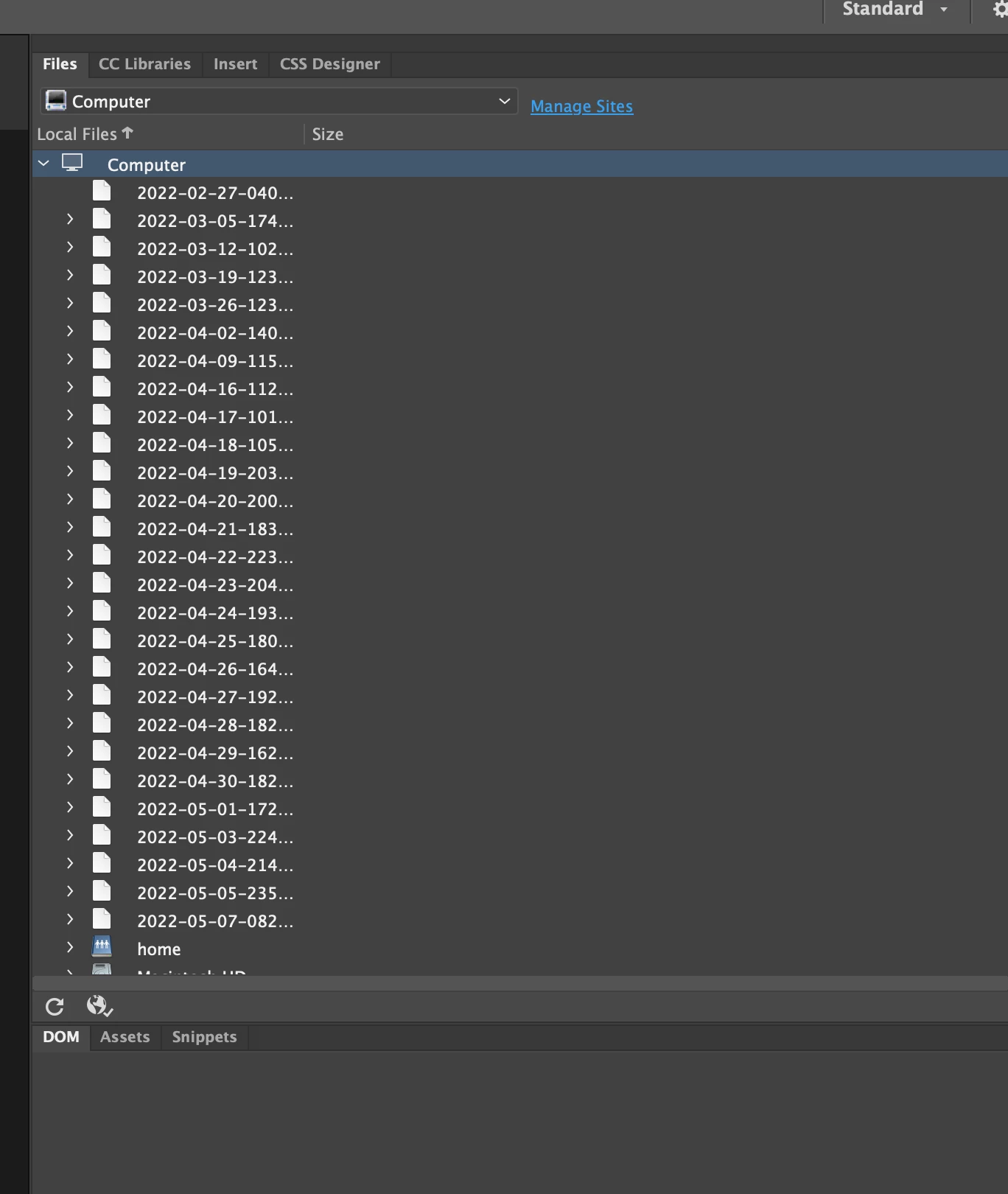
Dreaweaver showing backup files I cannot delete

  • May 17, 2022
  • 4 replies
  • 908 views

I have unistalled all Adobe Products and plists and everything on my Mac.  I still get all these backup files hogging up my manage Files Library. Please help.
    Correct answer Jon Fritz

    You need to define a site in DW to work within the program effectively. Rright now, you're showing the contents of your entire Computer.


    https://helpx.adobe.com/dreamweaver/how-to/define-a-dreamweaver-site.html

    4 replies

    Known Participant
    October 9, 2023

    The answer marked as the solution actually does not solve this problem. My Dreamweaver shows all drives, including the time machine backups, even with sites being defined. It is very annoying. There should be a way of excluding drives from the files location in Dreamweaver.

    Nancy OShea
    Adobe Expert
    October 9, 2023

    This isn't a Dreamweaver issue, it's a Mac/Time Machine issue.

    https://cleanmymac.com/blog/delete-time-machine-backups


    Nancy O'Shea— Product User, Community Expert & Moderator
    Known Participant
    October 10, 2023

    Thanks for trying, but you are wrong, for following reasons:


    - This has not always been a problem, but appeared at certain point, and never went away. It is dreamweaver. Other apps do not show backups, but volumes/drives only. Dreamveawer even shows volumes like Preboot, VM, and Updates which are otherwise no-show, even in Mac's Drive utility.

    - Backups are there for the purpose of backup, not to be deleted. It is a non-sense.

    - Apple recommends "never delete TM files manually as it will mess up the TM backups and files will get stuck in your trash."


    The link you provided is about if one struggles with space or whatever.


    Thanks

    Nancy OShea
    Adobe Expert
    May 17, 2022

    Go to Site > New Site and define your local site folder.  Example, [volume]\MySiteFolder\  where [volume] is your primary hard drive.


    Nancy O'Shea— Product User, Community Expert & Moderator
    New Participant
    May 18, 2022

    Thank you so much as mentioned it worked with the above purse when I created a site or at least to find one how do I close this conversation?

    BenPleysier
    Adobe Expert
    May 19, 2022

    You do not close a conversatiom that you did not originate.

    Wappler is the DMXzone-made Dreamweaver replacement and includes the best of their powerful extensions, as well as much more!
    Jon Fritz
    Jon FritzCorrect answer
    Adobe Expert
    May 17, 2022

    You need to define a site in DW to work within the program effectively. Rright now, you're showing the contents of your entire Computer.


    https://helpx.adobe.com/dreamweaver/how-to/define-a-dreamweaver-site.html

    durban1960
    New Participant
    May 18, 2022

    Thank you so much! Yes this worked perfectly.


    [Email signature removed by moderator.]


    BenPleysier
    Adobe Expert
    May 17, 2022

    Are the files set as `read-only`?

    Wappler is the DMXzone-made Dreamweaver replacement and includes the best of their powerful extensions, as well as much more!
    durban1960
    New Participant
    May 17, 2022

    Thqnk you for your response. I have no idea where these files are. I thought thwy were in my Time Machine files. Its a mystery. Dreamweaver works fine I just cannot get rid of all thes efiles.
