

Participant
November 16, 2018
Answered

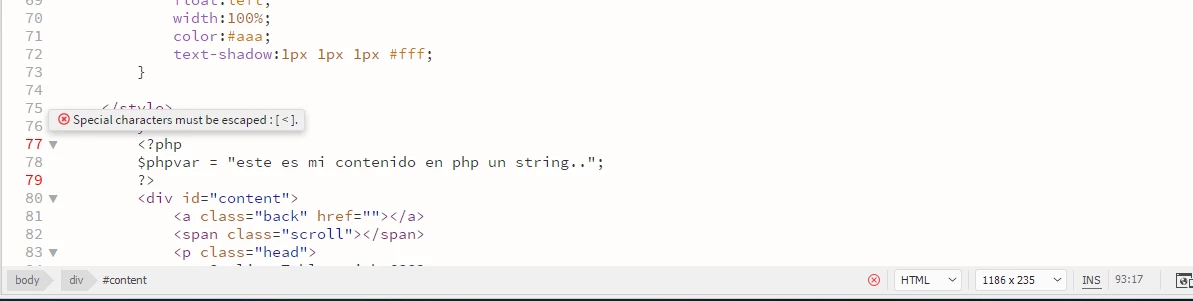
Error Special characters must be escaped: [ < ] php on Dreamweaver

  • November 16, 2018
  • 2 replies
  • 10705 views

Hello,

I am trying to use php on dreamweaver, but I couldn't because all the time dreamweaver shows me that error.

I would really appreciate any help you can give me
This topic has been closed for replies.
Correct answer Jon Fritz

DW doesn't know that you have your server set to run php code in your .html pages, so it's trying to Lint the code as HTML.

If you don't have your server set to parse php code in .html pages, your code won't work until you save the file as .php.

Since <?php ?> isn't technically a valid HTML tag as far as the Linter knows, it's flagging it as wrong.

Save your page as .php and it goes away.

2 replies

BenPleysier
Community Expert
Community Expert
November 16, 2018

I think that this is the culprit

Wappler is the DMXzone-made Dreamweaver replacement and includes the best of their powerful extensions, as well as much more!
Participant
November 16, 2018

Why? Can you explain me please?

Jon Fritz
Community Expert
Community Expert
November 16, 2018

What character is under the pop up?

Could you post the entire code?

That error typically means you're missing something before the highlighted line.

Participant
November 16, 2018

I thought that, but I tried to included php coding on a new html document and the error continues

Code:

<!doctype html>

<html>

<head>

<meta charset="utf-8">

<title>ejemplo</title>

</head>

<body>

<?php ?>

</body>

</html>

Jon Fritz
Community Expert
Jon FritzCommunity ExpertCorrect answer
Community Expert
November 16, 2018

DW doesn't know that you have your server set to run php code in your .html pages, so it's trying to Lint the code as HTML.

If you don't have your server set to parse php code in .html pages, your code won't work until you save the file as .php.

Since <?php ?> isn't technically a valid HTML tag as far as the Linter knows, it's flagging it as wrong.

Save your page as .php and it goes away.
