July 20, 2019
Answered

Files Window; "Size", Type, Modified, etc. col.s not showing up

  • July 20, 2019
  • 1 reply
  • 513 views

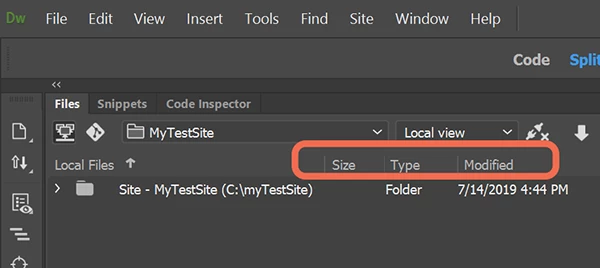
I know that the columns listed above were removed, a don't understand why; didn't make sense to me as these "assets' are very helpful.

I'm trying to find out how to "bring them back" into my files panel.

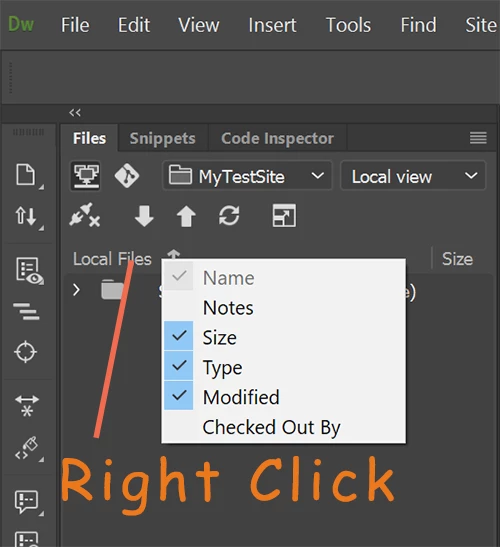
Please advise and be specific how to, I believe it's a "Right Click" on something.

Thanks,

Greg
    This topic has been closed for replies.
    Correct answer Nancy OShea

    Just right click and select desired options.

    gPeaches  wrote

    Do you know why Dreamweaver decided to make these import assets “invisible?”

    Greg

    [E-mail addresses removed by moderator.]

    Options are not invisible but they are not enabled by default.   If I remember back to that particular pre-release program, most users wanted a more streamlined UI with options to turn things on / off as required.

    1 reply

    Community Expert
    July 20, 2019

    In the Files window it will say Local Files or Remote Files depending on your view just above the listing.  That is the bar you need to right click on to show the file size/type/etc. are located.

    July 20, 2019

    Thanks Ben…especial for the quick reply!

    Do you know why Dreamweaver decided to make these import assets “invisible?”

    Greg

    [E-mail addresses removed by moderator.]

    Nancy OShea
    Community Expert
    Nancy OSheaCommunity ExpertCorrect answer
    Community Expert
    July 20, 2019

    Just right click and select desired options.

    gPeaches  wrote

    Do you know why Dreamweaver decided to make these import assets “invisible?”

    Greg

    [E-mail addresses removed by moderator.]

    Options are not invisible but they are not enabled by default.   If I remember back to that particular pre-release program, most users wanted a more streamlined UI with options to turn things on / off as required.

    Nancy O'Shea— Product User & Community Expert