


Known Participant
February 28, 2020
Answered

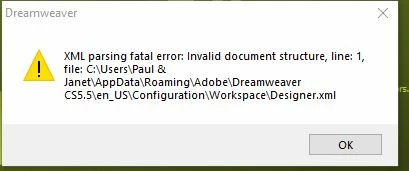
HELP ! XML parsing fatal error: Invalid document structure, line:1, file:C\Users

  • February 28, 2020
  • 2 replies
  • 3897 views

Many years ago (after evening classes) I downloaded Dreamweaver CS 5.5 and made my one and only webite which is used for my wife's small business.
I tried to open DW this morning and was met with this message which means absolutey nothing to me.
Does anyone have any advice - in really clear terms - as to how I go about correcting the problem. 
Many thanks

Paul
This topic has been closed for replies.
Correct answer Jon Fritz

Yep, the path in your most recent screenshot is correct.

Once renamed, restart DW and it will create a new folder in the same location that should come with a new Designer.xml file and allow the program to run correctly..

2 replies

Jon Fritz
Community Expert
Community Expert
February 28, 2020

To do what Ben suggests...

1. Turn on your Operting System's Hidden Folders. You can do a quick search for "view hidden folders Windows (your version)" in Google for the exact method for your operating system.

2. Go to the path in your screen capture (C > Users > your username > AppData > Roaming > Adobe > Dreamweaver (version) > your language > Configuration). The AppData folder in that path is normally hidden and inaccessible without doing Step 1.

3. Rename Configuration to Configuration_old

4. Open DW

What this will do is force DW to create a new, clean configuration folder, which includes a new Designer.xml file that should be free of corruptions.

EDIT: DO NOT rename the configuration folder in the Program Files location. That will disable DW permanently. The correct path has been added to the steps above for clarity.

pfmarconiAuthor
Known Participant
February 28, 2020

Many thanks Jon, I'm VERY grateful ! You stopped a major mistake being made.
I believe that I have the correct path and Configuration folder which needs to be renamed to Configuration_old ?
Thanks once more - and for your patience.
Paul

Jon Fritz
Community Expert
Jon FritzCommunity ExpertCorrect answer
Community Expert
February 28, 2020

Yep, the path in your most recent screenshot is correct.

Once renamed, restart DW and it will create a new folder in the same location that should come with a new Designer.xml file and allow the program to run correctly..

BenPleysier
Community Expert
Community Expert
February 28, 2020

Go to the Configuration folder and rename it as Configuration_backup. Restart Dreamweaver.

Wappler is the DMXzone-made Dreamweaver replacement and includes the best of their powerful extensions, as well as much more!
pfmarconiAuthor
Known Participant
February 28, 2020

Thanks Ben
Following your advice I should rename the arrowed folder shouldn't I  ?
Paul

Jon Fritz
Community Expert
Community Expert
February 28, 2020

NO!!

That is NOT the correct configuration folder and will break DW completely if changed/removed.

Follow the steps I posted to get to the correct configuration folder.