
Participant
June 28, 2023
Resuelto

How can I view hidden files in Dreamweaver Local Files on a Mac in 2023?

  • June 28, 2023
  • 1 respuesta
  • 1125 visualizaciones

I have the Files window open, and I'm currently viewing both Remote Server on the left side, and Local Files on the right side. I am able to view hidden files on the Remote Server side. I am unable to view them on the Local Files side.


In the past, there used to be a button on the top right corner of this window that could ultimately allow you to view hidden files. That button is not there currently.


On my Mac itself, I have enabled the showing of hidden files by using the Command + Shift + . keys. I am still unable to view hidden files in Dreamweaver. How can I view them?
Este tema ha sido cerrado para respuestas.
Mejor respuesta de Nayan_Kankariya

Hi @sbkimball,


Thanks for attaching the screenshot. Please try clicking on "Collapse to show only local or remote site" icon in the dialog to get the file panel menu icon as shared by @Jon Fritz in the above comment.


Have a pleasant day!


Regards,

Nayan

Dreamweaver Team

1 respuesta

Jon Fritz
Community Expert
Community Expert
June 28, 2023

"In the past, there used to be a button on the top right corner of this window that could ultimately allow you to view hidden files. That button is not there currently."

When you go to the fly-out menu of your Files window, and look under View, are you not seeing the Show Hidden Files option (needs to be checked)?


Participant
June 29, 2023

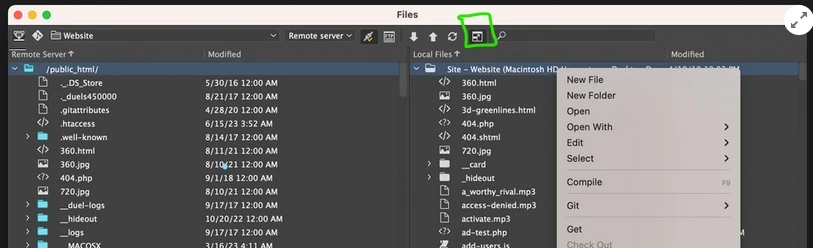
I am not seeing the flyout menu that is present in your version of Dreamweaver. Here is an image of what I see. I'm right clicking in this image to show even more options.

Nayan_Kankariya
Community Manager
Community Manager
June 29, 2023

Hi @sbkimball,


Thanks for attaching the screenshot. Please try clicking on "Collapse to show only local or remote site" icon in the dialog to get the file panel menu icon as shared by @Jon Fritz in the above comment.


Have a pleasant day!


Regards,

Nayan

Dreamweaver Team