Inspiring
March 14, 2020
Question

How do i properly insert a background image?

  • March 14, 2020
  • 2 replies
  • 1007 views

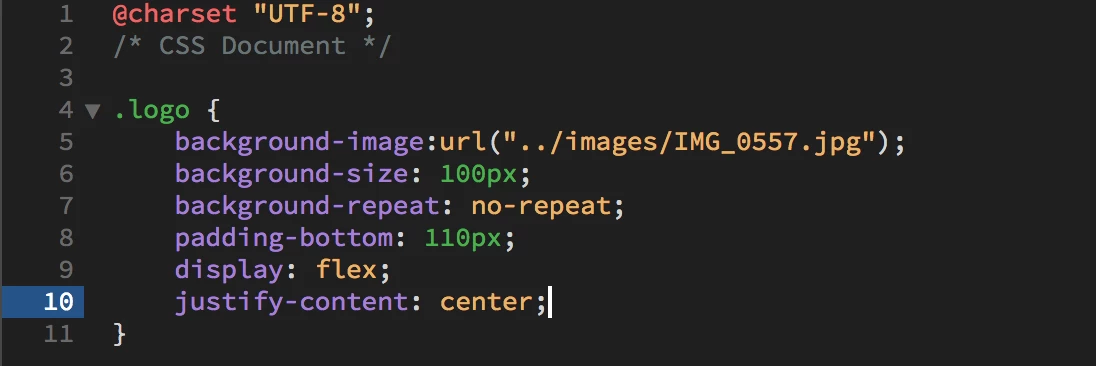
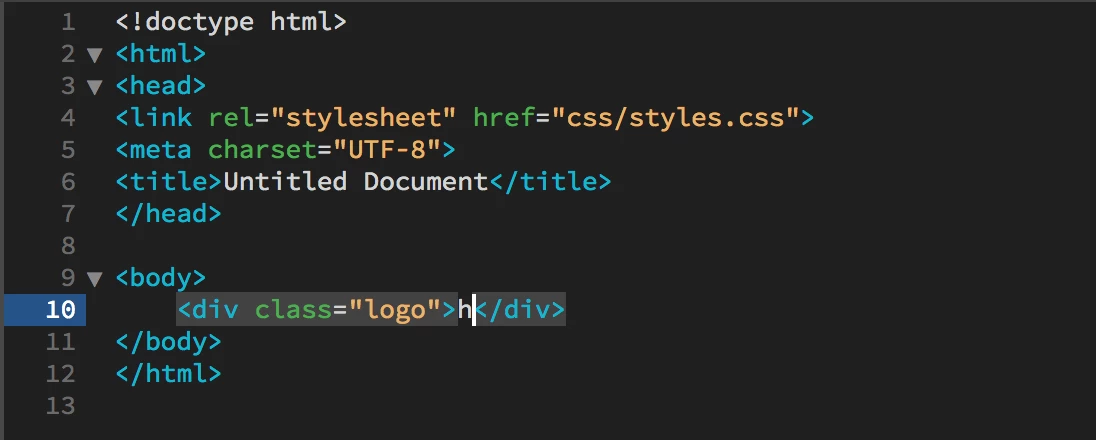
I've found the only way i can insert a background image in a div is if i include a bit of text (like the h iv'e used here), then sometimes later on i'll delete the text and the background image will stay, but other times the image will disappear too, what is going on? How do i do this properly? Also why hasn't the image centered as well as the letter???? 
    This topic has been closed for replies.

    2 replies

    Nancy OShea
    Adobe Expert
    March 14, 2020

    Remember rule #1 in web design.  HTML = content,  CSS = styles.  Logos are content, not styles.  Never put logos in the background.  Always put them in the foreground (HTML) so you can link them to your index page and add ALT attributes for better web accessibility.  


    CSS background elements are for incidental graphics, gradients or solid colors.  


    Nancy O'Shea— Product User, Community Expert & Moderator
    Brainiac
    March 14, 2020

    Normally l would say thats sound advice but this logo appears to be just an image of a cake, the name/text of the company looks to be seperate from the image in the html, so links can be applied to that and search engines have someting to eat, excuse the pun.


    On the other hand l dont see any reason in this instance why a small image of a cake needs to be a background image........weird stuff happens.

    Nancy OShea
    Adobe Expert
    March 14, 2020

    Assuming that cake icon is the brand/logo, the challenge is correctly aligning other elements over the background so they don't overlap the icon.  And this must work on ALL devices.   I see no reason to make this harder than it should be.  An ordinary HTML image is much simpler to work with.


    Nancy O'Shea— Product User, Community Expert & Moderator
    Brainiac
    March 14, 2020

    To keep a <div> open you need to have content inside it or set a height or use top and bottom padding to prop it open.


    Usually when you are including a background image in a container it is so you can overlay content on top of it.


    If you have no content inside a <div> and haven't set a height or any padding it will just close down on itself.


    The flex justify-content css attribute has no effect on background images, you need to use background-position:


    background-position: center, center;