


Inspiring
December 22, 2018
Question

How to change tab bar?

  • December 22, 2018
  • 1 reply
  • 654 views

I have got a tab style box. What I would like is to have The first tab-1 start in Blue as shown below and not tab-4 which it is at the moment.
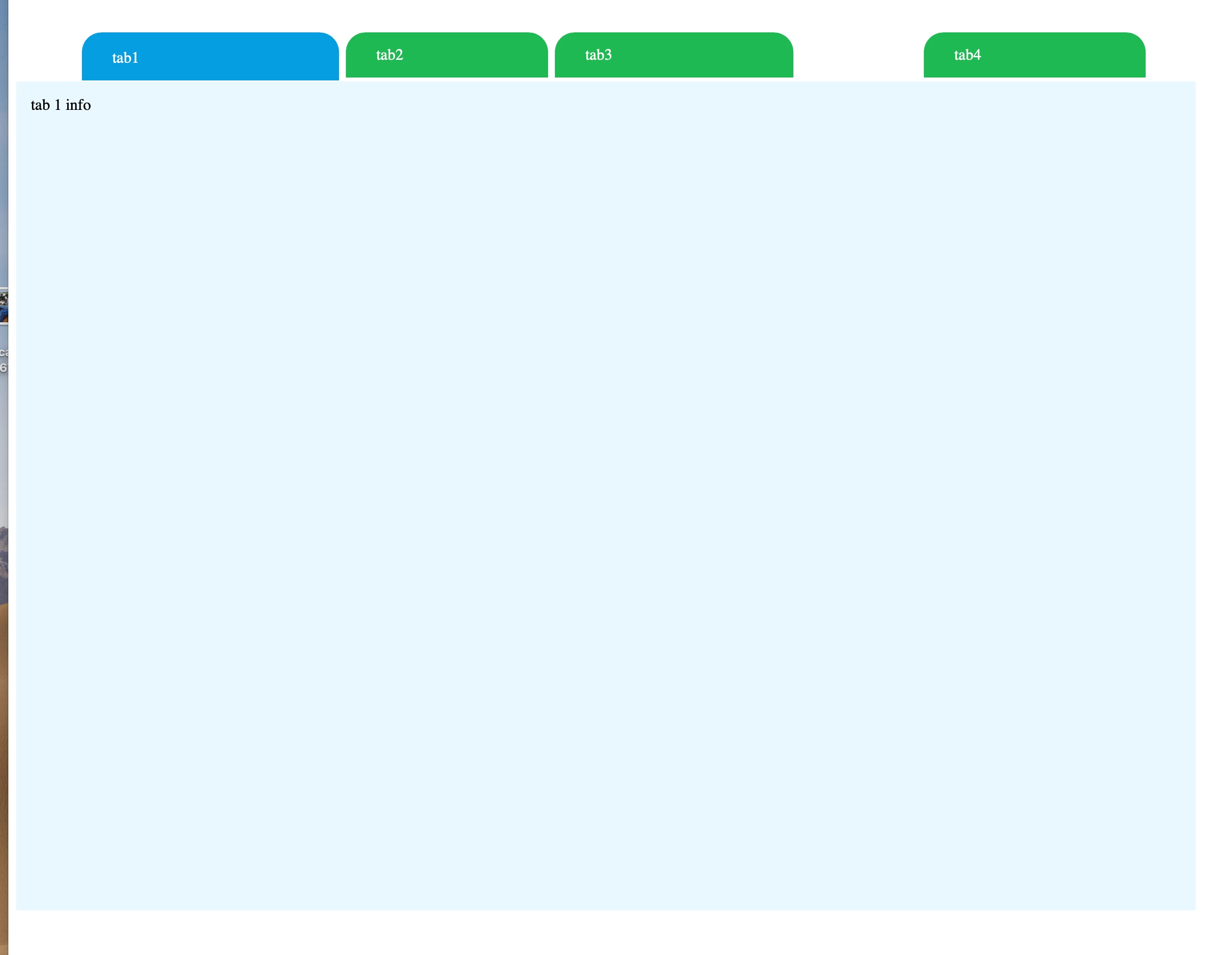
I can’t workout how to alter this? Hope you can help

code below

Thank You

Tim

------

------

<!DOCTYPE HTML>

<html lang="en-US">

<head>

  <meta charset="UTF-8">

  <meta name="description" content="Slider Template">

  <meta name="keywords" content="HTML,CSS,JavaScript">

  <meta name="viewport" content="width=device-width, initial-scale=1.0">

  <meta name="viewport" content="width=device-width, initial-scale=1, shrink-to-fit=no">

  <title>Template</title>

<script src="https://code.jquery.com/jquery-3.2.1.min.js"></script>

  <script src="https://ajax.googleapis.com/ajax/libs/jquery/3.2.1/jquery.min.js"></script>

  <link href="search-tab.css" rel="stylesheet" type="text/css">

<a name="top"></a>

<style>

@11220649-face {

  font-family: 'FontAwesome';

  src: url('fonts/fontawesome-webfont.eot?v=4.0.3');

  src: url('fonts/fontawesome-webfont.eot?#iefix&v=4.0.3') format('embedded-opentype'), url('fonts/fontawesome-webfont.woff?v=4.0.3') format('woff'), url('../fonts/fontawesome-webfont.ttf?v=4.0.3') format('truetype'), url('fonts/fontawesome-webfont.svg?v=4.0.3#fontawesomeregular') format('svg');

  font-weight: normal;

  font-style: normal;

}

.fa {

  display: inline-block;

  font-family: FontAwesome;

  font-style: normal;

  font-weight: normal;

  line-height: 1;

  -webkit-font-smoothing: antialiased;

  -moz-osx-font-smoothing: grayscale;

  cursor:pointer;

}

.fa:hover{

  transform:scale(1.2);

    -ms-transform:scale(1.2); /* IE 9 */

    -moz-transform:scale(1.2); /* Firefox */

    -webkit-transform:scale(1.2); /* Safari and Chrome */

    -o-transform:scale(1.2); /* Opera */

   -webkit-transition: 0.5s;

  -moz-transition: 0.5s;

  -o-transition: 0.5s;

  -ms-transition: 0.5s;

  transition: 0.5s;

}

/* makes the font 33% larger relative to the icon container */

.fa-2x {

  font-size: 20px;

  line-height:40px;

}

/* Font Awesome uses the Unicode Private Use Area (PUA) to ensure screen

   readers do not read off random characters that represent icons */

.fa-user:before {

  content: "\f007";

}  

.fa-envelope:before {

  content: "\f0e0";

}

.fa-lock:before {

  content: "\f023";

}

.fa-facebook:before {

  content: "\f09a";

}

.fa-twitter:before {

  content: "\f099";

}

.tabs h1 {

    font-size: 32px;

  font-family: 'Roboto';

  margin-bottom:15px;

}

.tabs p {

}

.text-font-search {

    width: 73px;

    font-size: 20px;

    margin-top: 9px;

    margin-left: 17px;

}

/* Each Tab CSS to make Radio button Work*/

/* Blue Color Tab - If you want to used blue tab, just used following css*/

/******************** START ********************/

.tabs.blue {

    width: 1200px;

    float: left;

    position: relative;

    margin-left: auto;

    margin-right: auto;

    margin-top: 5px;

}

.in-use-button {

}

.suggest-category-button {

    width: 164px;

    padding-top: 11px;

    margin-left: 147px;

    color: rgba(255,255,255,1.00);

}

.tabs.blue li {

    float: left;

    display: block;

    width: 246px;

    margin-top: 55px;

}

.tabs.blue input[type="radio"] {

    position: absolute;

    top: -9999px;

    left: -9999px;

}

.tabs.blue label {

    display: block;

    padding: 14px 31px;

    font-size: 16px;

    font-weight: normal;

    cursor: pointer;

    position: relative;

    top: 5px;

    -moz-transition: all 0.2s ease-in-out;

    -o-transition: all 0.2s ease-in-out;

    -webkit-transition: all 0.2s ease-in-out;

    transition: all 0.2s ease-in-out;

    background-color: rgba(178,0,255,1.00);

}

.tabs.blue .tab-content {

    z-index: 2;

    display: none;

    overflow: hidden;

    width: 1200px;

    padding: 15px;

    position: absolute;

    top: 53px;

    left: 0;

    min-height: 600px;

}

.tabs.blue [id^="tab"]:checked + label {

  top: 5px;

  padding-top: 17px;


}

.tabs.blue [id^="tab"]:checked ~ [id^="tab-content"] {

  display: block;

}

/* TAB COLOR SCHEME FOR BLUE*/

.tabblue .tabs label {

    background-color: #1CB953;

    border-top-left-radius: 20px;

    border-top-right-radius: 20px;

    margin-right: 3px;

}

.tabblue .fa:hover{color:#009EE0;}

.tabblue .tabs label:hover {

    /* [disabled]background-color: #86E000; */

}

.multi-button {

    margin-left: 50px;

    width: 144px;

    color: rgba(255,255,255,1.00);

    background-color: rgba(28,186,83,1.00);

}

.save-button {

    background-color: rgba(0,158,224,1.00);

    padding-top: 10px;

    padding-bottom: 10px;

    padding-right: 30px;

    padding-left: 30px;

    width: 101px;

    height: 25px;

    margin-top: 166px;

    margin-left: 485px;

    border-radius: 20px;

}

.caterories-in-use {

    margin-left: 17px;

    width: 181px;

    color: rgba(255,255,255,1.00);

    background-color: rgba(99,71,72,1.00);

}

.white-text {

    color: #FFFFFF;

    margin-left: 210px;

    padding-left: 26px;

    padding-right: 25px;

}

.left-tab-search {

    margin-left: 27px;

    width: 200px;

}

.tabblue .tabs .tab-content {

    background-color: #E8F8FF;

    width: 1172px;

    min-height: 700px;

    margin-top: 57px;

}

.main-panel-settings {

    width: 1173px;

    height: 800px;

}

#tab-content1 .main-panel-settings div {

}

.tabblue .tabs [id^="tab"]:checked + label {background: #009EE0;}

.tabblue .tabs input[type="submit"]{background:#0875a2;}

.tabblue .tabs input[type="submit"]:hover{background:#065170;}

.tabblue .tabaddon { color: #16B3F5;}

/******************** END ********************/

/* TAB Form */

.tabs input[type="text"], .tabs input[type="password"], .tabs input[type="email"], .tabs select {

    border: medium none;

    color: #757575;

    height: 21px;

    line-height: 40px;

    margin-bottom: 10px;

    padding: 10px;

    width: 600px;

}

.myuser-tab {

    width: 247px;

    height: 76px;

}

.myuser-suggest-box {

}

.tabs select {

width: 48%;

float:left;

margin-right:4%;

}

.tabs select.last {

margin-right:0px;

}

.tabs .btn {

    float: left;

    margin-top: 15px;

    width: 100%;

}

.tabs .btn em{

  font-size:12px;

}

.tabs input[type="submit"]{

  display:block;

  border:none;

  float:right;

  color:#FFFFFF;

  padding: 10px 12px;

  cursor:pointer;

  text-decoration:none;

}

.tabs input[type="submit"]:hover{

  -webkit-transition: 0.5s;

  -moz-transition: 0.5s;

  -o-transition: 0.5s;

  -ms-transition: 0.5s;

  transition: 0.5s;

}

.tabs h4{

font-style:italic;

text-align:center;

margin-bottom:10px;

font-weight:normal;

}

.tabaddon {

    background: none repeat scroll 0 0 #FFFFFF;

    border-right: 1px solid #ebebeb;

    float: left;

    height: 40px;

    text-align: center;

    width: 40px;

}

.tabs .social{

  width:100%;

  float:left;

  margin-bottom:10px;

}

.tabs .social a {

    color: #fff;

    float: left;

    font-size: 14px;

    padding: 10px 30px;

    text-decoration: none;

    width: 50%;

}

.tabs .social .fa{

margin-right:25px;

}

.tabs .social .facebook{

background: none repeat scroll 0 0 #3B5998;

}

.tabs .social .facebook:hover{

  background:#3e5fa4;

  -webkit-transition: 0.5s;

  -moz-transition: 0.5s;

  -o-transition: 0.5s;

  -ms-transition: 0.5s;

  transition: 0.5s;

}

.tabs .social .twitter{

background: none repeat scroll 0 0 #16B3F5;

}

.tabs .social .twitter:hover{

    background-color: #E5F4FA;

    -webkit-transition: 0.5s;

    -moz-transition: 0.5s;

    -o-transition: 0.5s;

    -ms-transition: 0.5s;

    transition: 0.5s;

}

.search-panel-contianer {

    width: 1020px;

    margin-left: 43px;

    min-height: 500px;

    margin-top: 98px;

}

.search-sections {

    width: 319px;

    height: 43px;

    border: 3px solid #019EE0;

    border-radius: 20px;

    clear: left;

    margin-right: 68px;

    margin-bottom: 9px;

    margin-top: 19px;

    background-color: rgba(255,255,255,1.00);

    margin-left: -35px;

}

.panel2 {

    clear: none;

    float: right;

    background-color: #FFFFFF;

}

.panel-text {

    width: 210px;

    margin-left: 33px;

    margin-top: 8px;

    font-size: 66px;

}

.x-delete {

    width: 17px;

    float: right;

    margin-top: 7px;

    margin-right: 26px;

}

.search-strip-panel {

    height: 57px;

}

.mail-button {

    width: 54px;

    margin-left: -891px;

    margin-top: 64px;

}

.fav-button {

    width: 39px;

    margin-left: 14px;

    padding-top: 0px;

}

.text-search-panel {

    width: 500px;

    border-radius: 10;

    height: 32px;

    padding-left: 12px;

    margin-top: -47px;

    margin-left: 56px;

}

.miles-from-event {

    height: 32px;

    width: 200px;

    border-radius: 10;

    padding-left: 13px;

}

.arrow-button {

    width: 36px;

    margin-top: 1px;

    margin-left: 20px;

}

</style>

  <script>

$(document).ready(function(){


   $('#content').load("search-options-settings.html");

});

</script>

  </script>

  <script src="https://code.jquery.com/jquery-3.1.1.js" integrity="sha256-16cdPddA6VdVInumRGo6IbivbERE8p7CQR3HzTBuELA=" crossorigin="anonymous"></script><script>

$(document).ready(function(){


$('.hamburger').css('cursor','pointer').click(function() {

var status = $('.home').attr('class');

if(status === "home") {

$('#layer_1').show();

$('.home').addClass('display_none');

}

if(status === "home display_none") {

$('#layer_1 , #layer_2 , #layer_3').hide();

$('.home').removeClass('display_none');

}

});

$('.show_layer_1').click(function() {

$('.close_all').hide();

$('#layer_1').show();

});

$('.show_layer_2').click(function() {

$('.close_all').hide();

$('#layer_2').show();

});

});

</script

></head>

<body>

<div class="container">

  <div><div> </div></div>

  <!-- Carousel -->

<div class="main-container">


  <div><div class="search-strip">

<div><section class="tabblue">

  <ul class="tabs blue">

          <li>

            <input type="radio" name="tabs blue" id="tab1" checked />

            <label for="tab1" class="white-text left-tab-search">tab1</label>

            <div id="tab-content1" class="tab-content">

              <div class="main-panel-settings">

                <div class="tab-menu-top-text">tab 1 info</div>

   <br>

</div>

<form method="post" name="register" action="">

<div class="btn"> </div>

            </form>

            </div>

          </li>

       <li>

            <input type="radio" name="tabs blue" id="tab2" />

            <label for="tab2" class="multi-button">tab2</label>

            <div id="tab-content2" class="tab-content">

              <div class="main-panel-settings">

                <div class="tab-menu-top-text">tab2 info</div>

   <br>

<a href="#" class="save-button clear-the-float">Save Settings</a>              </div>

<form method="post" name="register" action="">

<div class="btn"> </div>

            </form>

            </div>

          </li>


          <li>

            <input type="radio" name="tabs blue" id="tab3" checked />

            <label for="tab3" class="caterories-in-use">tab3</label>

            <div id="tab-content1" class="tab-content">

              <div class="main-panel-settings">

                <div class="tab-menu-top-text">tab3 info</div>

   <br>

</div>

<form method="post" name="register" action="">

<div class="btn"> </div>

            </form>

            </div>

          </li>


          <li>

            <input type="radio" name="tabs blue" id="tab4" checked />

            <label for="tab4" class="suggest-category-button">tab4</label>

            <div id="tab-content4" class="tab-content">

              <form method="post" name="register" action="">

                <span class="tabaddon"><i class="fa fa-user fa-2x"></i></span>

                <input class="myuser-tab" type="text" placeholder="myusername" />

<span class="tabaddon"><i class="fa fa-envelope fa-2x"></i></span>

                <input class="field" type="email" placeholder="myusername@gmail.com"/>

                <div class="btn">

                  <input type="submit" value="Send"/>

                </div>

              </form>

            </div>

          </li>


  </ul>

  </section></div>

<br>

  <br>

</div>

</div>

</div>

</body>

</html>

    This topic has been closed for replies.

    1 reply

    Nancy OShea
    Community Expert
    Community Expert
    December 22, 2018

    1st fix your code errors.  Remove  code marked in red.

    <!DOCTYPE HTML>

    <html lang="en-US">

    <head>

      <meta charset="UTF-8">

      <meta name="description" content="Slider Template">

      <meta name="keywords" content="HTML,CSS,JavaScript">

      <meta name="viewport" content="width=device-width, initial-scale=1.0">

      <meta name="viewport" content="width=device-width, initial-scale=1, shrink-to-fit=no">

      <title>Template</title>

    <script src="https://code.jquery.com/jquery-3.2.1.min.js"></script>

      <script src="https://ajax.googleapis.com/ajax/libs/jquery/3.2.1/jquery.min.js"></script>

      <link href="search-tab.css" rel="stylesheet" type="text/css">

    <a name="top"></a>

    EDIT:  You have 3 instances of jQuery library.  You need only 1.

    Nancy O'Shea— Product User & Community Expert
    tim crossAuthor
    Inspiring
    December 23, 2018

    Thank you I have correct Jquery repeats! I stripped the tab bar out of my site so the code is a bit smaller! but didn't delete the jQuery bits. sadly I have to have a few jQuery comments within site due to using Ajax and two different version of query scripts.

    but have repeated 3.2.1 a few times by mistake!

    -----

    Updated Coe below

    Has anyone got an idea to get the first tab to go blue instead at present the fourth one??

    Thanks

    Tim

    ------

    <!DOCTYPE HTML>

    <html lang="en-US">

    <head>

      <meta charset="UTF-8">

      <meta name="description" content="Slider Template">

      <meta name="keywords" content="HTML,CSS,JavaScript">

      <meta name="viewport" content="width=device-width, initial-scale=1.0">

      <title>Template</title>

      <link href="search-tab.css" rel="stylesheet" type="text/css">

    <style>

    @font-face {

      font-family: 'FontAwesome';

      src: url('fonts/fontawesome-webfont.eot?v=4.0.3');

      src: url('fonts/fontawesome-webfont.eot?#iefix&v=4.0.3') format('embedded-opentype'), url('fonts/fontawesome-webfont.woff?v=4.0.3') format('woff'), url('../fonts/fontawesome-webfont.ttf?v=4.0.3') format('truetype'), url('fonts/fontawesome-webfont.svg?v=4.0.3#fontawesomeregular') format('svg');

      font-weight: normal;

      font-style: normal;

    }

    .fa {

      display: inline-block;

      font-family: FontAwesome;

      font-style: normal;

      font-weight: normal;

      line-height: 1;

      -webkit-font-smoothing: antialiased;

      -moz-osx-font-smoothing: grayscale;

      cursor:pointer;

    }

    .fa:hover{

      transform:scale(1.2);

        -ms-transform:scale(1.2); /* IE 9 */

        -moz-transform:scale(1.2); /* Firefox */

        -webkit-transform:scale(1.2); /* Safari and Chrome */

        -o-transform:scale(1.2); /* Opera */

       -webkit-transition: 0.5s;

      -moz-transition: 0.5s;

      -o-transition: 0.5s;

      -ms-transition: 0.5s;

      transition: 0.5s;

    }

    /* makes the font 33% larger relative to the icon container */

    .fa-2x {

      font-size: 20px;

      line-height:40px;

    }

    /* Font Awesome uses the Unicode Private Use Area (PUA) to ensure screen

       readers do not read off random characters that represent icons */

    .fa-user:before {

      content: "\f007";

    .fa-envelope:before {

      content: "\f0e0";

    }

    .fa-lock:before {

      content: "\f023";

    }

    .fa-facebook:before {

      content: "\f09a";

    }

    .fa-twitter:before {

      content: "\f099";

    }

    .tabs h1 {

        font-size: 32px;

      font-family: 'Roboto';

      margin-bottom:15px;

    }

    .tabs p {

    }

    .text-font-search {

        width: 73px;

        font-size: 20px;

        margin-top: 9px;

        margin-left: 17px;

    }

    /* Each Tab CSS to make Radio button Work*/

    /* Blue Color Tab - If you want to used blue tab, just used following css*/

    /******************** START ********************/

    .tabs.blue {

        width: 1200px;

        float: left;

        position: relative;

        margin-left: auto;

        margin-right: auto;

        margin-top: 5px;

    }

    .in-use-button {

    }

    .suggest-category-button {

        width: 164px;

        padding-top: 11px;

        margin-left: 147px;

        color: rgba(255,255,255,1.00);

    }

    .tabs.blue li {

        float: left;

        display: block;

        width: 246px;

        margin-top: 55px;

    }

    .tabs.blue input[type="radio"] {

        position: absolute;

        top: -9999px;

        left: -9999px;

    }

    .tabs.blue label {

        display: block;

        padding: 14px 31px;

        font-size: 16px;

        font-weight: normal;

        cursor: pointer;

        position: relative;

        top: 5px;

        -moz-transition: all 0.2s ease-in-out;

        -o-transition: all 0.2s ease-in-out;

        -webkit-transition: all 0.2s ease-in-out;

        transition: all 0.2s ease-in-out;

        background-color: rgba(178,0,255,1.00);

    }

    .tabs.blue .tab-content {

        z-index: 2;

        display: none;

        overflow: hidden;

        width: 1200px;

        padding: 15px;

        position: absolute;

        top: 53px;

        left: 0;

        min-height: 600px;

    }

    .tabs.blue [id^="tab"]:checked + label {

      top: 5px;

      padding-top: 17px;

    }

    .tabs.blue [id^="tab"]:checked ~ [id^="tab-content"] {

      display: block;

    }

    /* TAB COLOR SCHEME FOR BLUE*/

    .tabblue .tabs label {

        background-color: #1CB953;

        border-top-left-radius: 20px;

        border-top-right-radius: 20px;

        margin-right: 3px;

    }

    .tabblue .fa:hover{color:#009EE0;}

    .tabblue .tabs label:hover {

        /* [disabled]background-color: #86E000; */

    }

    .multi-button {

        margin-left: 50px;

        width: 144px;

        color: rgba(255,255,255,1.00);

        background-color: rgba(28,186,83,1.00);

    }

    .save-button {

        background-color: rgba(0,158,224,1.00);

        padding-top: 10px;

        padding-bottom: 10px;

        padding-right: 30px;

        padding-left: 30px;

        width: 101px;

        height: 25px;

        margin-top: 166px;

        margin-left: 485px;

        border-radius: 20px;

    }

    .caterories-in-use {

        margin-left: 17px;

        width: 181px;

        color: rgba(255,255,255,1.00);

        background-color: rgba(99,71,72,1.00);

    }

    .white-text {

        color: #FFFFFF;

        margin-left: 210px;

        padding-left: 26px;

        padding-right: 25px;

    }

    .left-tab-search {

        margin-left: 27px;

        width: 200px;

    }

    .tabblue .tabs .tab-content {

        background-color: #E8F8FF;

        width: 1172px;

        min-height: 700px;

        margin-top: 57px;

    }

    .main-panel-settings {

        width: 1173px;

        height: 800px;

    }

    #tab-content1 .main-panel-settings div {

    }

    .tabblue .tabs [id^="tab"]:checked + label {background: #009EE0;}

    .tabblue .tabs input[type="submit"]{background:#0875a2;}

    .tabblue .tabs input[type="submit"]:hover{background:#065170;}

    .tabblue .tabaddon { color: #16B3F5;}

    /******************** END ********************/

    /* TAB Form */

    .tabs input[type="text"], .tabs input[type="password"], .tabs input[type="email"], .tabs select {

        border: medium none;

        color: #757575;

        height: 21px;

        line-height: 40px;

        margin-bottom: 10px;

        padding: 10px;

        width: 600px;

    }

    .myuser-tab {

        width: 247px;

        height: 76px;

    }

    .myuser-suggest-box {

    }

    .tabs select {

    width: 48%;

    float:left;

    margin-right:4%;

    }

    .tabs select.last {

    margin-right:0px;

    }

    .tabs .btn {

        float: left;

        margin-top: 15px;

        width: 100%;

    }

    .tabs .btn em{

      font-size:12px;

    }

    .tabs input[type="submit"]{

      display:block;

      border:none;

      float:right;

      color:#FFFFFF;

      padding: 10px 12px;

      cursor:pointer;

      text-decoration:none;

    }

    .tabs input[type="submit"]:hover{

      -webkit-transition: 0.5s;

      -moz-transition: 0.5s;

      -o-transition: 0.5s;

      -ms-transition: 0.5s;

      transition: 0.5s;

    }

    .tabs h4{

    font-style:italic;

    text-align:center;

    margin-bottom:10px;

    font-weight:normal;

    }

    .tabaddon {

        background: none repeat scroll 0 0 #FFFFFF;

        border-right: 1px solid #ebebeb;

        float: left;

        height: 40px;

        text-align: center;

        width: 40px;

    }

    .tabs .social{

      width:100%;

      float:left;

      margin-bottom:10px;

    }

    .tabs .social a {

        color: #fff;

        float: left;

        font-size: 14px;

        padding: 10px 30px;

        text-decoration: none;

        width: 50%;

    }

    .tabs .social .fa{

    margin-right:25px;

    }

    .tabs .social .facebook{

    background: none repeat scroll 0 0 #3B5998;

    }

    .tabs .social .facebook:hover{

      background:#3e5fa4;

      -webkit-transition: 0.5s;

      -moz-transition: 0.5s;

      -o-transition: 0.5s;

      -ms-transition: 0.5s;

      transition: 0.5s;

    }

    .tabs .social .twitter{

    background: none repeat scroll 0 0 #16B3F5;

    }

    .tabs .social .twitter:hover{

        background-color: #E5F4FA;

        -webkit-transition: 0.5s;

        -moz-transition: 0.5s;

        -o-transition: 0.5s;

        -ms-transition: 0.5s;

        transition: 0.5s;

    }

    .search-panel-contianer {

        width: 1020px;

        margin-left: 43px;

        min-height: 500px;

        margin-top: 98px;

    }

    .search-sections {

        width: 319px;

        height: 43px;

        border: 3px solid #019EE0;

        border-radius: 20px;

        clear: left;

        margin-right: 68px;

        margin-bottom: 9px;

        margin-top: 19px;

        background-color: rgba(255,255,255,1.00);

        margin-left: -35px;

    }

    .panel2 {

        clear: none;

        float: right;

        background-color: #FFFFFF;

    }

    .panel-text {

        width: 210px;

        margin-left: 33px;

        margin-top: 8px;

        font-size: 66px;

    }

    .x-delete {

        width: 17px;

        float: right;

        margin-top: 7px;

        margin-right: 26px;

    }

    .search-strip-panel {

        height: 57px;

    }

    .mail-button {

        width: 54px;

        margin-left: -891px;

        margin-top: 64px;

    }

    .fav-button {

        width: 39px;

        margin-left: 14px;

        padding-top: 0px;

    }

    .text-search-panel {

        width: 500px;

        border-radius: 10;

        height: 32px;

        padding-left: 12px;

        margin-top: -47px;

        margin-left: 56px;

    }

    .miles-from-event {

        height: 32px;

        width: 200px;

        border-radius: 10;

        padding-left: 13px;

    }

    .arrow-button {

        width: 36px;

        margin-top: 1px;

        margin-left: 20px;

    }

    </style>

      <script>

    $(document).ready(function(){


       $('#content').load("search-options-settings.html");

    });

    </script>

      </script>

      <script src="https://code.jquery.com/jquery-3.1.1.js" integrity="sha256-16cdPddA6VdVInumRGo6IbivbERE8p7CQR3HzTBuELA=" crossorigin="anonymous"></script><script>

    $(document).ready(function(){


    $('.hamburger').css('cursor','pointer').click(function() {

    var status = $('.home').attr('class');

    if(status === "home") {

    $('#layer_1').show();

    $('.home').addClass('display_none');

    }

    if(status === "home display_none") {

    $('#layer_1 , #layer_2 , #layer_3').hide();

    $('.home').removeClass('display_none');

    }

    });

    $('.show_layer_1').click(function() {

    $('.close_all').hide();

    $('#layer_1').show();

    });

    $('.show_layer_2').click(function() {

    $('.close_all').hide();

    $('#layer_2').show();

    });

    });

    </script

    ></head>

    <body>

    <div class="container">

      <div><div> </div></div>

      <!-- Carousel -->

    <div class="main-container">

      <div><div class="search-strip">

    <div><section class="tabblue">

      <ul class="tabs blue">

              <li>

                <input type="radio" name="tabs blue" id="tab1" checked />

                <label for="tab1" class="white-text left-tab-search">tab1</label>

                <div id="tab-content1" class="tab-content">

                  <div class="main-panel-settings">

                    <div class="tab-menu-top-text">tab 1 info</div>

       <br>

    </div>

    <form method="post" name="register" action="">

    <div class="btn"> </div>

                </form>

                </div>

              </li>

           <li>

                <input type="radio" name="tabs blue" id="tab2" />

                <label for="tab2" class="multi-button">tab2</label>

                <div id="tab-content2" class="tab-content">

                  <div class="main-panel-settings">

                    <div class="tab-menu-top-text">tab2 info</div>

       <br>

    <a href="#" class="save-button clear-the-float">Save Settings</a>              </div>

    <form method="post" name="register" action="">

    <div class="btn"> </div>

                </form>

                </div>

              </li>


              <li>

                <input type="radio" name="tabs blue" id="tab3" checked />

                <label for="tab3" class="caterories-in-use">tab3</label>

                <div id="tab-content1" class="tab-content">

                  <div class="main-panel-settings">

                    <div class="tab-menu-top-text">tab3 info</div>

       <br>

    </div>

    <form method="post" name="register" action="">

    <div class="btn"> </div>

                </form>

                </div>

              </li>


              <li>

                <input type="radio" name="tabs blue" id="tab4" checked />

                <label for="tab4" class="suggest-category-button">tab4</label>

                <div id="tab-content4" class="tab-content">

                  <form method="post" name="register" action="">

                    <span class="tabaddon"><i class="fa fa-user fa-2x"></i></span>

                    <input class="myuser-tab" type="text" placeholder="myusername" />

    <span class="tabaddon"><i class="fa fa-envelope fa-2x"></i></span>

                    <input class="field" type="email" placeholder="myusername@gmail.com"/>

                    <div class="btn">

                      <input type="submit" value="Send"/>

                    </div>

                  </form>

                </div>

              </li>


      </ul>

      </section></div>

    <br>

      <br>

    </div>

    </div>

    </div>

    </body>

    </html>

    BenPleysier
    Community Expert
    Community Expert
    December 23, 2018

    Remove 'checked' form tabs 3 and 4 and leave as is on tab 1

    <input type="radio" name="tabs blue" id="tab1" checked />

    Also make sure that you do not have the same value ID in your document.

    You could copy my code and paste it into a new document.

    <!DOCTYPE HTML>

    <html lang="en-US">

      <head>

        <meta charset="UTF-8">

        <meta name="description" content="Slider Template">

        <meta name="keywords" content="HTML,CSS,JavaScript">

        <meta name="viewport" content="width=device-width, initial-scale=1.0">

        <title>Template</title>

        <link href="search-tab.css" rel="stylesheet" type="text/css">

        <link rel="stylesheet" type="text/css" href="https://stackpath.bootstrapcdn.com/font-awesome/4.7.0/css/font-awesome.min.css" integrity="sha384-wvfXpqpZZVQGK6TAh5PVlGOfQNHSoD2xbE+QkPxCAFlNEevoEH3Sl0sibVcOQVnN" crossorigin="anonymous">

        <style>

          .tabs h1 {

            font-size: 32px;

            font-family: 'Roboto';

            margin-bottom: 15px;

          }

          .tabs p {

          }

          .text-font-search {

            width: 73px;

            font-size: 20px;

            margin-top: 9px;

            margin-left: 17px;

          }

          .tabs.blue {

            width: 1200px;

            float: left;

            position: relative;

            margin-left: auto;

            margin-right: auto;

            margin-top: 5px;

          }

          .in-use-button {

          }

          .suggest-category-button {

            width: 164px;

            padding-top: 11px;

            margin-left: 147px;

            color: rgba(255,255,255,1.00);

          }

          .tabs.blue li {

            float: left;

            display: block;

            width: 246px;

            margin-top: 55px;

          }

          .tabs.blue input[type="radio"] {

            position: absolute;

            top: -9999px;

            left: -9999px;

          }

          .tabs.blue label {

            display: block;

            padding: 14px 31px;

            font-size: 16px;

            font-weight: normal;

            cursor: pointer;

            position: relative;

            top: 5px;

            -moz-transition: all 0.2s ease-in-out;

            -o-transition: all 0.2s ease-in-out;

            -webkit-transition: all 0.2s ease-in-out;

            transition: all 0.2s ease-in-out;

            background-color: rgba(178,0,255,1.00);

          }

          .tabs.blue .tab-content {

            z-index: 2;

            display: none;

            overflow: hidden;

            width: 1200px;

            padding: 15px;

            position: absolute;

            top: 53px;

            left: 0;

            min-height: 600px;

          }

          .tabs.blue [id^="tab"]:checked + label {

            top: 5px;

            padding-top: 17px;

          }

          .tabs.blue [id^="tab"]:checked ~ [id^="tab-content"] {

            display: block;

          }

          .tabblue .tabs label {

            background-color: #1CB953;

            border-top-left-radius: 20px;

            border-top-right-radius: 20px;

            margin-right: 3px;

          }

          .tabblue .fa:hover {

            color: #009EE0;

          }

          .tabblue .tabs label:hover {

          }

          .multi-button {

            margin-left: 50px;

            width: 144px;

            color: rgba(255,255,255,1.00);

            background-color: rgba(28,186,83,1.00);

          }

          .save-button {

            background-color: rgba(0,158,224,1.00);

            padding-top: 10px;

            padding-bottom: 10px;

            padding-right: 30px;

            padding-left: 30px;

            width: 101px;

            height: 25px;

            margin-top: 166px;

            margin-left: 485px;

            border-radius: 20px;

          }

          .caterories-in-use {

            margin-left: 17px;

            width: 181px;

            color: rgba(255,255,255,1.00);

            background-color: rgba(99,71,72,1.00);

          }

          .white-text {

            color: #FFFFFF;

            margin-left: 210px;

            padding-left: 26px;

            padding-right: 25px;

          }

          .left-tab-search {

            margin-left: 27px;

            width: 200px;

          }

          .tabblue .tabs .tab-content {

            background-color: #E8F8FF;

            width: 1172px;

            min-height: 700px;

            margin-top: 57px;

          }

          .main-panel-settings {

            width: 1173px;

            height: 800px;

          }

          #tab-content1 .main-panel-settings div {

          }

          .tabblue .tabs [id^="tab"]:checked + label {

            background: #009EE0;

          }

          .tabblue .tabs input[type="submit"] {

            background: #0875a2;

          }

          .tabblue .tabs input[type="submit"]:hover {

            background: #065170;

          }

          .tabblue .tabaddon {

            color: #16B3F5;

          }

          .tabs input[type="text"], .tabs input[type="password"], .tabs input[type="email"], .tabs select {

            border: medium none;

            color: #757575;

            height: 21px;

            line-height: 40px;

            margin-bottom: 10px;

            padding: 10px;

            width: 600px;

          }

          .myuser-tab {

            width: 247px;

            height: 76px;

          }

          .myuser-suggest-box {

          }

          .tabs select {

            width: 48%;

            float: left;

            margin-right: 4%;

          }

          .tabs select.last {

            margin-right: 0px;

          }

          .tabs .btn {

            float: left;

            margin-top: 15px;

            width: 100%;

          }

          .tabs .btn em {

            font-size: 12px;

          }

          .tabs input[type="submit"] {

            display: block;

            border: none;

            float: right;

            color: #FFFFFF;

            padding: 10px 12px;

            cursor: pointer;

            text-decoration: none;

          }

          .tabs input[type="submit"]:hover {

            -webkit-transition: 0.5s;

            -moz-transition: 0.5s;

            -o-transition: 0.5s;

            -ms-transition: 0.5s;

            transition: 0.5s;

          }

          .tabs h4 {

            font-style: italic;

            text-align: center;

            margin-bottom: 10px;

            font-weight: normal;

          }

          .tabaddon {

            background: none repeat scroll 0 0 #FFFFFF;

            border-right: 1px solid #ebebeb;

            float: left;

            height: 40px;

            text-align: center;

            width: 40px;

          }

          .tabs .social {

            width: 100%;

            float: left;

            margin-bottom: 10px;

          }

          .tabs .social a {

            color: #fff;

            float: left;

            font-size: 14px;

            padding: 10px 30px;

            text-decoration: none;

            width: 50%;

          }

          .tabs .social .fa {

            margin-right: 25px;

          }

          .tabs .social .facebook {

            background: none repeat scroll 0 0 #3B5998;

          }

          .tabs .social .facebook:hover {

            background: #3e5fa4;

            -webkit-transition: 0.5s;

            -moz-transition: 0.5s;

            -o-transition: 0.5s;

            -ms-transition: 0.5s;

            transition: 0.5s;

          }

          .tabs .social .twitter {

            background: none repeat scroll 0 0 #16B3F5;

          }

          .tabs .social .twitter:hover {

            background-color: #E5F4FA;

            -webkit-transition: 0.5s;

            -moz-transition: 0.5s;

            -o-transition: 0.5s;

            -ms-transition: 0.5s;

            transition: 0.5s;

          }

          .search-panel-contianer {

            width: 1020px;

            margin-left: 43px;

            min-height: 500px;

            margin-top: 98px;

          }

          .search-sections {

            width: 319px;

            height: 43px;

            border: 3px solid #019EE0;

            border-radius: 20px;

            clear: left;

            margin-right: 68px;

            margin-bottom: 9px;

            margin-top: 19px;

            background-color: rgba(255,255,255,1.00);

            margin-left: -35px;

          }

          .panel2 {

            clear: none;

            float: right;

            background-color: #FFFFFF;

          }

          .panel-text {

            width: 210px;

            margin-left: 33px;

            margin-top: 8px;

            font-size: 66px;

          }

          .x-delete {

            width: 17px;

            float: right;

            margin-top: 7px;

            margin-right: 26px;

          }

          .search-strip-panel {

            height: 57px;

          }

          .mail-button {

            width: 54px;

            margin-left: -891px;

            margin-top: 64px;

          }

          .fav-button {

            width: 39px;

            margin-left: 14px;

            padding-top: 0px;

          }

          .text-search-panel {

            width: 500px;

            border-radius: 10;

            height: 32px;

            padding-left: 12px;

            margin-top: -47px;

            margin-left: 56px;

          }

          .miles-from-event {

            height: 32px;

            width: 200px;

            border-radius: 10;

            padding-left: 13px;

          }

          .arrow-button {

            width: 36px;

            margin-top: 1px;

            margin-left: 20px;

          }

        </style>

        <script src="https://code.jquery.com/jquery-3.1.1.js" integrity="sha256-16cdPddA6VdVInumRGo6IbivbERE8p7CQR3HzTBuELA=" crossorigin="anonymous"></script>

        <script>

          $(document).ready(function(){

            $('#content').load("search-options-settings.html");

            $('.hamburger').css('cursor','pointer').click(function() {

              var status = $('.home').attr('class');

              if(status === "home") {

                $('#layer_1').show();

                $('.home').addClass('display_none');

              }

              if(status === "home display_none") {

                $('#layer_1 , #layer_2 , #layer_3').hide();

                $('.home').removeClass('display_none');

              }

            });

            $('.show_layer_1').click(function() {

              $('.close_all').hide();

              $('#layer_1').show();

            });

            $('.show_layer_2').click(function() {

          $('.close_all').hide();

          $('#layer_2').show();

            });

          });

        </script>

      </head>

      <body>

        <div class="container">

          <div class="main-container">

            <div class="search-strip">

              <section class="tabblue">

                <ul class="tabs blue">

                  <li>

                    <input type="radio" name="tabs blue" id="tab1" checked="">

                    <label for="tab1" class="white-text left-tab-search">tab1</label>

                    <div id="tab-content1" class="tab-content">

                      <div class="main-panel-settings">

                        <div class="tab-menu-top-text">tab 1 info</div>

                        <br>

                      </div>

                      <form method="post" name="register" action="">

                        <div class="btn"> </div>

                      </form>

                    </div>

                  </li>

                  <li>

                    <input type="radio" name="tabs blue" id="tab2">

                    <label for="tab2" class="multi-button">tab2</label>

                    <div id="tab-content2" class="tab-content">

                      <div class="main-panel-settings">

                        <div class="tab-menu-top-text">tab2 info</div>

                        <br>

                        <a href="#" class="save-button clear-the-float">Save Settings</a> </div>

                      <form method="post" name="register" action="">

                        <div class="btn"> </div>

                      </form>

                    </div>

                  </li>

                  <li>

                    <input type="radio" name="tabs blue" id="tab3">

                    <label for="tab3" class="caterories-in-use">tab3</label>

                    <div id="tab-content3" class="tab-content">

                      <div class="main-panel-settings">

                        <div class="tab-menu-top-text">tab3 info</div>

                        <br>

                      </div>

                      <form method="post" name="register" action="">

                        <div class="btn"> </div>

                      </form>

                    </div>

                  </li>

                  <li>

                    <input type="radio" name="tabs blue" id="tab4">

                    <label for="tab4" class="suggest-category-button">tab4</label>

                    <div id="tab-content4" class="tab-content">

                      <form method="post" name="register" action="">

                        <span class="tabaddon"><i class="fa fa-user fa-2x"></i></span>

                        <input class="myuser-tab" type="text" placeholder="myusername">

                        <span class="tabaddon"><i class="fa fa-envelope fa-2x"></i></span>

                        <input class="field" type="email" placeholder="myusername@gmail.com">

                        <div class="btn">

                          <input type="submit" value="Send">

                        </div>

                      </form>

                    </div>

                  </li>

                </ul>

              </section>

            </div>

          </div>

        </div>

      </body>

    </html>

    Wappler is the DMXzone-made Dreamweaver replacement and includes the best of their powerful extensions, as well as much more!