

New Participant
January 3, 2023
Answered

How to change [Workspace] Layout?

  • January 3, 2023
  • 4 replies
  • 532 views

Hi

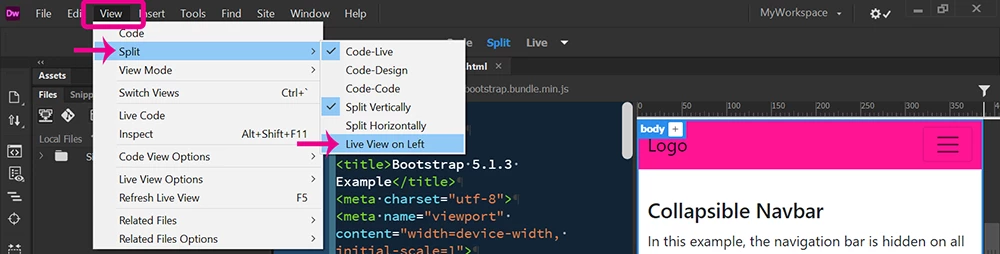
How can i change the Layout of DM? I want to have the Part with the Code on the left side and the local folder structure on the right side. I can't finde a "how to" for this.

Thanks in advance.

This topic has been closed for replies.
Correct answer Nancy OShea

View > Split View > Split Vertically > Live View on Left.  See screenshot.


4 replies

derf6545gAuthor
New Participant
January 4, 2023

Thank you all for the replies, now i have made it! 🙂

Nancy OShea
Community Expert
January 3, 2023

You can click, hold & drag Files Panel to another part of the application frame until you see a blue border around it, then release.


When you're finished customizing your workspace, save Workspace as a re-usable preset.


Nancy O'Shea— Product User & Community Expert
Nancy OShea
Nancy OSheaCorrect answer
Community Expert
January 3, 2023

View > Split View > Split Vertically > Live View on Left.  See screenshot.


Nancy O'Shea— Product User & Community Expert
Community Expert
January 3, 2023

These steps will help guide you in the process of creating a custom workspace as you are looking for: https://helpx.adobe.com/dreamweaver/using/dreamweaver-workflow-workspace.html . Using those steps you can change the workspace to look the way you want it and then click on the Workspace Switcher in the top right to save your workspace.