Participating Frequently
April 25, 2020
Question

How to fix errors in my code [was: dreamweaver]
  • April 25, 2020
  • 7 replies
  • 3783 views

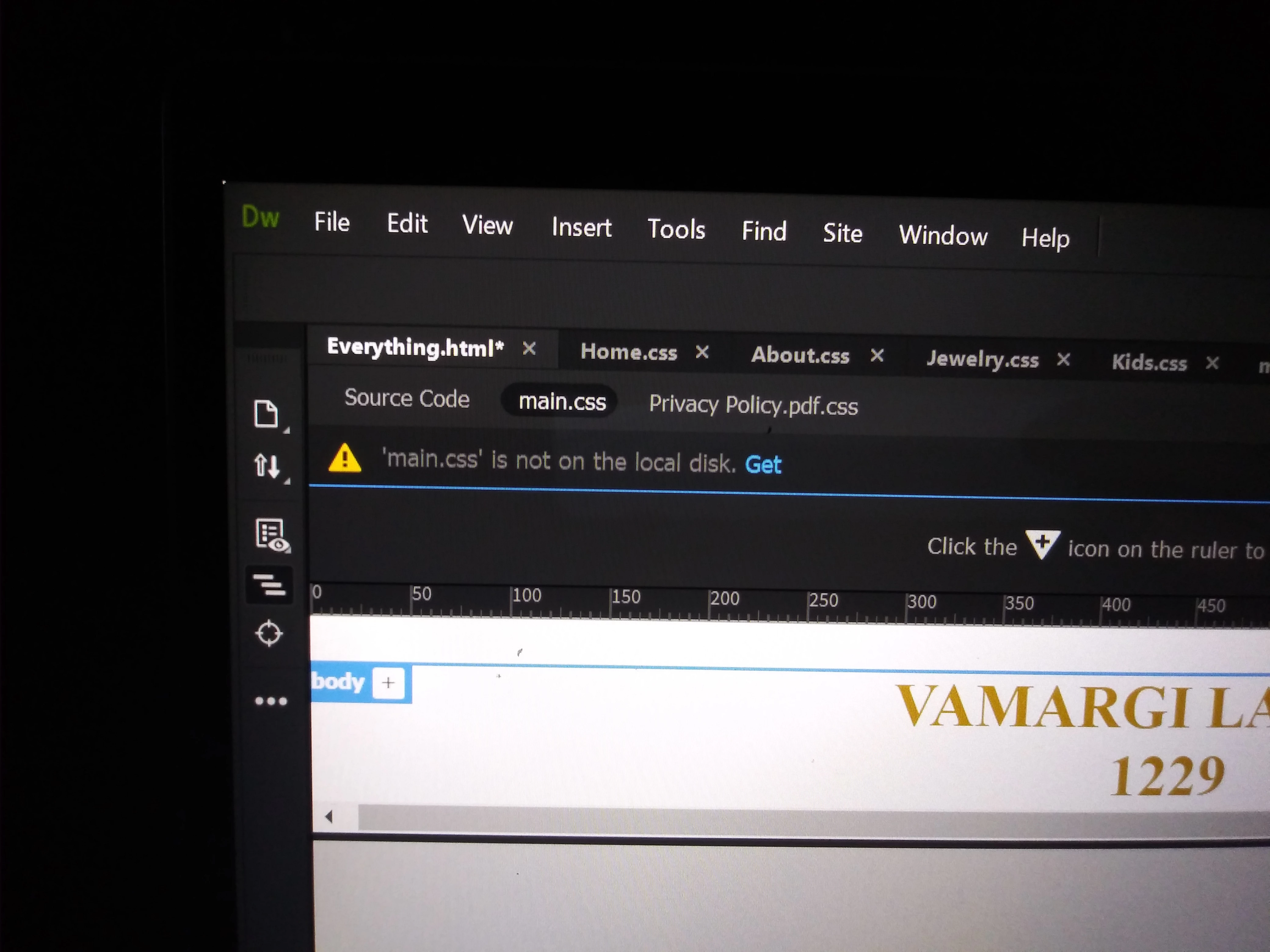
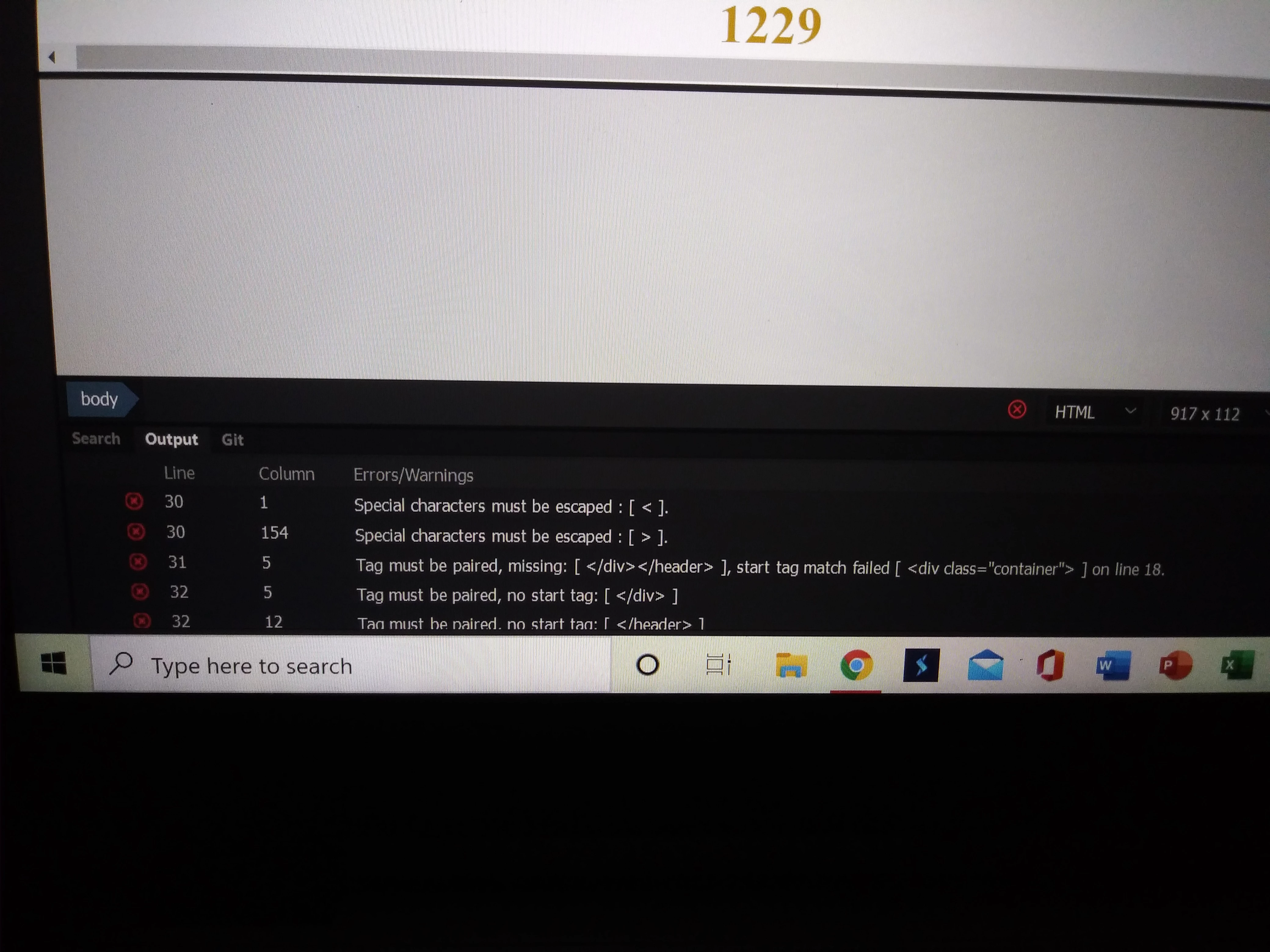
I have purchased dreamweaver to building my client's websites. I have never used an application software like this before. I found out that I needed to purchase a webhost provider. I invested more money into Bluehost. I bought a package that has SSL certifactions, maleware protection, unlimited domian names, e-commerce. I wanted to connect everything to dreamweaver. No one who works for Bluehost nor Adobe , knows how to do it. Connecting the applications to the dreamweaver sit I am building. I also have been watching video's on youtube: bring your own laptop. And www.w3schools.com, to learn coding and how to use html and css. And my codes are saying my closing tags are not connecting to the open tags. And the other picture is saying I am missing the main.css. Can anyone help me? Coding websites or tutiorals. How to fix these problems? How to connect the products from Bluehost to dreamweavet.

This topic has been closed for replies.

7 replies

hans-g.
Brainiac
April 27, 2020

Hallo, hallo, lets work gently! And to come down, please have a look to my screenshot of your https://vamargilanino1229.com/ :


what means your real website isn't on the web yet. I therefore must wonder myself do you have a provider, to whom you can upload your files? Only in this case we can see your website in question and try to help.


Why? At the moment your work is existent only on YOUR harddisk and nobody can see it, yes, no other person than yourself. Therefore would be your first step to find a provider to upload your website. This goal should be realised easily, because your photos from your first thread suggest that all the necessary files are in place.


Hans-Günter

hans-g.
Brainiac
April 27, 2020

... and sorry, Ben is right, naturally: My way is in contrast to his proposal to let us know your code (maybe with problems for you with copy and paste ans the large number of different files) to show us your website(s) in real mode.

Hans-Günter

hans-g.
Brainiac
April 26, 2020

Why don't you send us a link to your website?

Anya.m650Author
Participating Frequently
April 26, 2020
BenPleysier
Adobe Expert
April 26, 2020

http://vamargilanino1229.com/ does not have any content


/C:/Users/anyam/OneDrive/Desktop/TMPfi0vr9.htm is not a public accessable link 


And this is where this grumpy old man comes into action by saying "cobbler, stick to your last". Get yourself a web developer for the website.


Wappler is the DMXzone-made Dreamweaver replacement and includes the best of their powerful extensions, as well as much more!
Nancy OShea
Adobe Expert
April 25, 2020

Somehow, you had created 2 discussions on the same topic so to avoid further confusion, I merged them into one discussion.


These user-to-user forums are for people who have specific questions about a product.  But teaching people how to code goes beyond the scope of what we can provide here.  Unlike graphic design which is static and unchanging, the web is constantly changing.  Responsive web design is even more challenging because the site must work well on all devices.  It takes weeks/months/years to learn everything you need to need to know to be good enough to take on clients.  If you're really serious about this,  I think you should enroll in some structured learning courses on LinkedIn Learning (formerly Lynda.com).


When you joined Bluehost, they sent you an e-mail with your FTP log-in credentials.  Your first step is to go to Site > New Site and define your local site folder.  In other words, a folder on your computer hard drive where you will keep all your site files.  Example, C:\MyTestSite.  See screenshots below.


Next click on Servers tab and enter the FTP log-in details and server's Root Directory.  If unsure, contact your host.


Hit the TEST button to see if it connects.  If it doesn't, click the More Options triangle.


Once connected to server, you may save your site settings and close out the panels.


Open your Files Panel (F8) and select your site folder from the drop-list.

In my example below, the local site folder is named MyTestSite.


Post back if you have any questions.


Nancy O'Shea— Product User, Community Expert & Moderator
Brainiac
April 25, 2020

I disagree about enrolling on a learning course. There is no need to pay to learn website development, most paid instruction is no better than you can get for free.


Its all out there, the only thing that will hold you back is passion and commitment. Yes it takes time but the excitment and discovery on the way up far outweighs the stagnation when you reach a peak.


Back in the day we used to take a website we liked apart and studied how it worked, went through the html/css  looking for clues as to how the website was built/presented. In time you become familar with repeating patterns. You learn by trial an error as most good developers do. It isnt plain sailing, theres a lot of rehersals even for those with many years under their belts but the love for what you do will get you there, without the love and unpaid hours of dedication youre dead in the water, it wont happen.

Nancy OShea
Adobe Expert
April 26, 2020

For more details on setting up a site and connecting to your remote server, see the online User Guide.  F1 from the DW Help Menu.

https://helpx.adobe.com/dreamweaver/user-guide.html


Nancy O'Shea— Product User, Community Expert & Moderator
Nancy OShea
Adobe Expert
April 25, 2020

It might help us to know your skill set.

  • How many websites have you created and with which products?
  • How good are you with HTML5, CSS and JavaScript code? 


Nancy O'Shea— Product User, Community Expert & Moderator
Brainiac
April 25, 2020

I thinks that's - 1. None and 2. What's html5, css and javascript.


'I have purchased dreamweaver to building my client's websites. I have never used an application software like this before'.

Nancy OShea
Adobe Expert
April 25, 2020

It helps me to know if they previously used Muse, WordPress/Wix or even iWeb.  At least then we know what skill level we're dealing with.  


Nancy O'Shea— Product User, Community Expert & Moderator
hans-g.
Brainiac
April 25, 2020

Hello Anya,

I would like to underline Ben's words and add two things:
Please load up yout website in question - no matter how it looks like - and send us a link to it.

And, if you have not done already, give your web presence a structure, like


aso.


Hans-Günter


BenPleysier
Adobe Expert
April 25, 2020

The error messages are self explanatory, you are missing a <div> and a <header> tag. Without seeing your code, I cannot tell you where these tags are supposed to go. All I can say is that they should go prior to line 30.


The second image tells you that main.css should be within the site definition, assuming that you have correctly defined the site.


To get help using Dreamweaver, click the F1 key.


Remember that Dreamweaver is a tool to help you develop a website.


Having a scalpel does not make you a surgeon, similar to having Dreamweaver does not make you a website developer. There is lots of learning and using other tools,


Wappler is the DMXzone-made Dreamweaver replacement and includes the best of their powerful extensions, as well as much more!
Anya.m650Author
Participating Frequently
April 25, 2020

can you help me?

Nancy OShea
Adobe Expert
April 25, 2020

You need to be more specific in this user-to-user forum. 

What exactly do you need help with?


Nancy O'Shea— Product User, Community Expert &amp; Moderator
Brainiac
April 25, 2020

'What exactly do you need help with?'


The lack of being able to 'express' themselves, most probably, reading into the lack of information contained within the post.