


Fluffy Paper Clip
Inspiring
October 1, 2021
Answered

How to use Advanced Find/Replace to delete 10,000 links with different names

  • October 1, 2021
  • 3 replies
  • 953 views

I have tens of thousands of internal links on my site that I want to delete using the Advanced function of the Find/Replace feature.
Trouble is.... all the links have different names, BUT... they all end in one of six endings... like this:

https://sitename.com/folder01/iuteretrtret-aaaa.html
https://sitename.com/folder08/avgvggvhs-bbbb.html
https://sitename.com/folder23/aggvdsvhd-cccc.html
https://sitename.com/folder63/ajskdgvdsi-dddd.html
https://sitename.com/folder82/ufgfwgggf-eeee.html
https://sitename.com/folder95/ieufiuefeej-ffff.html

Is there a way I can use the Advanced  Find/Replace  function to delete the 10,000 links to files that end in  -aaaa.html   and the 10,000 links to files that end in -bbbb.html   and the 10,000 links to files that end in -cccc.html   and the 10,000 links to files that end in -dddd.html.  I tried various combination in the Find/Replace drop-down menus and only ever succeeded in deleting all links on the pages, not just the six non ending-specific ones mentioned above.

Many thanks in advance.
    This topic has been closed for replies.
    Correct answer B i r n o u

    you can use Regex for that purpose...

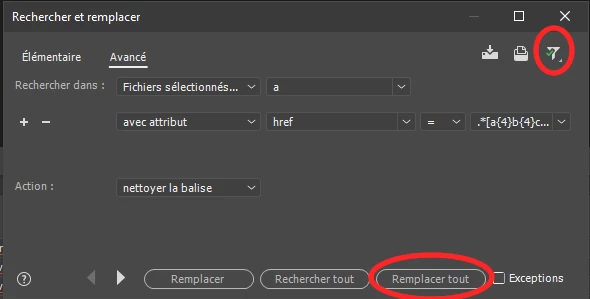
    • open the search in files option (Ctrl | Cmd) + Shift F
    • use the advanced TAB
    • open the filter , the last icon on the right (resembling a funnel topped by a green check mark)
    • ensure to uncheck everything but the "Use Regular Expression" option
    • search in the entire site, or selected files depending on your need
    • select the TAG a
    • select "using attribute" and define "href" then "=" and as a value use the following expression
      .*[a{4}b{4}c{4}d{4}e{4}f{4}].html
      (starting with a dot, and ending with a l (from HTML in lower case))
    • as Action, define the clean the tag (sorry I don't know the english expression for that option, I only have a french DW)


    make sure to have a web site back up... and launch the replace all


    3 replies

    B i r n o u
    Legend
    October 1, 2021

    in France we say... I have a million of that thing... to mean that we have a lot of it... maybe the OP expresses the same feeling... well I guess

    Nancy OShea
    Community Expert
    Community Expert
    October 1, 2021

    In North America, we do that too. 


    Nancy O'Shea— Product User & Community Expert
    Nancy OShea
    Community Expert
    Community Expert
    October 1, 2021

    I think a bigger and more relevant question is why do you have 10,000 absolute links in your site and no backend database with which to manage them? 


    DW is not the best tool for performing 10,000 find & replace routines.  But links stored inside a server-side MySQL database could be replaced very efficiently with a few lines of SQL code. 


    Nancy O'Shea— Product User & Community Expert
    Fluffy Paper Clip
    Inspiring
    October 8, 2021

    I suppose I could have used SQL, if I knew what it was. I have less knowledge about what SQL is than I do about find and replace.  I have somehow amassed a huge site as a hobby with just a rudimentary knowledge of DW and almost no knowledge of html.  Birnou's reply meant I effectively used DW to do my find and replaces. But thank you for trying to help.


    Nancy OShea
    Community Expert
    Community Expert
    October 8, 2021
    quote

    I have somehow amassed a huge site as a hobby...

    =============
    In that case, it's time to consider the advantages of a dynamic site made with server-side programming and content stored in a database (e.g. MySQL).  Static sites are OK for 10-20 page sites.  Beyond that, it's a burden for everyone.  A dynamic CMS site is way more efficient, easier to manage and less costly to host than a boat load of static HTML files.  Something to think about...

    https://www.wpbeginner.com/showcase/best-cms-platforms-compared/


    Nancy O'Shea— Product User & Community Expert
    B i r n o u
    B i r n o uCorrect answer
    Legend
    October 1, 2021

    you can use Regex for that purpose...

    • open the search in files option (Ctrl | Cmd) + Shift F
    • use the advanced TAB
    • open the filter , the last icon on the right (resembling a funnel topped by a green check mark)
    • ensure to uncheck everything but the "Use Regular Expression" option
    • search in the entire site, or selected files depending on your need
    • select the TAG a
    • select "using attribute" and define "href" then "=" and as a value use the following expression
      .*[a{4}b{4}c{4}d{4}e{4}f{4}].html
      (starting with a dot, and ending with a l (from HTML in lower case))
    • as Action, define the clean the tag (sorry I don't know the english expression for that option, I only have a french DW)


    make sure to have a web site back up... and launch the replace all


    Fluffy Paper Clip
    Inspiring
    October 8, 2021

    Thank you - I didn't understand the string of attributes, but I was able to change one or two of your drop-down menus and made the changes I needed to. You saved me weeks of time 🙂

    B i r n o u
    Legend
    October 8, 2021

    I'm glad that it helped you. thanks for the feedbacks

    have a pleasant day

    birnou