


New Participant
September 8, 2024
Answered

Html Template in dreamweaver

  • September 8, 2024
  • 4 replies
  • 832 views

I have an old html template for a site that I USE to be able to edit in DW CS6. Now I need to make a change in it and I had upgraded to CC and I feel stupid because I can't see VISUALLY anything but the front page of the bootstrap site. I see the code, and where I use to be able to just scroll down and come across all the other parts of the site, I can't in current DW. I would like to do some code modification in DW because I have a visual editor for feed back but now I can't see it. I feel like its something simple that I'm not seeing. The screen shot shows the extent where I can scroll and see the visual file, but in old DW, I could scroll down further to see the second and third pages. the site is [removed by moderator]

I can no longer visually see the whole site. I could just edit code and all, but I don't really want to do that in a big way.
    This topic has been closed for replies.
    Correct answer Nancy OShea

    CS6 is outdated web software from 13+ years ago. 😝


    Open template.dwt file in Code View.

    Select All (Ctrl+A), 

    Copy (Ctrl+C),

    Paste into a web forum reply (Ctrl+V) -- don't use email.


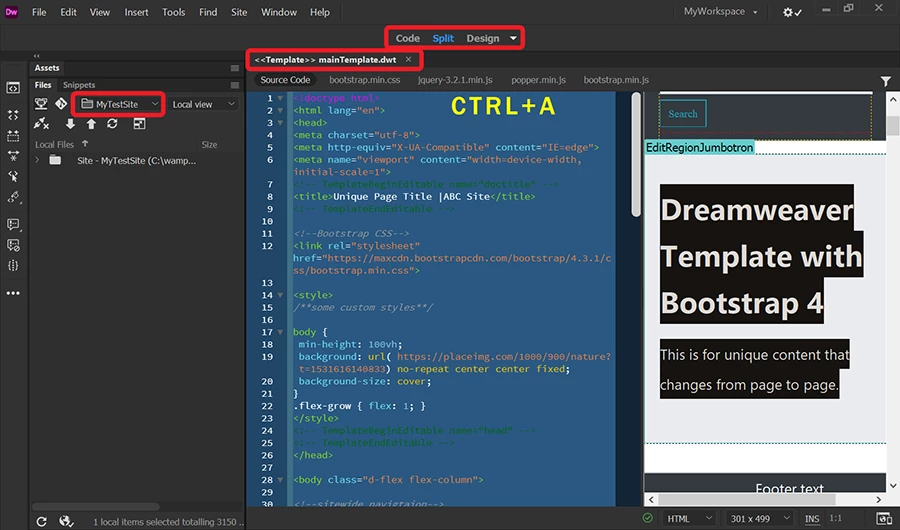
    See Screenshot of Template.dwt in Dreamweaver CC 2021:


    4 replies

    Jon Fritz
    Community Expert
    September 16, 2024

    It sounds to me like your old site might have been a single page site, where multiple pages were all together in one file, hidden or revealed as you clicked through a menu system.

    It would have looked like you could scroll through your entire site in DW's Design View, because Design View ignores most CSS and javascript. But now it sounds like you're using a more typical multi-page site instead. If you properly defined a site originally, your other pages will be located under Window > Files.

    If that's the case, each will need to be opened individually, there' s never been a function in DW to allow you to simply scroll through each individual page of a site to make modifications. 

    Nancy OShea
    Community Expert
    September 10, 2024

    To work with Dreameaver Templates (DWT files), switch from LIVE to DESIGN View (Ctrl/Cmd + Shift + F11).

    Or use the drop-down from your Document Toolbar (see screenshot).


    When documents don't behave as expected, it's time to validate your code and fix reported errors.

    Dreamweaver CC is much less forgiving of code errors than legacy CS6. 

    Go to Window > Results > Validation.  Check document.


    Hope that helps.


    Nancy O'Shea— Product User, Community Expert & Moderator
    New Participant
    September 15, 2024

    Actually, I thought it was a bootstrap template but its a plain html template. I use to be able to just open it up in DW and I have the visual view and the code. It helped me find what code I needed to duplicate or modify and gave me a visual feedback reference. This was DW CS6. I think I'm down to buying an old machine and installing it on there and editing the site. DW will open it up, but the visual part of the site won't show anything other than the first page. I guess I'm going to have to get an old machine to edit this.

    Nancy OShea
    Nancy OSheaCorrect answer
    Community Expert
    September 15, 2024

    CS6 is outdated web software from 13+ years ago. 😝


    Open template.dwt file in Code View.

    Select All (Ctrl+A), 

    Copy (Ctrl+C),

    Paste into a web forum reply (Ctrl+V) -- don't use email.


    See Screenshot of Template.dwt in Dreamweaver CC 2021:


    Nancy O'Shea— Product User, Community Expert & Moderator
    Community Expert
    September 9, 2024

    It's possible in the old version of DW you had not been using live view, but were instead using design view which can be very inaccurate in its display and cannot be used with dynamic content.


    With that said, the only thing DW related in your pages is an old swap image script. And I am not seeing bootstrap either. Maybe you had taken some influence from its base code, but the css is definitely custom.

    BenPleysier
    Community Expert
    September 9, 2024

    Either, you are telling us porkies or you have shown the wrong website.

    • The site is not a Bootstrap site
    • The site does not contain any Dreamweaver Template


    I will leave it to others to determine if this is a spam post.


    Wappler is the DMXzone-made Dreamweaver replacement and includes the best of their powerful extensions, as well as much more!