



christineavatar
Legend
January 8, 2022
Answered

I need to put all css on the html page to have it work

  • January 8, 2022
  • 2 replies
  • 611 views

Is that how it is supposed to be?

I have not done Dreamweaver in a while and I am starting back up. I have remembered just enough to get into trouble. The most serious problem I have is when has to do with my css sheet. It doesn't effect the page unless I put all the information from my css onto my html page. For every page everytime. I don't remember that but I can't remember what I did before. Help!
This topic has been closed for replies.
Correct answer Nancy OShea

1. Is your local site folder defined in DW?

2. Does your external CSS file reside in your local site folder?

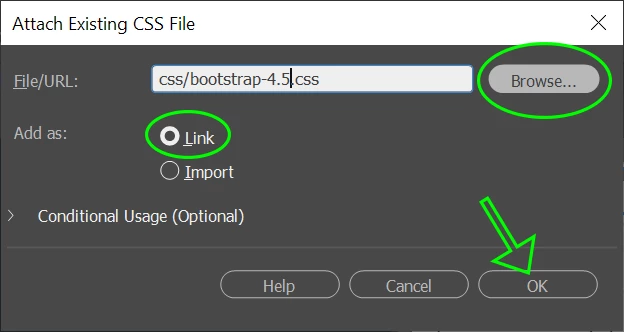
3. Did you attach the style sheet to your HTML document's <head> tag?  Go to Tools > CSS > Attach Style Sheet  (see screenshot).

4. Save document (Ctrl/Cmd + S).  And Preview in REAL browsers.


Failing that, you probably have errors in your HTML or CSS code which need attention.

Use the online validation services below to check your code for errors.

HTML:   https://validator.w3.org/

CSS:  https://jigsaw.w3.org/css-validator/


Hope that helps.


2 replies

Nancy OShea
Community Expert
Nancy OSheaCommunity ExpertCorrect answer
Community Expert
January 9, 2022

1. Is your local site folder defined in DW?

2. Does your external CSS file reside in your local site folder?

3. Did you attach the style sheet to your HTML document's <head> tag?  Go to Tools > CSS > Attach Style Sheet  (see screenshot).

4. Save document (Ctrl/Cmd + S).  And Preview in REAL browsers.


Failing that, you probably have errors in your HTML or CSS code which need attention.

Use the online validation services below to check your code for errors.

HTML:   https://validator.w3.org/

CSS:  https://jigsaw.w3.org/css-validator/


Hope that helps.


Nancy O'Shea— Product User & Community Expert
christineavatar
Legend
January 9, 2022

That seems to have done it, Nancy! The issue was I had no recolection of deliberately attacheing the style sheet to the html. I had put them in the same place and thought that was that. Thank you so much for your help!

Nancy OShea
Community Expert
Community Expert
January 9, 2022

You're welcome.  Glad you got it sorted. 🙂


Nancy O'Shea— Product User & Community Expert
Community Expert
January 8, 2022

What you are saying is not making a lot of sense. The CSS has to be on your page, but it can be in the html file itself, or included via a separate stylesheet.  Can you share a link to the page in question so we can better provide you with guidance to resolve your styling issue?

christineavatar
Legend
January 9, 2022

Sorry, I'm kind of brain dead after strugeling for two days with this. What I was trying to say is that even with the style sheet being used I still have to add all the instructions onto the html page. That doesn't make sense to me.


Community Expert
January 9, 2022

Back to my previous post, can we see the page to help see what is going on?  If the CSS stylesheet is being included it should be picked up by the document unless there are errors in the code.  If you are unable to share your code, you can try to run your page through the validators to fix the code yourself: https://validator.w3.org ; or you can use the inspector in your browser to view what rules are being picked up because you may also be in a situation where rules are overwriting another as they follow the order in which they are included on the page.