


Participating Frequently
February 6, 2017
Answered

Images or CSS will not load in design view or Live view

  • February 6, 2017
  • 1 reply
  • 2745 views

Hello all, I am completely baffled as to why my CSS or images will not display within Design or Live view. The images and CSS are hosted on a server and was working fine. All of a sudden, iam not able to see any of the CSS or images. However, when I preview in browser, everything looks fine. Can anyone add any insight as to what has gone wrong.

My colleagues that work in the same department seem to have no problems, we are pulling the files from the same server, but for some reason I am not able to see the CSS and images no longer. I've deleted and re-installed Dreamweaver but that hasn't solved the issue. I'm using Dreamweaver 2017.0.1

This topic has been closed for replies.
Correct answer Niharika Jha

Thanks, I tried replacing the code and still nothing

I have restarting and I have deleted Dreamweaver and reinstalled it to no avail


Hi,

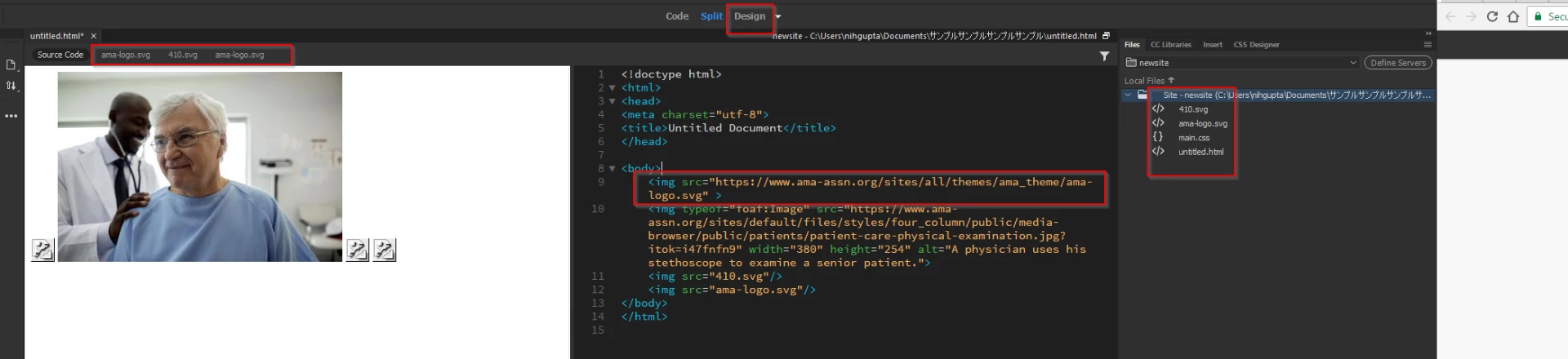
I finally got what the issue is, I did dig into the site that you are working on and while going through its source code, found that the icon that you are actually trying to load is not a png file, it is an svg file and the Design view in DW can't load/preview svg files yet.

The Live View can, because it renders everything similar to as a browser does.

Also, to see these files in related files, you need to download/save the svg file in a local site, like I did in the snapshot below- I actually used a different web link for the icon - https://www.ama-assn.org/sites/all/themes/ama_theme/ama-logo.svg

To demonstrate the difference, I also inserted an image file (not an svg) from the same site and you can see the preview in Design view.

Regards,

Niharika Gupta

1 reply

Nancy OShea
Community Expert
Community Expert
February 7, 2017

Check your View Options.  See screenshot.

Nancy O'Shea— Product User & Community Expert
Participating Frequently
February 7, 2017

Thanks for the reply, I did double check to make sure it was checked and it was, so my issue remains

Participating Frequently
February 8, 2017

Hi,

Please try replacing the links in your code-  http with https and see if it works, also we are assuming that you have a working internet connection because images in Live View should have definitely worked if it works in Real Time Preview.

Last option would be to restart DW and see, sometimes there may be some cached images problems.

Regards,

Niharika Gupta


Thanks, I tried replacing the code and still nothing

I have restarting and I have deleted Dreamweaver and reinstalled it to no avail