



Lightbox issue [can't preview]
I'm not an experienced Dreamweaver user--meaning I use Dreamweaver to work on a website designed by my predecessor. On most of our pages we include a lightbox gallery of photos related to the page topic. Whenever I needed to create a new page, I took an existing one, resaved it under a new name, and then modified what needed to be modified to make the new page.
So to create the new gallery, I went into the lightbox grid on my page, deleted the contents of each gridbox, then added back in each new thumbnail and linked it to the full-size image. But now with Dreamweaver 2020 I can't do that any more.
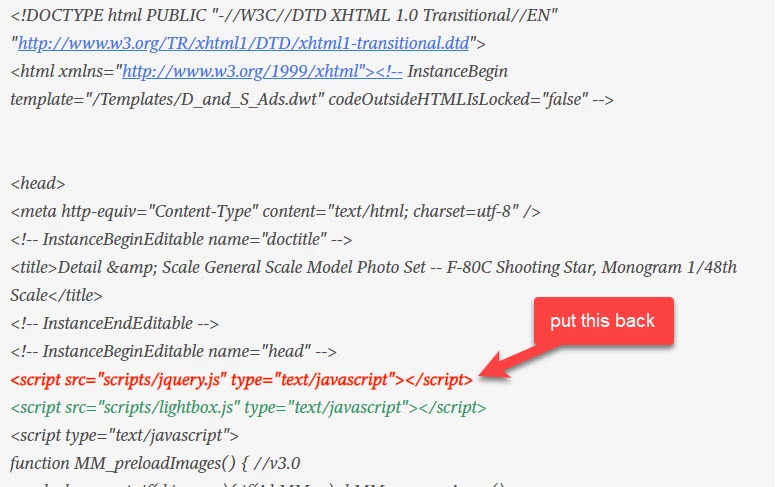
I need to create a new page that includes a six photo grid, 3x2. I do what I normally do and everything looks fine. But for starters, since the 2020 update, the live view no longer features a workable lightbox gallery...I click the thumbnails and nothing happens, so I can't test before uploading to the remote server. When I do that I get to the new page, and when I click a lightbox thumbnail, instead of creating the image above the page with forward/back arrows, it creates a new full page with nothing but the full-size image on it...so I would have to hit the back arrow in Safari to move back to the prior page where I can see the lightbox gallery again.
To make sure it wasn't me that was doing something different, I opened another page, changed some text but did not modify the gallery at all. Saved the page and then uploaded it to the server and I get the same thing...clicking on a lightbox thumbnail--that I did not modify in any way--takes me to a new full page with nothing on it but the full-size image of what the thumbnail protrayed.
Here's a link to the particular page in question:
Can anyone help me figure this out so I can go back to "recreating" my lightbox galleries?
Rock
 AdChoices