


peggriffy
Inspiring
December 2, 2021
Answered

Local Files will not display

  • December 2, 2021
  • 1 reply
  • 1649 views

My local files will not display in the files panel in Dreamweaver.  The files are on the hard drive and have not moved from where they always have been.  Manage Sites is pointing to the correct file location. Thank you.
    This topic has been closed for replies.
    Correct answer peggriffy

    If you can't restore preferences, I suspect you don't have administrative privileges.

    Right-click on Dreamweaver 2021 icon from your Win Start Menu.

    Select More > Run as Administrator.


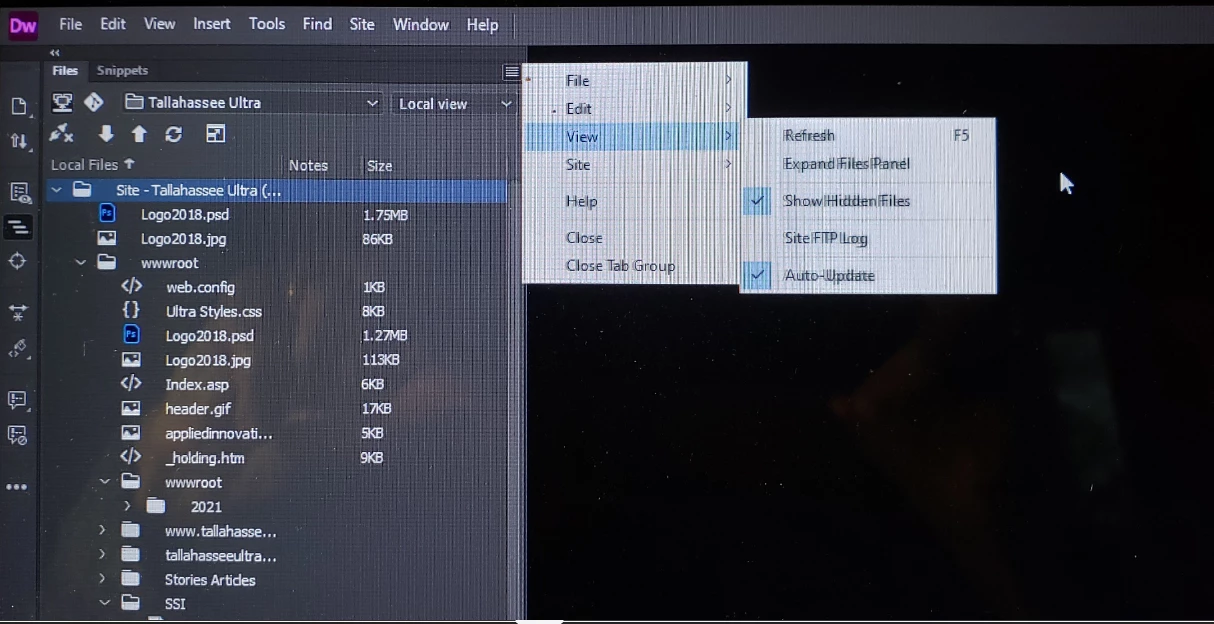
    Thank you again.  I just found the problem.  Files were hidden.  See screenshot.  As soon as I checked "Show Hidden Files" the local files re-appeared.  I appreciate all of your help.


    1 reply

    Nancy OShea
    Adobe Expert
    December 2, 2021

    Perhaps you received an automatic update?  You can disable those from CC Desktop App Preferences.

    Go to Site > New Site and define your local site folder again.


    Nancy O'Shea— Product User, Community Expert & Moderator
    peggriffy
    peggriffyAuthor
    Inspiring
    December 8, 2021
    Thank you for your response. I followed your instructions and still cannot
    see my local files in Dreamweaver. I am unable to update my website. Any
    help you can give me would be appreciated.
    peggriffy
    peggriffyAuthor
    Inspiring
    December 10, 2021

    Also which version of Dreamweaver -- Help > About Dreamweaver?

    And which operating system do you have?


    21.2