

Inspiring
October 9, 2021
Answered

[Locked] How to import websites from DW CS6 into DW 2021?

  • October 9, 2021
  • 6 replies
  • 6581 views

I'm at the import window and can't move forward. What must I do next?

Perhaps some file(s) have to renamed before I can import the docs from my DW CS6 website into DW 2021?  

This topic has been closed for replies.
Correct answer Nancy OShea

Did you export site settings from CS6 first?  That's the first step. 
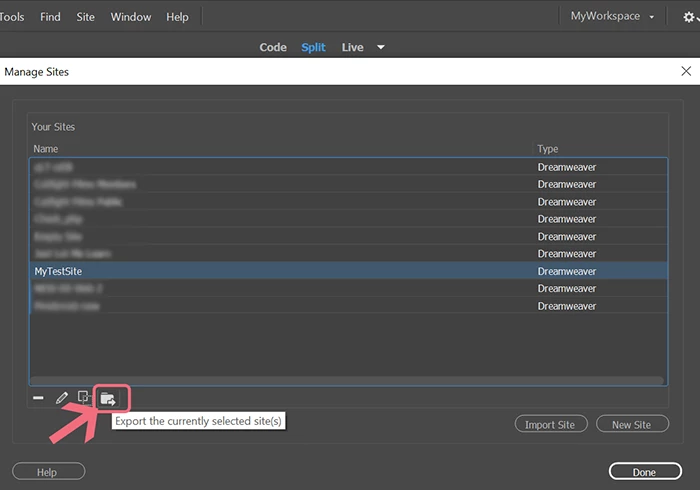


Alternatively, you will need to manually create new settings in DW CC since you have no .ste file to import.


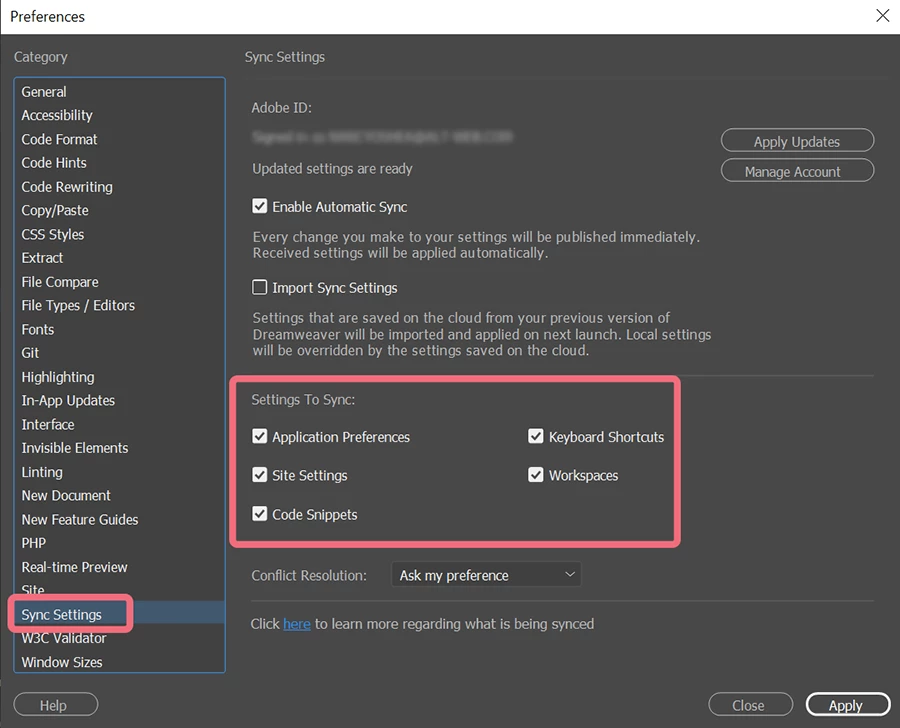
Once your site definitions are all set-up, be sure to sync settings to the cloud from Preferences.  In future migrations of DW CC, you can then import synced  settings from your cloud storage.  See screenshot.


6 replies

BenPleysier
Community Expert
Community Expert
October 24, 2021

I repeat what I said before


As one nearly octogenarian to a real octogenarian, the instructions shown in the link of my first reply, tell you everything. Here is the link once again.

https://helpx.adobe.com/dreamweaver/using/import-export-dreamweaver-site-settings.html


If you first read under Export your site settings and then view the first 40 seconds of this video

https://youtu.be/UE1cTzqAWVc


The second part of the video shows the Import site settings.


And that is it, you are ready to run with Dreamweaver 2021


Please do not tell me that I am going through a time wasting exercise while trying to help you.

Wappler is the DMXzone-made Dreamweaver replacement and includes the best of their powerful extensions, as well as much more!
Inspiring
October 24, 2021

Thank you.

B i r n o u
Legend
October 10, 2021

Well, I think that @BenPleysier is right... if you al ready have a website in DW CS6... that do mean, that exporting STE from CS6 and then import this STE from 2021... should do the job?

Nancy OShea
Community Expert
Community Expert
October 15, 2021

Bump.


Nancy O'Shea— Product User & Community Expert
Inspiring
October 24, 2021

So sorry.......


Previous was wrong screenshot.

Nancy OShea
Community Expert
Community Expert
October 9, 2021

We are assuming your local site folder is already on your computer hard drive e.g. C:\MySiteFolder\


Nancy O'Shea— Product User & Community Expert
B i r n o u
Legend
October 9, 2021

excuse me @BIRON Photos  if I'm wrong, but it seems to me that you would like to import your site (in fact all the files, folders and documents that compose it)... if that's it... the STE files only take care of the parameters of your site, as well at the local level, as at the server level.


so if they are the actual files you want to import... open Dreamweaver, and first of all (if it is not already done) create a site (Site > New Site) create a local folder on your hard drive.


from there two methods,


1 - either you recover your site from an archive, a backup, a hard disk... etc... and you manually copy the files in the freshly created local folder...


or


2 - if your files are online, directly accessible from the web site, so in DW you create a server space from the parameters of your site (Site > Manage Site, then edit the site created previously), from the category Server, create a new server, fill in the parameters

  • FTP or SFTP,
  • FTP URL,
  • Port,
  • login and password ...
  • define the root folder

for those information, if you don't have them, you need to get in touche with the provider, or your netwaork admin


you can then use the client FTP from DW, connect to the server and get all the files that will be placed in your local folder

https://helpx.adobe.com/dreamweaver/using/connect-remote-server.html


Nancy OShea
Community Expert
Nancy OSheaCommunity ExpertCorrect answer
Community Expert
October 9, 2021

Did you export site settings from CS6 first?  That's the first step. 


Alternatively, you will need to manually create new settings in DW CC since you have no .ste file to import.


Once your site definitions are all set-up, be sure to sync settings to the cloud from Preferences.  In future migrations of DW CC, you can then import synced  settings from your cloud storage.  See screenshot.


Nancy O'Shea— Product User & Community Expert
BenPleysier
Community Expert
Community Expert
October 9, 2021
Wappler is the DMXzone-made Dreamweaver replacement and includes the best of their powerful extensions, as well as much more!
Inspiring
October 9, 2021
I did look, but I have never heard of .ste files; there are none in my DW CS6 sites.
BenPleysier
Community Expert
Community Expert
October 9, 2021

the .ste file is the Dreamweaver site definition file. When you export the settings, the extension of the exported file is .ste.

Wappler is the DMXzone-made Dreamweaver replacement and includes the best of their powerful extensions, as well as much more!