New Participant
June 20, 2018
Answered

PHP File is not on the local disk ?

  • June 20, 2018
  • 1 reply
  • 2160 views

...and then when i click on "get"

Get operation failed since namefile.php does not exist on the remote site.!!

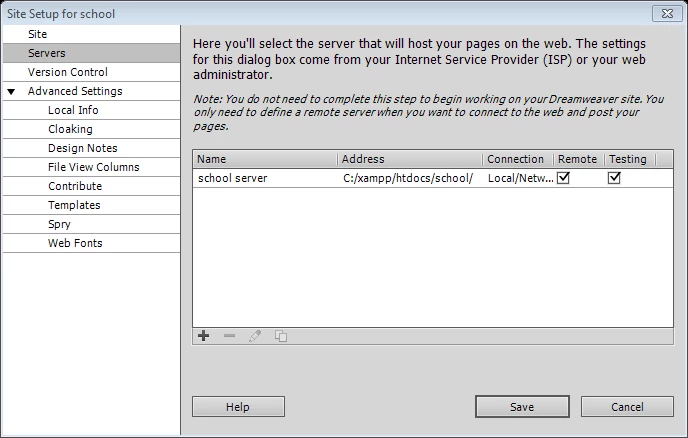
where i set a new dreamweaver site and put all files "html, css ,php,images" in school.file

what is the problem and where ?

This topic has been closed for replies.
Correct answer David_Powers

Are short tags enabled on your server and is the server running?

If short tags are not enabled (usually done manually in the php.ini file), the opening brackets of your includes will need to be changed from <? to <?php. The local server must also be running in order for the includes to be parsed.

When the local server is set up as you have it, the links inside include files should be set as site root document relative or absolute. Sometimes document relative links won't work correctly. Site root relative links will start with a leading / followed by your link information. You also might not need the school folder in your link either.

Make sure your server is running, and try this for the header include, see if either one makes a difference for you...

<?php

include_once("school/header.php")

?>

or

<?php

include_once("header.php")

?>

EDIT: Holy caffeine deficiency Batman! Post edited for glaring wrongness.


https://forums.adobe.com/people/Jon+Fritz+II  wrote

try this for the header include, see if either one makes a difference for you...

<?php

include_once("/school/header.php")

?>

or

<?php

include_once("/header.php")

?>

That won't work. PHP includes don't support site-root-relative links. They must be either absolute links or relative links.

I suspect that header.php and footer.php are both in the same folder. So the correct code would be this:

<?php include_once("header.php"); ?>

<?php include_once("footer.php"); ?>

1 reply

Jon Fritz
Adobe Expert
June 20, 2018

Has namefile.php been uploaded to the server to make it available for download (Get)?

If so, is it within the folder set as your Root Directory under your FTP server settings?

New Participant
June 21, 2018

sorry i am new in use like this programs so please can you give me more explanation about server that you mean ??

and i didn't setup ftp server...

Jon Fritz
Adobe Expert
June 21, 2018

so why its not working ?

i still have the same message !


Without seeing your code it's hard to say exactly what's going wrong. To make a guess, I'd say the link to a header.php include file is pointing to something that isn't on your hard drive and/or you don't have access to download it.

Check the link that's attempting to pull header.php, it's likely to be part of an include <?php > tag, and make sure it's going to something you have access to locally.