



PleaseWork1978
Inspiring
August 25, 2021
Question

PHP Form Dropdown Has Default Font Instead Of Embedded Font?

  • August 25, 2021
  • 4 replies
  • 2031 views

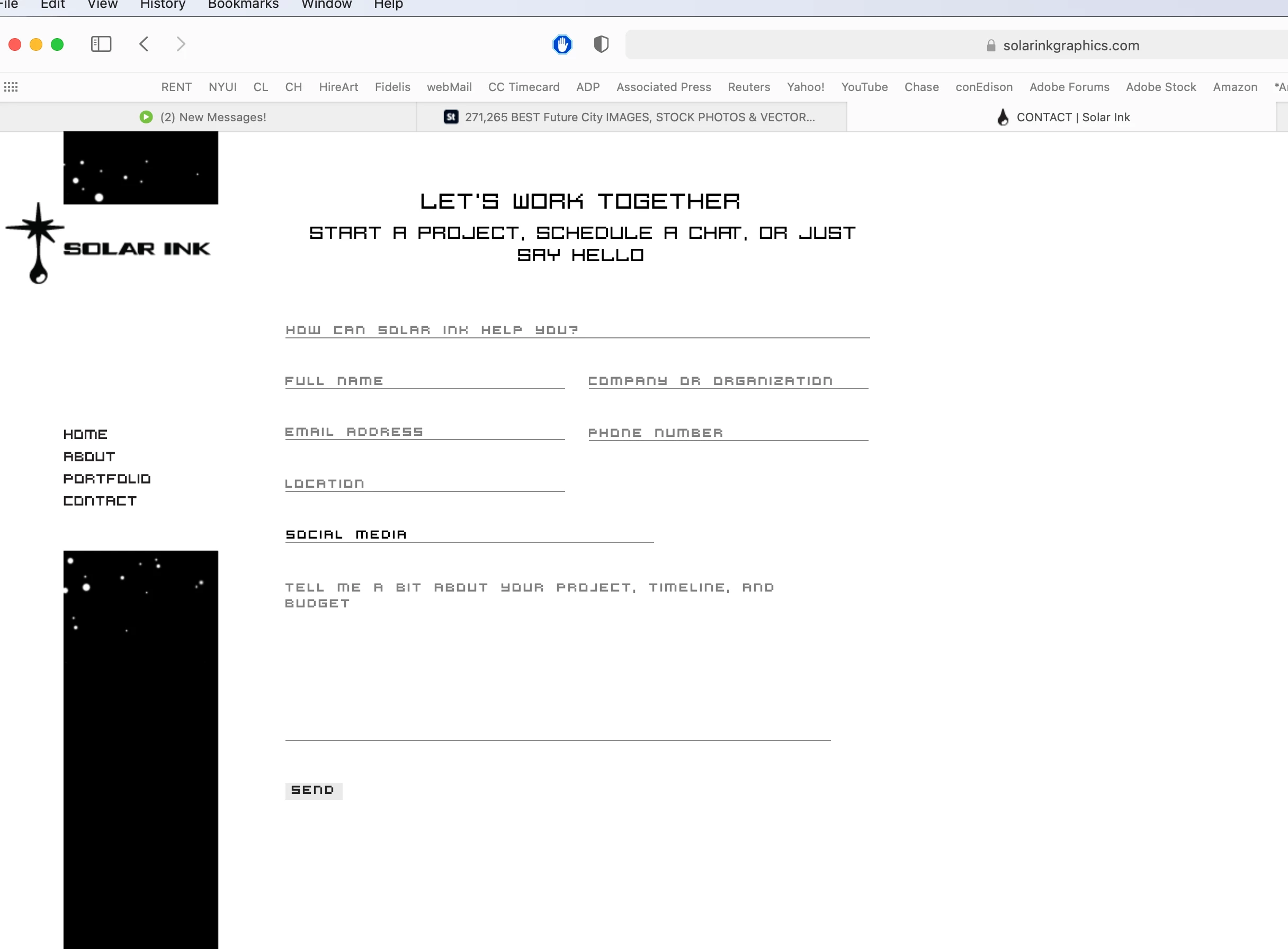
So I have a contact.php with a form area that contains a drop down, using an embedded font (Fig. 1 below).

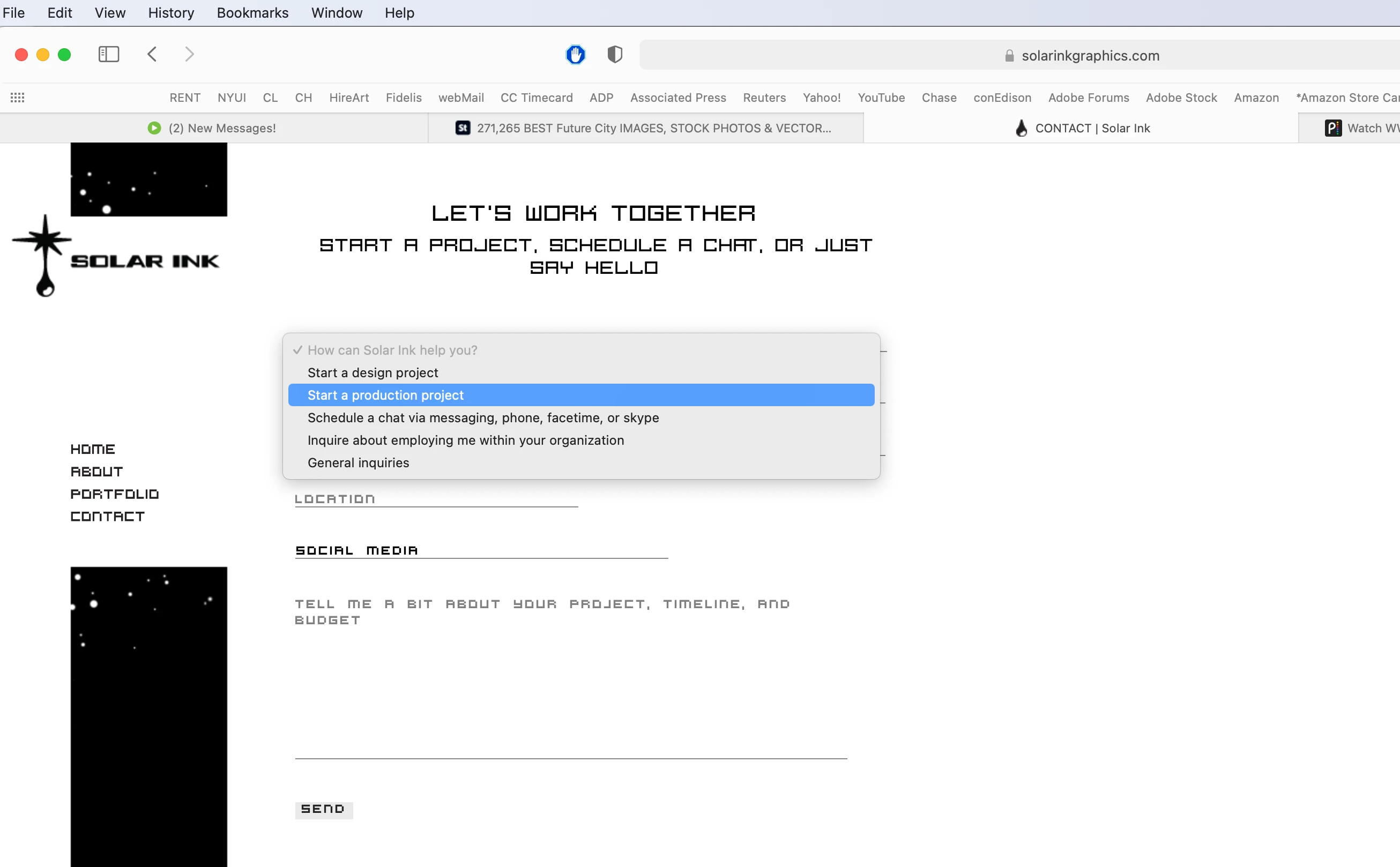
Everything displays fine, except, on the dropdown menu items area the font defaults to a sans-serif instead of the embedded font (Fig. 2 below).


Is there are way to force the dropdown menu items to be shown in the embedded font, just like the front facing part of the form does?


1. contact.php with embedded fonts displayed fine.


2. contact.php drop down menu item defaulting to san-serif font.
    This topic has been closed for replies.

    4 replies

    Nancy OShea
    Community Expert
    August 26, 2021

    Have you tried advanced CSS form stylying with appearance:none?

    https://developer.mozilla.org/en-US/docs/Learn/Forms/Advanced_form_styling


    I find it interesting that Firefox now supports the vendor prefix for -webkit.  I guess if you can't beat 'em, join 'em.  🙂


    Nancy O'Shea— Product User & Community Expert
    PleaseWork1978
    Inspiring
    August 26, 2021

    I placed it, but I must be missing something else, because it’s still failing to show with the correct font in Chrome.

    It’s working great now in Safari and Firefox though.


    Screenshot posted in the above reponse btw. 


    PleaseWork1978
    Inspiring
    August 26, 2021

    I'm not sure the below code will help much but you can have a play around with it. I don't advise using that Virtual DJ typeface, its pretty ugly and unreadable so I've swapped it for a more readable font but you can always swap it back if really want to use it.


    <!DOCTYPE html>
    <html lang="en">
    <head>
    <meta charset="UTF-8">
    <title>Customised Form Select List</title>
    <link rel="preconnect" href="https://fonts.googleapis.com">
    <link rel="preconnect" href="https://fonts.gstatic.com" crossorigin>
    <link href="https://fonts.googleapis.com/css2?family=Roboto+Slab:wght@200;300;400&display=swap" rel="stylesheet"> 
    <link rel="stylesheet" href="https://maxcdn.bootstrapcdn.com/font-awesome/4.7.0/css/font-awesome.min.css">
    <style>
    body {
    font-family: 'Roboto Slab', serif;
    font-size: 16px;
    }
    .formSelect {
    width: 60%;
    margin: 0 auto;
    }
    .formSelect h2 {
    font-size: 30px;
    font-weight: 400;
    text-align: center;
    margin: 0 0 15px 0;
    padding: 0;
    }
    .formSelect h3 {
    font-size: 22px;
    font-weight: 400;
    text-align: center;
    margin: 0;
    padding: 0;
    }
    .formSelect h4 {
    display: flex;
    justify-content: space-between;
    align-items: center;
    width: 100%;
    box-sizing: border-box;
    margin: 25px 0 0 0;
    padding: 0;
    background-color: #f2f2f2;
    border: 1px solid #ccc;
    color: #000;
    padding: 10px 15px;
    font-weight: 400;
    cursor: pointer;
    }
    .formSelect ul {
    margin: 0 0 20px 0;
    padding: 0;
    border: 1px solid #ccc;
    box-sizing: border-box;
    display: none;
    }
    .formSelect li {
    box-sizing: border-box;
    line-height: 22px;
    margin: 0;
    padding: 10px 15px;
    list-style: none;
    border-bottom: 1px solid #ccc;
    cursor: pointer;
    }
    .formSelect li:hover {
    background-color: #007bff;
    color: #fff;
    }
    .formSelect li:last-child {
    border-bottom: none;
    }
    .formSelect .label {
    display: block;
    margin: 25px 0 0 0;
    }
    .formSelect input {
    font-size: 16px;
    padding: 10px;
    width: 100%;
    box-sizing: border-box;
    border: 1px solid #ccc;
    font-family: 'Roboto Slab', serif;
    }
    textarea.projectBudget {
    width: 100%;
    border: 1px solid #ccc;
    min-height: 200px;
    font-size: 16px;
    box-sizing: border-box;
    padding: 15px;
    font-family: 'Roboto Slab', serif;
    }
    .show {
    display: block!important;
    }
    .showOptions span {
    display: flex;
    justify-content: center;
    align-items: center;
    background-color: #007bff;
    color: #fff;
    width: 22px;
    height: 22px;
    border-radius: 4px;
    }
    .showOptions span i {
    font-size: 18px;
    }
    .hideOptions {
    display: none;
    margin-left: auto;
    background-color: #000;
    color: #fff;
    border: none;
    padding: 3px 10px;
    font-size: 14px;
    text-transform: uppercase;
    letter-spacing: 1px;
    }
    .chosenOption {
    box-sizing: border-box;
    display: none;
    width: 100%;
    }
    .submit {
    background-color: #f2f2f2;
    color: #000;
    border: 0;
    padding: 10px 15px;
    margin: 25px 0 0 0;
    width: 100px!important;
    border-radius: 5px;
    }
    .formGroup {
    display: flex;
    justify-content: space-between;
    }
    .formGroup label {
    width: 48%;
    }
    </style>
    </head>
    <body>
    
    <div class="formSelect">
    <h2>Let's Work Together</h2>
    <h3>Start a project, schedule a chat or just say hello</h3>
    	
    <form name="feedbackForm" method="post" action="" class="feedbackForm">
    
    <h4 class="showOptions">How can Solar Ink help you?<span><i class="fa fa-angle-down"></i></span></h4>
    <ul class="optionsList">
    <li>Start a design project</li>
    <li>Start a production project</li>
    <li>Schedule a chat via messaging, phone, facetime, or skype</li>
    <li>Inquire about employing me within your organisation</li>
    <li>General inquires</li>
    
    </ul>
    <label for="chosenOption" class="chosenOption">
    <input type="text" class="chosenOptionInput" name="chosenOption" id="chosenOption" readonly>
    </label>
    
    <label for="name" class="label">Name<br>
    <input type="text" class="name" name="name" id="name">
    </label>
    
    <div class="formGroup">
    	
    <label for="emailAddress" class="label">Email Address<br>
    <input type="text" class="emailAddress" name="emailAddress" id="emailAddress">
    </label>
    
    <label for="phoneNumber" class="label">Phone Number<br>
    <input type="text" class="phoneNumber" name="phoneNumber" id="phoneNumber">
    </label>
    
    </div>
    <!-- end formGroup -->
    
    <div class="formGroup">
    	
    <label for="location" class="label">Location<br>
    <input type="text" class="location" name="location" id="location">
    </label>
    
    <label for="searchEngine" class="label">Search Engine<br>
    <input type="text" class="searchEngine" name="searchEngine" id="searchEngine">
    </label>
    
    </div>
    <!-- end formGroup -->
    
    <label for="projectBudget" class="label">Tell me a bit about your project, timeline and budget<br>
    <textarea class="projectBudget"></textarea>
    </label>
    <input type="submit" class="submit" value="Submit">
    </form>
    </div>
    
    <script>
    const showOptions = document.querySelectorAll('.showOptions');
    const optionsList = document.querySelectorAll('.optionsList');
    const options = document.querySelectorAll('.optionsList li');
    const chosenOption = document.querySelectorAll('.chosenOption');
    let indexCount;
    
    showOptions.forEach(function(showOptions, index) {
    showOptions.onclick = function() {
    optionsList.forEach(function(optionsList) {
    optionsList.classList.remove('show')
    });
    indexCount = index;
    this.nextElementSibling.classList.toggle('show');	
    }
    })
    options.forEach(function(option) {
    option.onclick = function() {
    const chosenOptionInput = document.querySelectorAll('.chosenOptionInput');
    optionsList.forEach(function(optionsList) {
    optionsList.classList.remove('show');
    })
    let selectedOption = option.innerText;
    chosenOptionInput[indexCount].value = selectedOption;
    chosenOption[indexCount].classList.add('show');
    }
    });
    </script>
    </body>
    </html>


    Whoa this looks great, I haven’t tested it yet though.


    My initial concern is whether I can get the current PHP script to work with this, because my original PHP page builds the form with <select> <option> tags. 


    But I’l try to check on this when I get the chance.


    Thanks so much. 


    The fonts I’m not too worried about right now, I’m just trying to get it to function correctly. But thanks for the input. Ha. I don’t know, virtual DJ has character. I guess when I get the chance I’ll run it by some folks and see how they feel. 


    Cheers. 

    Known Participant
    August 25, 2021

    btw, the font does seem to work correctly in Chrome, for me, but not in Firefox.

    Brainiac
    August 25, 2021
    quote

    btw, the font does seem to work correctly in Chrome, for me, but not in Firefox.


    By @wake6


    Yes, the styling of certain form aspects with css, like 'select', 'option'  is limited and not hugely stable in all browsers, they treat them differently. You can get better looking styling by creating your own dropdowns but this requires some coding knowledge.

    PleaseWork1978
    Inspiring
    August 25, 2021

    Yeah, more and more I'm realizing that creating a drop down on javascript is the way I'm going ti have to go, to get the more concise uniformity I'm looking for. 

    My only question now is, can I build onto this preexisting php form, with ecerything in place as it is, and add the javascript drop downs (there are two drop downs on this form) to the preexisting php page and form?

    Brainiac
    August 25, 2021

    I don't think you can specify a specific font within a default <select></select> form. You would have to build a custom drop-down menu using javascript.

    Known Participant
    August 25, 2021

    I went to https://www.w3schools.com/tags/tryit.asp?filename=tryhtml5_select_form and added this code

    <head>
    <style>
    select{
    font-family: times;
    }
    </style>
    </head>

    and re ran it and it altered the font.


    Known Participant
    August 25, 2021

    Can we see your html and css?
    I suspect that your css doesn't define a font for the <select> tag.

    PleaseWork1978
    Inspiring
    August 25, 2021

    I'm not at my machine right now, but I have select and option as well as other IDs, classes, etc., all listed on the same CSS line, pointing to the same font. 

    Which is why it works on every other part of the form. 

    But as soon as I get the chance I'll post the code, maybe there's something else wrong that other will be able to see.