


Known Participant
February 7, 2024
Question

responsive videos

  • February 7, 2024
  • 3 replies
  • 1325 views

Hello.  I am still using dreamweaver and I used the Responsive Video Embed on the Insert Panel as seen below:
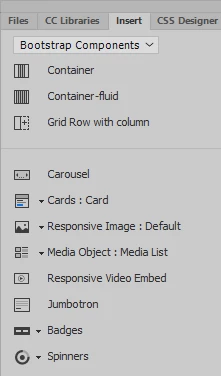
 

The code looks like this:

<div class="embed-responsive embed-responsive-16by9">
<iframe class="embed-responsive-item" src="videos/firstpagevideoopt.mp4"></iframe>
</div>

The video is on my server.

It plays fine, but I cannot find a way to hide the video controls. Been trying for a while now.

There is a way to hide the controls in a html5 video tag, but I am having a rough time with the CSS for the video tag.

Any help will be greatly appreciated.

Ben

    This topic has been closed for replies.

    3 replies

    Brainiac
    February 8, 2024

    I'm not sure why you don't want the video controls, maybe they are intrusive for you? You know you can create a more descreet play button, which you can overlay onto the video, a bit like the youTube play button if that would be more suitable........shout out if you want an example.


    As long as you don't have noise associated with the video onload then I think its OK to have it autoplay onload, many, many websites do that as its all about movement, animation these days, not static, motionless experiences! Unless I'm mistaken Chrome no longer has the ability to switch off autoplay unless it was re-instated in newer versions..........I think you can still switch off sound in the browser, however few will know how to do that and you can switch off your computer sound anyway if you're on the internet at work or home, if it's that annoying to you......but its still courteous to allow a visitor to choose sound on a video - autoplay should be optional, as long as its a muted video.

    Nancy OShea
    Adobe Expert
    February 8, 2024

    People with Autoplay Blocking will not see video that contains an audio track.  It will be blocked such that they see only an empty space where the player should be.  See below for more about Media & Autoplay.

    https://developer.mozilla.org/en-US/docs/Web/Media/Autoplay_guide


    Nancy O'Shea— Product User, Community Expert &amp; Moderator
    Brainiac
    February 8, 2024
    quote

    People with Autoplay Blocking


    By @Nancy OShea


    The question is how many have autoplay blocking applied or a more pointed question is how many even know how to do it. In my experience no-one but geeky people, minorities mess around with their browser settings.


    Some you win, some you lose  - that's always going to be the case, you can't please all of the people all of the time - either produce a fairly sedentary website, which is useless to most, or risk upsetting a minority and produce something a little more exciting - I don't have the definitive answer.


    Does Chrome show and play the video assuming you can't block autoplay in that browser - at the last count that had 64% percent of the market, Firefox less than 3%


    As I covered in an earlier post there's the option to switch off your computer sound whilst using the internet if youre that sensitive or are in an environment where sound may be disruptive, use it would be my advice!

    Nancy OShea
    Adobe Expert
    February 7, 2024

    WHY?

    Hiding player controls is annoying & not recommended for all sorts of reasons: 

    • It adversely affect user's access to media. 
    • It removes volume/mute/play/pause/fullscreen/replay/closed captioning.
    • Many people have autoplay blockers. They won't see anything.
    • Office workers who share space with co-workers need player controls.
    • Parents with a sleeping baby nearby need player controls.
    • Podcast listeners need a way to turn off competing media. 
    • In the absence of player controls, annoyed people will be forced to leave your site.


    Nancy O'Shea— Product User, Community Expert &amp; Moderator
    Adobe Expert
    February 8, 2024
    quote

    WHY?

    Hiding player controls is annoying & not recommended for all sorts of reasons: 

    • It adversely affect user's access to media. 
    • It removes volume/mute/play/pause/fullscreen/replay/closed captioning.
    • Many people have autoplay blockers. They won't see anything.
    • Office workers who share space with co-workers need player controls.
    • Parents with a sleeping baby nearby need player controls.
    • Podcast listeners need a way to turn off competing media. 
    • In the absence of player controls, annoyed people will be forced to leave your site.


    By @Nancy OShea


    100% agree with Nancy on this. It's best to have controls. If you want to be able to customize your video without having to worry with the code and given that the bootstrap code you are using is out of date in DW, you may want to consider using the updated bootstrap code for videos, or consider a solution like Vimeo or Wistia that can provide you with easy to access controls and customizations for your videos.

    beng2000Author
    Known Participant
    February 17, 2024

    Hi Ben. I use Visual Studio Code as well.  In DW, I just put the links to Bootstrap 4 and delete the DW generated Bootstrap. Just want to be used to doing this.


    I just learned Bootstrap 4 last year.  I know I need to use Bootstrap 5 now.  In your opinion, is there a high learning curve between 4 and 5.


    Also, the sites I make with Bootstrap look like cookie cutter sites to me because of the top navbar. I am not sure how to make sites look differently with the navbar.  I would eventually like to design with code and not Bootstrap.


    Furthermore, I know HTML5 and CSS but not JavaScript, so I'm doing a course from Udemy on JavaScript and SEO.  SEO has changed dramatically over the years.  I validate my sites, and I'm absorbing all info from Google Search Essentials.  


    Thanks!


    Brainiac
    February 7, 2024

    https://www.w3schools.com/css/tryit.asp?filename=tryresponsive_video2 


    See if the above helps. If you don't want any controls then remove 'controls' from the <video> tag and replace with 'autoplay' without the '  '.

    beng2000Author
    Known Participant
    February 17, 2024

    Thank you.


    I think what I need is animation on the website, not a video. I don't know how to incorporate animation in my designs yet, but I will learn.