


Secure connection, what to do?


Copy link to clipboard
Copied
My client sees the following warning when he logs into a website created by me. The site allows proprietary information to be viewed/used, but does not pose a threat if an unauthorised person gains access.
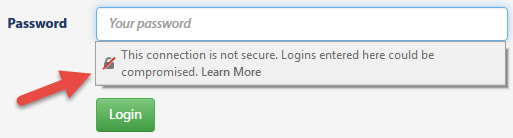
Info held in a database includes name, address, location, phone and email. According to the Privacy Act, this info may not be divulged.
Should the client invest in an SSL certificate? If so, which level? Any recommendations?


 36
Replies
36
36
Replies
36


Copy link to clipboard
Copied
The message is indicating only that the connection between the server(s) and the users computer is not secure, which is all the use of ssl and https does. It has nothing to do with the actual security of the site itself, but only gives a sort of secure connection.
An ssl certificate from a reputable signed company is relatively cheap now, but remenber you will have to change any links and place all resources inside the secure folder. It may also be worth using http2 as this allows extra security, but its use will depend on no old browsers being used.
The real security starts with the database and the site itself, as the database must be behind a secure firewall, and if possible not within the same structure as the site itself. I don't know about php's security coding, but if it has similar to C# then it often becomes a question of just how secure you wish to make it.
Once you move into legal responsibilities to keep data secure, the term, 'all resonable precations taken' is a minefield, and i have seen experianced programmers cry when their 'secure' code was hacked in a couple of minutes by a friendly hacker, whos job it is to check just how secure something is.
Copy link to clipboard
Copied
Thank you for your reply.
I have no problem with site (including DB) security; 'all reasonable precautions taken' does apply.
My problem is based on the following remarks:
- information sent over the net, including username and password, can be intercepted.
- with the exception of Admin logins, unauthorised access is not a dealbreaker because the info is not a security issue.
- Admins have access to all DB content.
- User login details may be used on a variety of websites; users rarely change their details internet wide.
Does this mean that site traffic should be encrypted?
Copy link to clipboard
Copied
For the first item, information being intercepted over the internet, this is the real reason for ssl/https. Such interceptions though are rare, as they require direct hacking of the servers involved or slicing into the network. It's worth remembering though, that https will give the site a higher search engine ranking if the entire site is placed within the secure folder. So there could be a positive involved with the cost of doing sites using https by default.
The only item I would recommend regarding the info, is to encrypt the email address on the database, as this is generaly regarded as sensitive info. I don't know about Australia, but in Europe the loss of such data would certainly incur a fine if stolen from the database. The rest of the user data would depend on the 'all reasonable precautions taken', being proven by yourself and the site owner, for which the use of ssl will certainly be an advantage.
One other item to remember is not to do a wordpress for the log-in page, i don't know if they still do it, but if one had the log-in info wrong, it would tell the user which one was incorrect, which is a definite do not do. An hacker in such circumstances would then know which item was correct, and could then concentrate on the incorrect item. Always use a general message that says the info is incorrect.
Copy link to clipboard
Copied
Once again, thank you for your feedback.
The site is as secure as I can get it. This has been my ziel ever since I started out and even now, though some of those sites are over a decade old, there have been no unauthorised intrusions in any of them. Plenty of attempts though.
As previously stated, this is not the problem, the problem stems from the fact that apparently Chrome and Firefox are in the process of marking all websites as unsecure if served over HTTP.
These are some of the comments that I have come across:
For web developers that still haven’t taken seriously the push for HTTPS, and who are still serving their websites mostly over HTTP, this may be the last call to action that will convince them to make the transition. Large web sites could take many months or even more than a year to make this change.
Therefore, if they wait until Google and Mozilla officially set a deadline for clearly marking all HTTP websites as not secure, they may not be able to switch to HTTPS on time. That could cost them lost reputation with users who will start seeing their websites being marked as not secure.
Apart from your response, there have been no others that have chimed in. Does this mean that this is a problem in the making?
I have come across this website https://letsencrypt.org/getting-started/ and will take it from there.

Copy link to clipboard
Copied
Dont know. I'm looking at most of the websites I have hosted and only a handful have an httpsdocs folder, most just have a httpdocs folder or public_html folder. None, at the moment, are giving me the lock error or unsecure error that you have posted when I log into the backend or view the front end
Copy link to clipboard
Copied
When I see a link containing a security string as in
<link rel="stylesheet" href="https://maxcdn.bootstrapcdn.com/bootstrap/3.3.7/css/bootstrap.min.css" integrity="sha384-BVYiiSIFeK1dGmJRAkycuHAHRg32OmUcww7on3RYdg4Va+PmSTsz/K68vbdEjh4u" crossorigin="anonymous">
and Firefox and Chrome warning about security, I think that the time has come to think of the consequences for our own sites.
I was hoping that someone else had come to the same conclusion, but is at a more advanced stage of using HTTPS/TLS.
Copy link to clipboard
Copied
BenPleysier wrote
When I see a link containing a security string as in
<link rel="stylesheet" href="https://maxcdn.bootstrapcdn.com/bootstrap/3.3.7/css/bootstrap.min.css" integrity="sha384-BVYiiSIFeK1dGmJRAkycuHAHRg32OmUcww7on3RYdg4Va+PmSTsz/K68vbdEjh4u" crossorigin="anonymous">and Firefox and Chrome warning about security, I think that the time has come to think of the consequences for our own sites.
I was hoping that someone else had come to the same conclusion, but is at a more advanced stage of using HTTPS/TLS.
Maybe but seriously hackers are not interested in small time sites. Currently the majority of sites you will find behind secure servers are payment gateways, or large government type sites like nhs and for sure, they should be. I think its just the next big scare-mongering just like we've seen it the past. I'll watch it but I have to say almost everything that has been talked up in the past never happens.
Hackers may attempt to take down a CDN because it would cause major issues worldwide considering how many sites these days depend upon them so I would expect those links to be served from a secure environment.
If you have no secrurity concerns, no database or payment gateways hosted yourself then there is no need for extreme security measures in circumstances that do not warrant it.
I think the proof in the pudding is when hosting companies will only offer secure hosting as standard, simple - they have to take the lead if it is such a big issue.
Mozilla has been saying as far back as April 2015 they will phase out the unsecure HTTP - as yet no phase out date or any further information has been made available apart from 'we are thinking about how to do it whilst not breaking the web completely'.
If this IS going to happen anytime soon then hosting companies should be contacting companies on unsecure hosting to inform them that their website is unsecure and may possibly stop working if newer features are used. I know some started to do this when they decided to drop support for certain versions of php and advised to upgrade to 5.6 or preferably 7, this is no different. They don't want a swarm of complaints, neither do browsers want to risk not supporting large chucks of the web.
Copy link to clipboard
Copied
Just as an update Chrome does mark the login pages of my sites as an unsecure connection but its hardly in your face. I dont get a lock, just a tiny 'i' icon in the url bar which is almost unnoticable. This in itself is rather suspect because if Chrome thinks this is a major issue surely they could open a modal window and 'shout' it out.
Same thing happened when Google decided to identify all mobile websites. The icon was so unnoticable it was as if they themselves were embarrased about pretending it helped towards rankings.
More interesting if you get the little 'i' in the url bar the simple fix is to redirect the login page using php to https:// - all of my site connections are then deemed secure. Am I going to do that, no. Most of the sites have been up for years and never been compromised and have no sensitive information to steal that would make any difference. Would I redirect to https:// in future new development, yes, because there's no reason not to do so but its not because I'm particulary concerned its because if its available why go out of your way to avoid it.
Copy link to clipboard
Copied
All browsers are planning on implementing the https protocols as the prefered method, which personally i think is overkill if there is no back end data or any form of selling involved. That said if one then takes the search engine ranking hit for not using htpps into consideration, it becomes a case of having to use it, or suffer the site being penalised because it does not.
It will be a problem in the future for those ignoring it, and especially for those who only apply, (or have applied) https to one section of a site. I have not looked at how Dw might manage the problem, but as all ide's have no specific support i don't think it will make a big difference in that area.
The one thing i would like to see, and you will find using the 'letsencrypt' api, is the lack of real support for its use, in code editors, but then again i only know of 2 editors that offer any support.
I suppose it's like php 7 dropping the mysql connection, in that many people will ignore it, until it actually happens, by then though it will be too late.
Copy link to clipboard
Copied
I don't think that it is the task of an IDE to accommodate HTTPS/TLS, I think it is the task of the hosting company.
Copy link to clipboard
Copied
BenPleysier wrote
I don't think that it is the task of an IDE to accommodate HTTPS/TLS, I think it is the task of the hosting company.
https starts with the site itself, not the hosting company, get the site wrong and the browser will show a brocken https 'lock', marking its use as unsecure. It is certainly also a site development concern, get it wrong and it was a waste of time using https.
Copy link to clipboard
Copied
pziecina wrote
It's worth remembering though, that https will give the site a higher search engine ranking if the entire site is placed within the secure folder. So there could be a positive involved with the cost of doing sites using https by default.
I dont believe that myself. Why would a crap site with duff information be ranked higher just because its in a secure folder? Google aren't going to risk their business model of trying to determine good content for secure content, makes no sense. Scare mongers always get on the band wagon and say things like 'if your site is mobile friendly it will rank higher', zero proof has ever been produced and I still have a handful of sites which aren't mobile friendly doing rather better in the ranking than those that are. Equally I have a handful of sites which comply to Googles demands which arent doing as well as those that don't. Personally I think rankings is more to do with some 'good choice' back links than any other element.
Copy link to clipboard
Copied
osgood_ wrote
I dont believe that myself. Why would a crap site with duff information be ranked higher just because its in a secure folder? Google aren't going to risk their business model of trying to determine good content for secure content, makes no sense.
Ignoring what google and browsers say is obviosly your decission, but as they have the info on their web sites, and have published it in all their blogs, ignoring that info especially for new sites and given that a ssl certificate is no longer the cost or problem it was, is upto the developer.
Also search engines don't rank a site just on content.
Copy link to clipboard
Copied
pziecina wrote
osgood_ wrote
I dont believe that myself. Why would a crap site with duff information be ranked higher just because its in a secure folder? Google aren't going to risk their business model of trying to determine good content for secure content, makes no sense.
Ignoring what google and browsers say is obviosly your decission, but as they have the info on their web sites, and have published it in all their blogs, ignoring that info especially for new sites and given that a ssl certificate is no longer the cost or problem it was, is upto the developer.
Google tell you to optimise your site and then proceed to do completely the opposite when its their own pages, so I take what they say with a pinch of salt. You just need to be sensible.
pziecina wrote
Also search engines don't rank a site just on content.
Well they ceratinly are not going to take just the security aspect into consideration, it's not their business model, they are a search engine looking for the most applicable content. How much of the web do you think is behind https or currently has an ssl certificate?
Copy link to clipboard
Copied
Unfortunately redirecting to https:// from just the standard http:// in your case will only result in a page with a message 'Your page is not secure' I would ask your host how they have the server set up because when I do that to any site I have produced I get a 'secure' connection but its obviously not an option set up as default by your hosting provider.
Copy link to clipboard
Copied
This gets even more insane now I have had a better chance to check the majority of the websites I manage. Some seem to have a SSL certificate associated with them, which until now I didnt know about, so I have no idea how they got those certificates unless they came as part of the hosting package by default............hummm.
If I use https to access the pages parts of them are designated as unsecure, I guess those links not using the https:// protocol....its all a bit of a mish mash to me when it comes to using a secure connection.
Seems to me as though it would be a good idea for hosts to ONLY offer secure hosting to avoid the obvious confusion it creates.
Copy link to clipboard
Copied
osgood_ wrote
This gets even more insane now I have had a better chance to check the majority of the websites I manage. Some seem to have a SSL certificate associated with them, which until now I didnt know about, so I have no idea how they got those certificates unless they came as part of the hosting package by default............hummm.
Many providers now have a ssl certificate provided as default, previously this was associated with a specific folder within the site, but it is becomming more common for the server site root to have 2 seperate root folders, one for none https, and one for only https.
osgood_ wrote
If I use https to access the pages parts of them are designated as unsecure, I guess those links not using the https:// protocol....its all a bit of a mish mash to me when it comes to using a secure connection.
Secure sites start with the site itself -
- You cannot have any links to any assets such as image, css, javascript, video files outside the secure folder itself.
- If you are using any server side code, it must also be within the secure folder, plus you should ensure it checks for a secure link if it is being used to access a database or information/resources not on the same secure server.
- Any external links such as to jQuery or a cdn must be a secure connection. Simply changing the links to https does not work, especially if you are linking to an older version of a resource. The server the resource is hosted on, must respond with the correct response code too the browsers request, to indicate a valid ssl certificate, if the response code for the file itself is not considered as secure it is possible that it will not load at all, (see my post about problems connecting to the forum and web fonts) though this will depend on the isp's settings.
- Browser settings offer the possibility to notify the end user of a questionable, expired or revoked certificate, unless this setting is changed by the end user, in which case only the brocken padlock will show.
Those are the main points, and are only a small example.
Copy link to clipboard
Copied
pziecina wrote
Many providers now have a ssl certificate provided as default, previously this was associated with a specific folder within the site, but it is becomming more common for the server site root to have 2 seperate root folders, one for none https, and one for only https.
Problem is at least 2 of these 'secure sites' don't have a https folder - only either a public_html or a httpdocs folder so something behind the scenes is happening as when I type in https://www.blah.com or http://www.blah.com - both show the same content but one is flagged as secure and the other is flagged up as not secure. I would have thought IF https was set up correctly then when I type in http (without the s) it would be re-directed by default to https...........hummm. Not sure why its not if it has an SSL certificate....the plot gets more confusing.
Plus there are a few with https folders as well as http folders (as you point out) but some are 'inactive', I guess just sitting there waiting to be 'activated' if needs be.
pziecina wrote
osgood_ wrote
If I use https to access the pages parts of them are designated as unsecure, I guess those links not using the https:// protocol....its all a bit of a mish mash to me when it comes to using a secure connection.
Secure sites start with the site itself -
- You cannot have any links to any assets such as image, css, javascript, video files outside the secure folder itself.
- If you are using any server side code, it must also be within the secure folder, plus you should ensure it checks for a secure link if it is being used to access a database or information/resources not on the same secure server.
- Any external links such as to jQuery or a cdn must be a secure connection. Simply changing the links to https does not work, especially if you are linking to an older version of a resource. The server the resource is hosted on, must respond with the correct response code too the browsers request, to indicate a valid ssl certificate, if the response code for the file itself is not considered as secure it is possible that it will not load at all, (see my post about problems connecting to the forum and web fonts) though this will depend on the isp's settings.
- Browser settings offer the possibility to notify the end user of a questionable, expired or revoked certificate, unless this setting is changed by the end user, in which case only the brocken padlock will show.
Those are the main points, and are only a small example.
Yeah, I checked the source code and for some reason on some projects I am using an absolute url - http:// so its flaging up those links as unsecure, which means I would either have to update those links manually throughout the site or maybe redirect them using htaccess to use https://. As I know nothing about this workflow I would not be sure IF I was planning to convert to using https, which I'm not for any sites that are currently up and running (unless specifically asked to do so by the client) as I don't believe it offers much greater security or indeed does anything much for Google rankings. Future sites I will certainly consider the workflow because it seems as though Google and the Browsers are waiving their big sticks again and bully developers into a workflow which they say to use and may be uneccessary in a lot of cases where the website is static.
Lets be clear here IF a more secure web is an advantage and is needed, which I agree with in principle, then why are hosting companies allowed to keep selling sub-standard solutions? Once again we are seeing a FREE market in action where no-one can agree and developers are constantly battling against what is right and what is deemed to be wrong. I thought we had outgrown that appauling confusing situation and everyone was now singing from the same hymn sheet.
Incidentally is an external link to an unsecure site included on a secure https:// site unsecure - <a href="http://blahblah.com"></a>???? If so nothing can be done about that.
Copy link to clipboard
Copied
@Osgood
Found out possibly why Ben is seeing a warning in his log-in form, and you are not.
Chrome from v56, (have not checked other browsers) implemented a not secure warning in the actual form fields for, password and credit card info, the following article adds more info -
https://www.searchenginejournal.com/google-is-requiring-https-for-secure-data-in-chrome/183756/
Copy link to clipboard
Copied
pziecina wrote
@Osgood
Found out possibly why Ben is seeing a warning in his log-in form, and you are not.
Chrome from v56, (have not checked other browsers) implemented a not secure warning in the actual form fields for, password and credit card info, the following article adds more info -
https://www.searchenginejournal.com/google-is-requiring-https-for-secure-data-in-chrome/18 3756/
I think it is was because I don't use input field type="password" as it IS the client who is inputing the 'sensitive' information in all of my websites and would like to be able to 'see' what they are typing in rather than just a series of bullets, which if the password is quite complex, can be rather annoying - even a lot of high profile companies have the option of 'revealing' the password as you are typing it in these days. Whether that is secure or not I don't know. Obviously if you are sitting in a public place like a cafe or library it might be a cause for concern but if you're sitting in your own office?
Also you can deploy mask password field using javascript or jquery. I dont know if the rather concening message about the site not being secure goes away then, I'm investigating.
Copy link to clipboard
Copied
It's as I thought. IF you use a password masking technique (replacing text with dots as you type) you can easily avoid 'This connection is not secure' message popping up when someone clicks into a password form field. You just dont use the 'password' type, use 'text' type and replace whatever is typed into the 'text' type field with a series of dots as you type so your password is concealed, if thats a concern.
OK it still means the website connection is not secure but it's less alarming for clients and all they will see is the tiny little 'i' icon in the url bar which they wont even notice.
Just another puzzling attempt by browsers. Cant quite get my head around this one if its so easy to avoid. If they are that concerned which they seem to be why not just open up a large modal window alerting one to the fact that the connection is unsecure rather than trying to hide the fact under an almost 'invisible' icon which is part of the url........mind boggles.
Copy link to clipboard
Copied
The problem with using a text field for passwords is that accessibility devices will not recognise them as password fields. It depends on what you are doing though, if your client is not asking for user log-in, and it is just for their own admin use, it probably makes no difference to them.
What i don't understand is why one would use a secure connection for most web sites, as lets be honest they are selling nothing and just providing the simple corner shop info. If such sites do start using https then the internet infrastructure will start having problems, because a secure encrypted connection transfers more data, and many contries are already saying that they are having difficulties keeping up to the increased capacity requirements.
Just to answer your question about http requests not automatically redirecting to https, this is because it is a redirect and the response code sent from the server to the browser indicates a redirect. I don't know if you remember but one of the hacks used by hackers is to hi-jack the connection and direct to another site. This is how a redirect can look to a browser requesting a secure connection.
The redirect used to be a common method used, but more isp's are flagging it as a broken secure connection now.
Copy link to clipboard
Copied
pziecina wrote
The problem with using a text field for passwords is that accessibility devices will not recognise them as password fields. It depends on what you are doing though, if your client is not asking for user log-in, and it is just for their own admin use, it probably makes no difference to them.
I dont have any membership sites so it dont matter in my circumstances unless one of my clients is impaired somehow but I don't know of any. I'm sure it might be possible to get around it somehow if push comes to shove.
pziecina wrote
What i don't understand is why one would use a secure connection for most web sites, as lets be honest they are selling nothing and just providing the simple corner shop info. If such sites do start using https then the internet infrastructure will start having problems, because a secure encrypted connection transfers more data, and many contries are already saying that they are having difficulties keeping up to the increased capacity requirements.
Me neither. I'm not saying its a bad idea but for heaven sake lets make it as standard not as an option, that just adds to the mess and lets not hype up this crap about your site will travel much further up the rankings, even Google says it 'might' give your ranking a minor boost and they have no plans to make that part of the critera and stronger at this time. For everyone that says its boosted my ranking there's is another which says it did nothing. There is no conclusive evidence either way.
pziecina wrote
Just to answer your question about http requests not automatically redirecting to https, this is because it is a redirect and the response code sent from the server to the browser indicates a redirect. I don't know if you remember but one of the hacks used by hackers is to hi-jack the connection and direct to another site. This is how a redirect can look to a browser requesting a secure connection.
Its a bit foreign to me. I leave anything server related up to the server/host provider. I dont know if there is a way a current unsecure site, using a http connection, can be moved lock stock and barrel by the host into a secure folder, using a https connection, and everything just moves forward seemlessly from that point, without the developer needing to get involved. I mean I wouldnt want it to affect those sites that do have a high Google ranking and I've read a couple of posts where converting a site from http to https has had a detrimental effect on the rankings.
Copy link to clipboard
Copied
The problem with any of the search engines saying anything about rankings, is that they never say how it will affect the ranking calculation.
They did the same with html5, accessibility, back links, keywords, content, etc etc. If they said not doing something to a certain standard would reduce the site ranking by x% then it would be possible to at least say if it was worth the time and effort to implement a feature.
ssl now falls into the same critera, in that no one knows if it is worth doing. It is a necessity if user info is to be stored, but just another time waster if it is not. I doubt if most Dw users even know how to begin with developing ssl compliance sites, and if it ever a requirerment would know how much to charge let alone implement on the server.
Ben posted a link to the 'letsencrypt' web site, but unless one knows how to use the shell, and more importantly is allowed to use it, (most shared hosting plans do not allow its use) it cannot be installed, except by the hosting provider. Then there is the problem of lets encrypt only being valid for 90 days, unlike paid for certification which normally lasts 1 year, so an ongoing maintanence plan is also required just for the free certification.

-
- 1
- 2
Get ready! An upgraded Adobe Community experience is coming in January.
Learn more
 AdChoices