



BenPleysier
Community Expert
Community Expert
June 25, 2017
Question

Secure connection, what to do?

  • June 25, 2017
  • 3 replies
  • 3793 views

My client sees the following warning when he logs into a website created by me. The site allows proprietary information to be viewed/used, but does not pose a threat if an unauthorised person gains access.
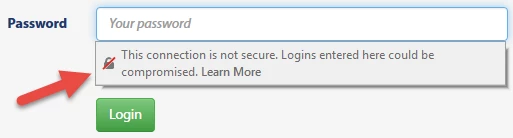
Info held in a database includes name, address, location, phone and email. According to the Privacy Act, this info may not be divulged.

Should the client invest in an SSL certificate? If so, which level? Any recommendations?

    This topic has been closed for replies.

    3 replies

    Teodor K
    Participating Frequently
    June 27, 2017

    The problem with this is not the site security, but that the information sent from site to the server is not encrypted.

    So imagine the following situation:

    You are sitting in a cafe/airport/bar with free WiFi network. You are entering your login credentials / CC info etc. in a form on a non-https site. Every teenager with a little knowledge and interest in networking with a Linux distribution installed on his laptop could easily sniff all of the traffic in the network, which of course will result in stolen login details ... (don't tell me this could not happen, as these things happen more often than you think)

    I've done that just to demonstrate people how easy it is to steal their login data in open WiFi networks, when they do not pay attention to where and what they are entering.

    That's why i always use VPN, which server i run in my home network and connect to it every time i connect to a free WiFi hotspot....

    ---DMXzone | Wappler
    Legend
    June 26, 2017

    Unfortunately redirecting to https:// from just the standard http:// in your case will only result in a page with a message 'Your page is not secure' I would ask your host how they have the server set up because when I do that to any site I have produced I get a 'secure' connection but its obviously not an option set up as default by your hosting provider.

    Legend
    June 26, 2017

    This gets even more insane now I have had a better chance to check the majority of the websites I manage. Some seem to have a SSL certificate associated with them, which until now I didnt know about, so I have no idea how they got those certificates unless they came as part of the hosting package by default............hummm.

    If I use https to access the pages parts of them are designated as unsecure, I guess those links not using the https:// protocol....its all a bit of a mish mash to me when it comes to using a secure connection.

    Seems to me as though it would be a good idea for hosts to ONLY offer secure hosting to avoid the obvious confusion it creates.

    BenPleysier
    Community Expert
    Community Expert
    June 27, 2017

    The problem with any of the search engines saying anything about rankings, is that they never say how it will affect the ranking calculation.

    They did the same with html5, accessibility, back links, keywords, content, etc etc. If they said not doing something to a certain standard would reduce the site ranking by x% then it would be possible to at least say if it was worth the time and effort to implement a feature.

    ssl now falls into the same critera, in that no one knows if it is worth doing. It is a necessity if user info is to be stored, but just another time waster if it is not. I doubt if most Dw users even know how to begin with developing ssl compliance sites, and if it ever a requirerment would know how much to charge let alone implement on the server.

    Ben posted a link to the 'letsencrypt' web site, but unless one knows how to use the shell, and more importantly is allowed to use it, (most shared hosting plans do not allow its use) it cannot be installed, except by the hosting provider. Then there is the problem of  lets encrypt only being valid for 90 days, unlike paid for certification which normally lasts 1 year, so an ongoing maintanence plan is also required just for the free certification.


    TLS (Transport Layer Security or its predecessor Secure Sockets Layer - SSL) is used to encrypt information that travels between the server and the client and from the client back to the server. The idea is that snoopers cannot decipher the info that is gathered.

    Information that is not being broadcast will not be subjected to this encryption, hence the site, including database, inputs, uploads and scripts, will have to be secured in the normal way.

    I have just created a support ticket to get my host to install Let's Encrypt on the server, this as a trial for one of my sites. I have also noted that

    For Plesk you won't even need to install Certbot. Instead, use the extension already available in Plesk — it will also give you automatic renewal of your certificates out-of-the-box as well!

    I will let you know how I go.

    Wappler is the DMXzone-made Dreamweaver replacement and includes the best of their powerful extensions, as well as much more!
    pziecina
    Legend
    June 26, 2017

    The message is indicating only that the connection between the server(s) and the users computer is not secure, which is all the use of ssl and https does. It has nothing to do with the actual security of the site itself, but only gives a sort of secure connection.

    An ssl certificate from a reputable signed company is relatively cheap now, but remenber you will have to change any links and place all resources inside the secure folder. It may also be worth using http2 as this allows extra security, but its use will depend on no old browsers being used.

    The real security starts with the database and the site itself, as the database must be behind a secure firewall, and if possible not within the same structure as the site itself. I don't know about php's security coding, but if it has similar to C# then it often becomes a question of just how secure you wish to make it.

    Once you move into legal responsibilities to keep data secure, the term, 'all resonable precations taken' is a minefield, and i have seen experianced programmers cry when their 'secure' code was hacked in a couple of minutes by a friendly hacker, whos job it is to check just how secure something is.

    BenPleysier
    Community Expert
    Community Expert
    June 26, 2017

    Thank you for your reply.

    I have no problem with site (including DB) security; 'all reasonable precautions taken' does apply.

    My problem is based on the following remarks:

    • information sent over the net, including username and password, can be intercepted.
    • with the exception of Admin logins, unauthorised access is not a dealbreaker because the info is not a security issue.
    • Admins have access to all DB content.
    • User login details may be used on a variety of websites; users rarely change their details internet wide.

    Does this mean that site traffic should be encrypted?

    Wappler is the DMXzone-made Dreamweaver replacement and includes the best of their powerful extensions, as well as much more!
    pziecina
    Legend
    June 26, 2017

    For the first item, information being intercepted over the internet, this is the real reason for ssl/https. Such interceptions though are rare, as they require direct hacking of the servers involved or slicing into the network. It's worth remembering though, that https will give the site a higher search engine ranking if the entire site is placed within the secure folder. So there could be a positive involved with the cost of doing sites using https by default.

    The only item I would recommend regarding the info, is to encrypt the email address on the database, as this is generaly regarded as sensitive info. I don't know about Australia, but in Europe the loss of such data would certainly incur a fine if stolen from the database. The rest of the user data would depend on the 'all reasonable precautions taken', being proven by yourself and the site owner, for which the use of ssl will certainly be an advantage.

    One other item to remember is not to do a wordpress for the log-in page, i don't know if they still do it, but if one had the log-in info wrong, it would tell the user which one was incorrect, which is a definite do not do. An hacker in such circumstances would then know which item was correct, and could then concentrate on the incorrect item. Always use a general message that says the info is incorrect.