


Participant
October 25, 2019
Answered

Solved - "Apply Source Formatting" deletes indents instead of adding them

  • October 25, 2019
  • 2 replies
  • 647 views

Solved, by restarting dreamweaver


[Forgive me if I am wrong, but I thought the purpose of "]Apply Source Formatting" is to rewrite the code (html) according the preferences settings. When I run this on a html page, dreamweaver is deleting all indents instead of cleaning up the indents or adding extra indents where necessary.
This especially concern my students as I substract points, when they deliver non-indented code 😉
This topic has been closed for replies.
Correct answer Paul-M

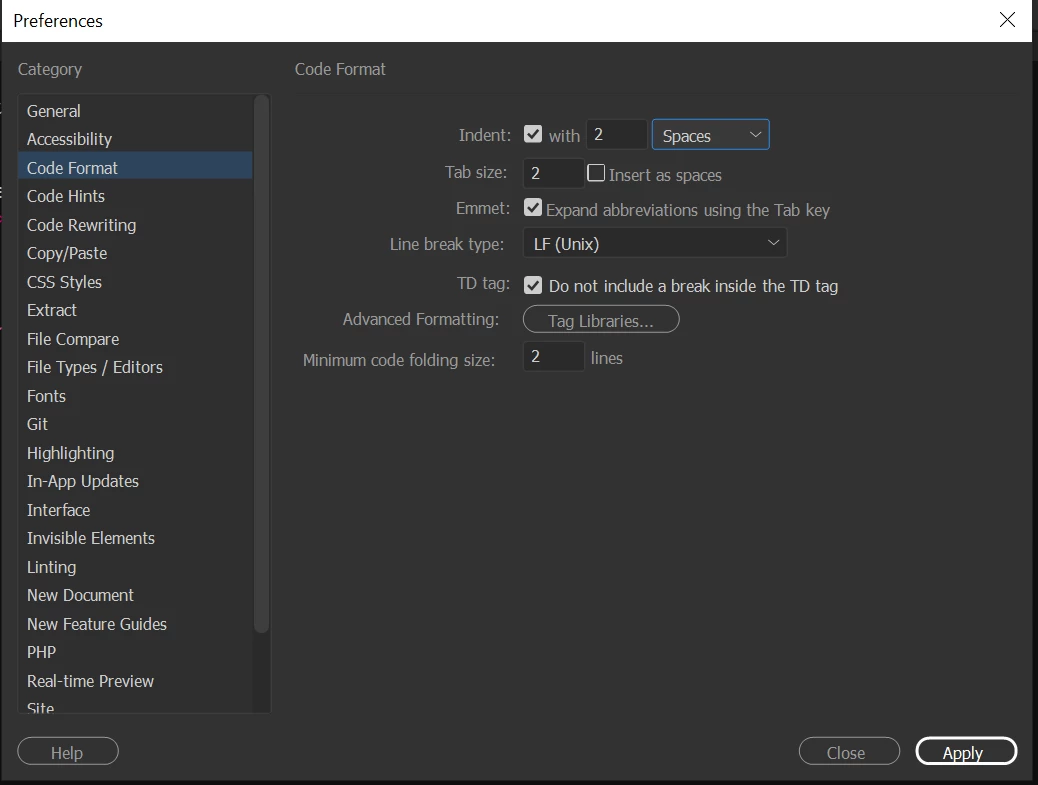
Have you set your indent options  in  preferences > code format ?


Also please state your OS and what version of Dreamweaver you are using...


2 replies

Nancy OShea
Community Expert
Community Expert
October 25, 2019

Apply source formatting only indents code if that's how you have things set-up in your tag libraries.  Personally, I see no advantage in indented code.  My OCD side has always preferred working with left aligned markup.  To the matter of subtracting points from students, I think that's terrible.  Indents have no effect on performance or whether the code is actually any good or not.   Formatting code with/without indents is a personal choice, not a web standard.


Nancy O'Shea— Product User & Community Expert
Legend
October 25, 2019

There's actually still isues with tag libraries

Paul-M - Community Expert
Paul-MCorrect answer
Legend
October 25, 2019

Have you set your indent options  in  preferences > code format ?


Also please state your OS and what version of Dreamweaver you are using...


Paul-M - Community Expert