


rogg
Participant
October 20, 2017
Answered

Standard toobar in Dreamweaver 18.0 10136 overlays menu and can't be moved

  • October 20, 2017
  • 2 replies
  • 366 views

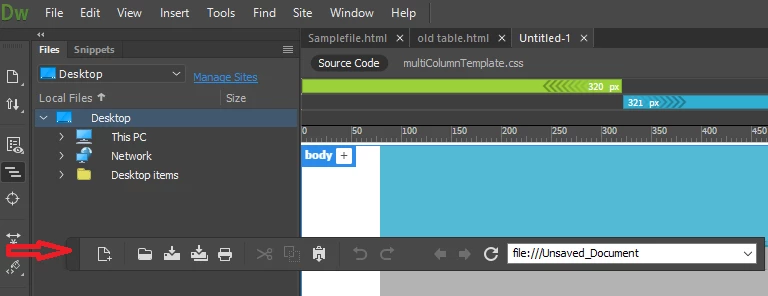
I just updated to the October 2017 release of Dreamweaver. Selecting the standard toolbar (Windows - Toolbars - Standard) when a document is open overlays the toolbar on top of the menu (File, Edit, View, etc.). The only way to recover the menu is to reset the current workspace. Not having the standard toolbar and the menu at the same time is a huge PITA. I use Windows 10 Pro.
    This topic has been closed for replies.
    Correct answer lnayal

    Hi Rogg,

    This behavior is seen with old releases as well. Actually toolbar comes floating when launched, you can drag it and dock it to top bar of DW without resetting the workspace. To drag standard toolbar, click on the pointed area of standard toolbar in below image

    Hope this helps.

    2 replies

    rogg
    roggAuthor
    Participant
    October 20, 2017

    Thanks, Inayal. That worked. Thing is, the place where it can be grabbed is narrower than in the prior Dreamweaver releases. It just took a little more precise pointing-and-grabbing, thanks to your very clear instructions.

    lnayalCommunity ManagerCorrect answer
    Community Manager
    October 20, 2017

    Hi Rogg,

    This behavior is seen with old releases as well. Actually toolbar comes floating when launched, you can drag it and dock it to top bar of DW without resetting the workspace. To drag standard toolbar, click on the pointed area of standard toolbar in below image

    Hope this helps.