


chrisb62953814
Participant
June 9, 2017
Question

Supported Ciphers/Encryption

  • June 9, 2017
  • 2 replies
  • 1388 views

We recently increased security on a web server to only accept certain ciphers in order to make our box more secure. However, after making this change, users can no longer upload in Dreamweaver. If we revert the change, the user has no issues. For more information, we had a user who had been using PuTTY before to upload files with no issues. After the change, the user was experiencing issues, but we determined that was because they were using a PuTTY version that didn't have ciphers listed as an option in PuTTY's configuration (see screenshot below). After upgrading the users to the newest client, the were back up and running.
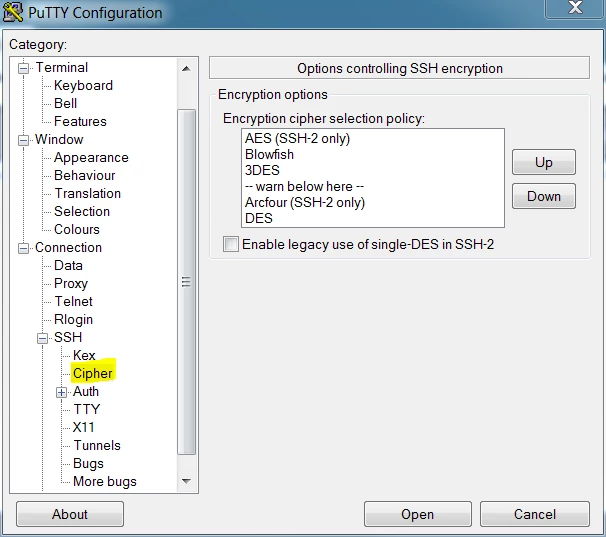
I've contacted Adobe about this, but the employee asked me what ciphers were, so I knew I wasn't going to have any luck.

Can anyone provide insight on the Dreamweavers' encryption or (even better) the ciphers supported by the product.

This topic has been closed for replies.

2 replies

Community Manager
June 9, 2017

Hi Chris,

To answer your question, we would need some more information:

1. What is the DW version you are using?

2. Which protocol you are using in DW to transfer files to server?

3. Also, when you increase the security on server by changing list of accepted ciphers, do you see any error message in DW while uploading? If yes, please share a snapshot.

Thanks,

Lalita

chrisb62953814
Participant
June 9, 2017

Lalita,

1. We're using Creative Cloud, which updates regularly. So, we're using the latest version.

2. We were using SFTP originally. But experience the issue on any method of SFTP.

3. We get the same error as outlined in this post Dreamweaver CC - SFTP - Cipher Not Supported

Jon Fritz
Community Expert
Community Expert
June 9, 2017

While you might very well be in the latest version, the CC version you are using isn't necessarily automatically updated via the CC Desktop App when a new full release comes out. As a subscriber, you have access to all CC versions of the program (5 so far) and, unless you specifically tell it to update to a new version (for example from CC2014 to CC2015), you may still be using an older release, though the fully updated version of it.

To verify the version you are actually on, go to Help > About Dreamweaver

BenPleysier
Community Expert
Community Expert
June 9, 2017

In a previous post on the subject I suggested disabling the firewall which did not help. The error message was "fatal: matching cipher is not supported: arcfour128"

I think we may have to ask Preran​ for guidance.

Wappler is the DMXzone-made Dreamweaver replacement and includes the best of their powerful extensions, as well as much more!
Preran
Community Manager
Community Manager
June 9, 2017

Thank you for the call out Ben. Let me check with the team and get back to you.

Thanks,

Preran