


Exit
  • Global community
    • Language:
      • Deutsch
      • English
      • Español
      • Français
      • Português
  • 日本語コミュニティ
  • 한국 커뮤니티
0

Trying to add a text box to a dreamweaver page

Community Beginner ,
Mar 05, 2022 Mar 05, 2022

I am working on a website thatrequirsinserting a lot of text document into web pages.,  'when I do so. tjte tex loes all of it's formatting and thusthe margins ar lost and making a jumbled mass of sentences all over the page.  Dreamweaver ha no options for settin margins
334
Translate
Report
Community guidelines
Be kind and respectful, give credit to the original source of content, and search for duplicates before posting. Learn more
community guidelines

correct answers 1 Correct answer

Community Expert , Mar 06, 2022 Mar 06, 2022

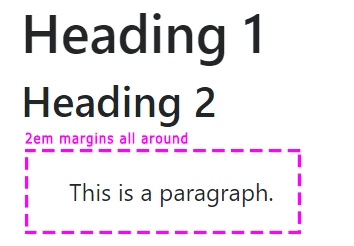
You don't set margins in Dreamweaver the way you would with a word processor, if that's what you mean.   Web pages use CSS Margins.


And there's no such thing as TEXT BOXES.  Use headings and paragraph tags to signify descriptive content to browsers.


HTML:

<h1>This is heading 1</h1>

<h2>This is heading 2</h2>

<p>This is a paragraph.</p>


Use CSS code to style your content. Add this to your stylesheet.


h1 { font-size: 2.25em }

h2 { font-size: 1.75 em }

p { font-size: 1 em; margin: 2em }


image.png

...
Translate
Community Expert ,
Mar 06, 2022 Mar 06, 2022

Maybe this article will help https://helpx.adobe.com/au/dreamweaver/how-to/use-css-to-style-divs.html

Wappler is the DMXzone-made Dreamweaver replacement and includes the best of their powerful extensions, as well as much more!
Translate
Report
Community guidelines
Be kind and respectful, give credit to the original source of content, and search for duplicates before posting. Learn more
community guidelines
Community Expert ,
Mar 06, 2022 Mar 06, 2022

You don't set margins in Dreamweaver the way you would with a word processor, if that's what you mean.   Web pages use CSS Margins.


And there's no such thing as TEXT BOXES.  Use headings and paragraph tags to signify descriptive content to browsers.


HTML:

<h1>This is heading 1</h1>

<h2>This is heading 2</h2>

<p>This is a paragraph.</p>


Use CSS code to style your content. Add this to your stylesheet.


h1 { font-size: 2.25em }

h2 { font-size: 1.75 em }

p { font-size: 1 em; margin: 2em }


image.png


Nancy O'Shea— Product User, Community Expert & Moderator
Translate
Report
Community guidelines
Be kind and respectful, give credit to the original source of content, and search for duplicates before posting. Learn more
community guidelines
Community Expert ,
Mar 06, 2022 Mar 06, 2022
LATEST

When copying & pasting formatted text from other apps, use Edit > Paste Special and select the 2nd option  -- Text with structure.   DO NOT bring other formatting in from MS Word, etc... as it inserts unwanted junk code into your HTML document.


image.png


Hope that helps.


Nancy O'Shea— Product User, Community Expert & Moderator
Translate
Report
Community guidelines
Be kind and respectful, give credit to the original source of content, and search for duplicates before posting. Learn more
community guidelines