


Inspiring
June 3, 2019
Answered

Using Standard Mac Font

  • June 3, 2019
  • 3 replies
  • 1295 views

I'm trying to use a font that's on my Mac in my stylesheet by using this code:

.styleccursive2 {

  font-family: "Noteworthy";

  font-size: 22px;

  color: #242424;

  text-align: left;

  font-weight: lighter;

  letter-spacing: -0.5px;

  word-spacing: 2px;

  line-height: 20pt;

}

But when I test it in my template, the font is shown as Cursive Arial
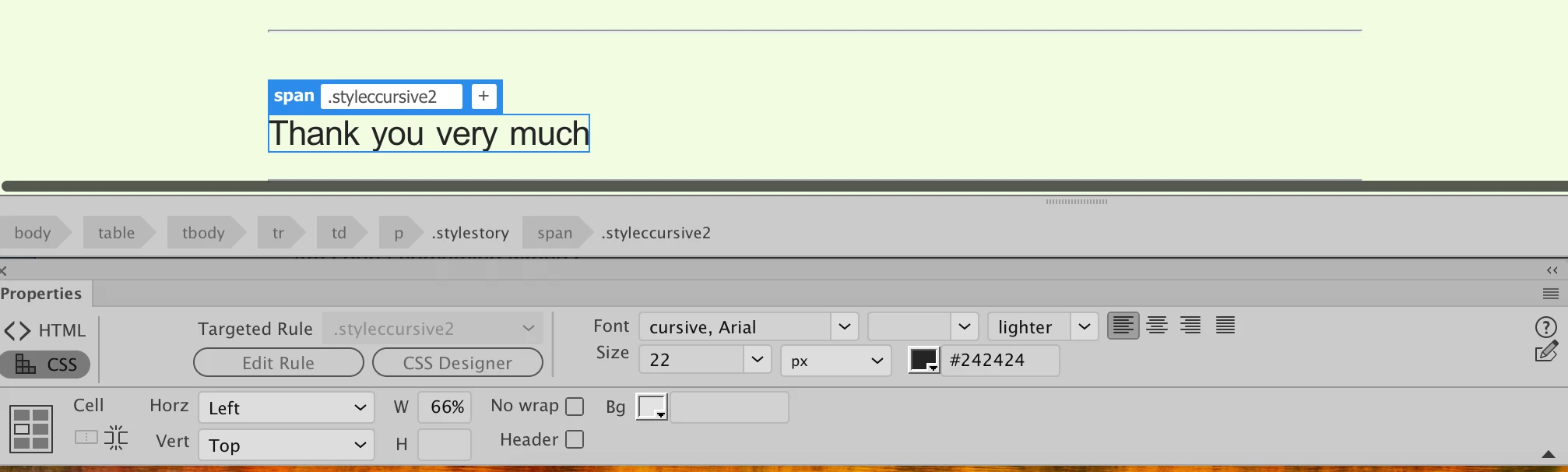
I made sure I uploaded my edited style sheet before testing it.

Am I don't something wrong?

Thanks

Alan

This topic has been closed for replies.
Correct answer English100

If you want, you could click my screen name, then the Message button on the right to send a Private Message with a link to your files. I could take a look at what's been uploaded and see if there isn't something you've been staring at too long to notice.


Jon

I checked this morning and the new font I added to my stylesheet yesterday is now available. It seems as if there is some sort of delay between when I make a change to my stylesheet and when DW recognizes it. Very weird!

Alan

3 replies

pziecina
Brainiac
June 4, 2019

What is the file type extension of the font(s) you are trying to use?

If it is not woff, (or woff2) otf, ttf, then you will have to convert it to a downloadable font using a font conversion program, and insert it into your css as a downloadable font. However doing so may leave you open to legal action as you would be using a copyright font.

Inspiring
June 4, 2019

It's not an issue with a font, it's an issue where a font that I added to my stylesheet is not showing up when I try to use it. It's as if the edit was erased as it uploaded which is ridiculous of course.

Jon

What would you need? I can send you my HTML template file and my stylesheet. I would prefer not to post them.

Alan

Jon Fritz
Community Expert
June 4, 2019

If you want, you could click my screen name, then the Message button on the right to send a Private Message with a link to your files. I could take a look at what's been uploaded and see if there isn't something you've been staring at too long to notice.

Jon Fritz
Community Expert
June 3, 2019

The fact that DW is showing "cursive, Arial" in the Font field of the Properties window, under the CSS tab, means you must have it set in your code as "cursive, Arial".

It's likely that you just have two .styleccursive2 selectors in your stylesheet. You could be editing the first iteration with the Noteworthy font (not a web-safe font as Ben mentions) and the second one, later in the css file, is still set as "cursive, Arial".

The second one would take precedent, being later in the cascade.

It's hard to say without seeing your code though. Is there a chance you could share a link to your work in progress?

Inspiring
June 3, 2019

Jon

styleccursive2 is the ONLY font in my stylesheet. I have no idea why it's showing as cursive, arial which is why I posted here.

Ben

Thanks, I'll take a look at that.

Alan

Inspiring
June 4, 2019

If you're absolutely sure you've uploaded the updated .css file and that it's linked correctly using the same file path and case structure shown in the <head> section of the page, what you describe could point to a caching or privileges issue.

Normally I'd say the browser could be holding onto old info (Chrome does that quite a bit), but since you're seeing the problem when pulling the remote file within DW itself, it points to the unusual issue of the server caching old files.

To test that, you can try deleting the .css file from the server entirely, and see if the site still comes up correctly in your browser or DW...

If it comes up with css styles, the server is caching the .css file and you'll need to talk to your hosting company to get them to kill that setting, or just upload the .css file again and wait for it to "pop" in place depending on the server settings.

If, as would normally be expected, the site "breaks" (stops reading the .css file), all you would need to do is re-upload your corrected .css file from your local site to the location being referenced by the link in your page's <head> section. This will also clear up the problem if you don't have access to overwrite files (but still have the ability to delete and write).


Jon

I checked the date of my stylesheet.css on the server side of my FTP Client and it's the same as the one on my laptop. I guess the issue was that the font wasn't recognized. I tried creating a new font from Google Fonts in my stylesheet which I edited and uploaded and made sure it was dated today at 10:15:

.styleccursive5 {

  font-family: "Dawning+of+a+New+Day&display", cursive;

  font-size: 36px;

  letter-spacing: 2px;

  color: #983200;

  text-align: left;

}

I opened an existing HTML file and tried to make some text use the new font, but in the Target Rule dropdown list the new font didn't even appear. I waited for a couple of hours to see if it would take the updated stylesheet a while to "take" but it hasn't.

I can see the stylesheet with the correct date and time that I edited sitting on the server side of my FTP Client.

I have no idea what's going on. I know that my hosting company doesn't have a time delay between uploads and availability, because I can edit one of my stories, upload it and the edited version is immediately available.

Alan

BenPleysier
Community Expert
June 3, 2019

Have a look at what web safe fonts are and the consequence when not using them: Fundamental text and font styling - Learn web development | MDN

Wappler is the DMXzone-made Dreamweaver replacement and includes the best of their powerful extensions, as well as much more!