

Inspiring
July 3, 2017
Answered

Vertical color bars to the left of the CSS code

  • July 3, 2017
  • 4 replies
  • 1575 views

Hi,

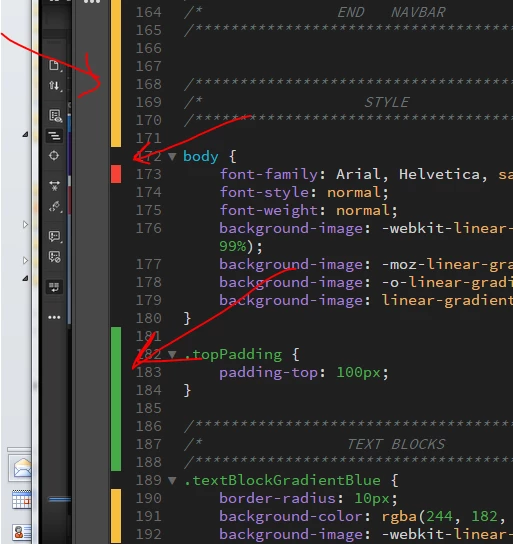
What are those vertical color bars to the left of the CSS code?

Wehre can I find reffrence to it?
This topic has been closed for replies.
Correct answer Niharika Jha

Hi,

These are gutter marks which appear when you are using GIT. You can find more context from the link- Learn how to download and use Git with Dreamweaver CC.

1. Green guttermark specifies new line added.

2. Yellow guttermark specifies modified line.

3. Red guttermark specifies deleted line.

Regards,

Niharika Gupta

Adobe Dreamweaver

4 replies

Niharika Jha
Adobe Employee
Niharika JhaCorrect answer
Adobe Employee
July 5, 2017

Hi,

These are gutter marks which appear when you are using GIT. You can find more context from the link- Learn how to download and use Git with Dreamweaver CC.

1. Green guttermark specifies new line added.

2. Yellow guttermark specifies modified line.

3. Red guttermark specifies deleted line.

Regards,

Niharika Gupta

Adobe Dreamweaver

karpiyonAuthor
Inspiring
July 5, 2017

it appears is though it has a purpose.

when i click on a red color bar it opens up a few more code lines as can be seen in my snapshot:

before:

after - see the new red frame

pziecina
Brainiac
July 5, 2017

It's still wrong though, as code collapse should be indicated by the small 'arrows', with a written indication at the point of collapse.

Maybe Preran​ can pass this problem on to a Dw team member for clarification, as i think it may be a problem with your installation, as i have never seen this. I could be wrong though, as i don't use Dw often at the moment, so it could be a setting that i have never used.

Preran
Community Manager
Community Manager
July 5, 2017

Hi Archana,

Can you please ask one of the Adobe forum team members to assign you a staff badge, for the forums.

The staff badge makes it easy for everyone to recognise Adobe staff.


I will take care of that, Paula. Thank you for pointing that out.

Thanks,

Preran

karpiyonAuthor
Inspiring
July 5, 2017

No, not Hi-dpi display and this appears only (i think...) in css code

it must have something to do with code marking but what?

I found no documentaion related to it.

I am using the latest version of DW

pziecina
Brainiac
July 5, 2017

As i say, i have never seen any color bars, so all i can think of is that there is a problem with your installation.

Have you tried resetting preferences?

https://helpx.adobe.com/dreamweaver/kb/restore-preferences-dreamweaver.html

karpiyonAuthor
Inspiring
July 5, 2017

And when I click on them the expand....

what are they?

pziecina
Brainiac
July 5, 2017

I have never seen the color bars, but it looks as though they have something to do with marking code blocks.

Are you by any chance using a hi-dpi display?
