


Known Participant
November 20, 2021
Question

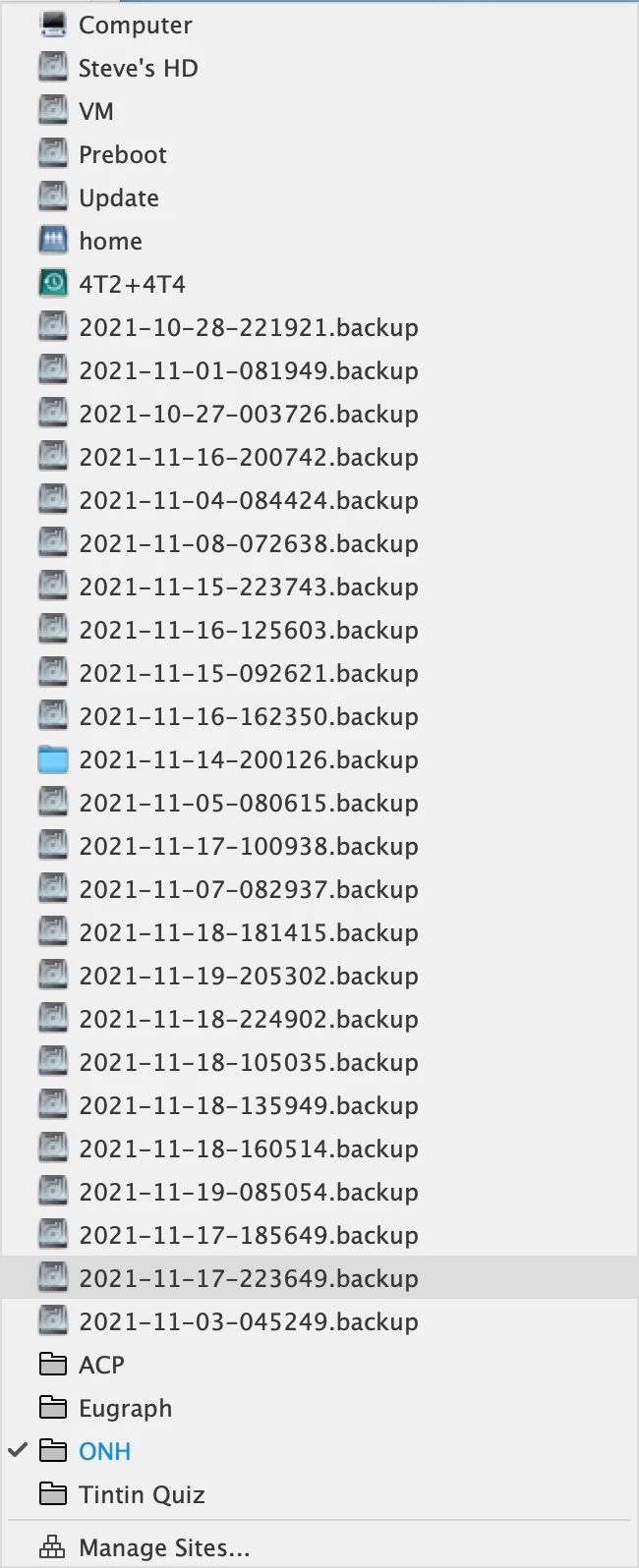
Wrong locations shown in Sites list [Time Machine backup files]

  • November 20, 2021
  • 4 replies
  • 5097 views

Dreamweaver 21.2 on macOS Big Sur is showing a large number of locations in the pop-up sites list, in addition to the correct sites. This seems to have begun after a power outage damaged Dreamweaver's prefs files.

I have restored prefs following this procedure, then manually set my prefs again. https://helpx.adobe.com/dreamweaver/kb/restore-preferences-dreamweaver.html

I have also restored the sites prefs file from Time Machine before the problem started. 


Here's what the list looks like. The sites at the bottom are correct, and correctly linked. I'd like to get rid of the rest.
This topic has been closed for replies.

4 replies

Participant
May 19, 2023

I am also having this issue. This thread of responses from Adobe shows they have no intent to solve this. Ive deleted all my files, completely removed Adobe and reisntalling it. These responses to you are pathetic. Good luck as we forege ahead

.

BenPleysier
Community Expert
Community Expert
May 20, 2023
quote

This thread of responses from Adobe shows they have no intent to solve this.


By @minedice


Sorry, no responses here from Adobe. The only response is from a conscientious co-user of Dreamweaver.


The common thread of this discussion seems to be Dreamweaver, Mac OS and Time Machine (whatever that is).


As I do not use Mac OS or Time Machine and I have no problems with Dreamweaver's backups, my solution would be to start getting rid of Time Machine. If that does not work, get rid of Mac OS.


Alternatively, get rid of Dreamweaver.


Wappler is the DMXzone-made Dreamweaver replacement and includes the best of their powerful extensions, as well as much more!
Known Participant
September 2, 2022

I started this thread Nov 20, 2021.

I have since migrated to a Mac Studio with macOS Monterey 12.5.1. All files are stored in the Mac Studio's internal SSD. The only use of external disks is for Time Machine backup (14T1 and 14T2). 4TSSD is empty.

The problem persists. Sometimes I see only a few backups, sometimes dozens.


Nancy OShea
Community Expert
Community Expert
September 2, 2022

Which version of Dreamweaver CC?


Nancy O'Shea— Product User & Community Expert
Known Participant
September 2, 2022

Dreamweaver 21.3

Creative Cloud app shows Dreamweaver up to date.

erzwo
Participant
August 31, 2022

Is there a solution?
I have the same problem.
New iMac, new installation of Dreamweaver and it shows me all backups from Time Machine.

The difference from before is that I am now backing up an additional external hard drive with Time Maschine. This results in the Time Machine hard drive showing all backups, not as folders as before, but as "drives". I can open these and then see a folder for each backed up hard drive.

I seem to remember that the site list used to show only the Time Machine disk, but not each backup.

Nancy OShea
Community Expert
Community Expert
August 31, 2022

Which operating system?


Nancy O'Shea— Product User & Community Expert
erzwo
Participant
September 1, 2022

macOS Monterey 12.4

Nancy OShea
Community Expert
Community Expert
November 20, 2021

The backup files look like the result of a restoration either from the power outage or time machine. 


I think you'll need to manually remove the backups with Mac Finder. But make sure your site files and folders are sufficiently backed up onto dedicated cloud or external backup drives, just in case.


Nancy O'Shea— Product User & Community Expert
Known Participant
November 20, 2021

I did not restore my iMac.

All the volumes and files Dreamweaver is seeing are real and are in their usual locations, so can't be "removed." For example: 4T2+4T4 is my external Time Machine drive.

I just want Dreamweaver to ignore them in the sites list.


Oddly, the list of Time Machine snapshots Dreamweaver is showing in the sites list is shorter now than before.


Known Participant
November 21, 2021

Thanks.

The Time Machine snapshots are no longer appearing.


One more bit of information:

If I control click on one of the locations that shouldn't be shown, the Reveal in Finder is grayed out.

And the Time Machine snapshot files are back again. All puzzeling.