Known Participant
October 28, 2017
Answered

F12 Design View differs from Online

  • October 28, 2017
  • 1 reply
  • 879 views

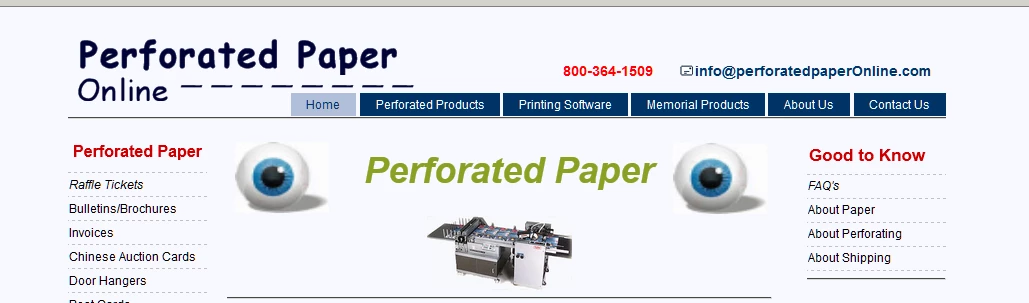
The header of our new test site - when viewed using the F12 key - differs from the online display.  Just the header, nothing else.  Specifically, the nav bar selections (Home, Contact Us, etc.) vary vertically.  First view is using F12, second when viewed online.

Anyone have an idea?

Thanks Mike

This topic has been closed for replies.
Correct answer Nancy OShea

Nancy,

When I add the

back in, the markup validator
displays


Perforated Paper


800-364-1509]]>   *info@perforatedpaperOnline.com*]]></p>

</div>

<ul>

<li>[Home | index.html]</li>

<li><a

href="http://shop.perforatedpaperonline.com/category-s/309.htm">Perforated

Products</a> </li>

<li><a

href="http://shop.perforatedpaperonline.com/category-s/108.htm">Printing

Software</a> </li>

<li><a

href="http://shop.perforatedpaperonline.com/category-s/158.htm">Memorial

Products</a> </li>

<li><a

href="http://www.perforatedpaperonline.com/proto_about_us.html">About

Us</a></li>

<li><a

href="http://www.perforatedpaperonline.com/proto_contact.html">Contact

Us</a></li>

</ul>

</div>

</div>

</div>


Why don't you revert to the one on your current home page which works -- albeit with a few code errors.


1 reply

Nancy OShea
Adobe Expert
October 28, 2017

Which browser are you using and is your zoom level set to 100%?

It might help if we could see the URL to your site.

Nancy O'Shea— Product User, Community Expert &amp; Moderator
mjohn551Author
Known Participant
October 28, 2017

Thanks for responding Nancy.

Am using Mozilla Firefox.

Link to test html page is http://www.perforatedpaperonline.com/proto index.html.  I have to believe it happened coincidentally with html changes I've been making.

Mike

Nancy OShea
Adobe Expert
October 28, 2017

There should be just a space between proto and index_html


OK.  When you add spaces to filenames on the web, you have to express the space with a %20 entity.  www.perforatedpaperonline.com/proto%20index.html

Anyway, getting back to the problem.   Add a couple of paragraphs to top_nav_upper like this.

<div id="top_nav_upper">

<p>& n b s p ;</p>

<p>& n b s p ;</p>

Remove the spaces.  I only added them here because this forum strips out non-breaking spaces if I don't. 

Lastly, fix your code errors and you should be good to go.

[Invalid] Markup Validation of http://www.perforatedpaperonline.com/proto%20index.html - W3C Markup Validator

Nancy O'Shea— Product User, Community Expert &amp; Moderator