


Known Participant
July 4, 2021
Answered

local file list has disappeared

  • July 4, 2021
  • 2 replies
  • 649 views

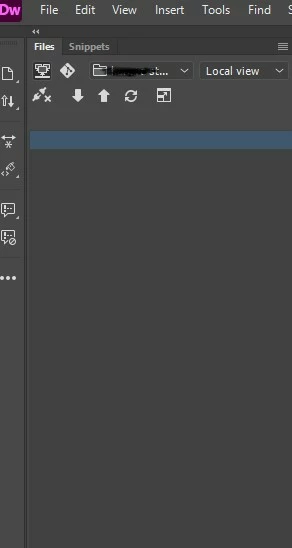
I was typing in a few characters to locate a a file in the sidebar file list, and then suddently they all just disappeared. they are still on the  machine, just not displayed in DW.

I check cloaking - i disabled it.

I still see the list of remote files if I'm connected, but nothing on the local side.

What did I do - and i do i reverse it 🙂


Thanks
 

This topic has been closed for replies.
Correct answer Nancy OShea

Did you accidentally hit the Delete key?

Go to Site > New Site and redefine your local site folder.

If the files are missing, retrieve them from your computer's recyle bin or trash folder.


2 replies

B i r n o u
Adobe Expert
July 5, 2021

completing what @Nancy OShea said, when seeing your file panel screen shot, it looks like if the web site definition doesn't point to any location in your local folder... either if your files disappear, you should still see the main root folder, and its path location


B i r n o u
Adobe Expert
July 5, 2021

yes, I've noticed that sometimes the site definition information gets corrupted and you have to recreate the site definitions from scratch

Nancy OShea
Nancy OSheaCorrect answer
Adobe Expert
July 4, 2021

Did you accidentally hit the Delete key?

Go to Site > New Site and redefine your local site folder.

If the files are missing, retrieve them from your computer's recyle bin or trash folder.


Nancy O'Shea— Product User, Community Expert & Moderator
kneidelsAuthor
Known Participant
July 5, 2021

they are not missing from the computer  - they are where they should be. Just they are not showing in DW