


adamwcareington
Participant
November 15, 2017
Answered

Show and Hide Toggle Visual Media Queries bar in the toolbar

  • November 15, 2017
  • 1 reply
  • 4024 views

Just updated to Dreamweaver CC 2018 and can not find a way to hide the Visual Media Queries bar while in Live View or Split Live/Code view (The green, blue, purple, etc horizontal bars above the rulers in live view).

From Use Media Queries to design responsive sites in Dreamweaver it says "To hide the bar, use the Toggle Visual Media Queries bar in the toolbar." But I don't know what part is the toolbar. I see Window > Toolbar but it only has 3 options; Document, Standard, and Common.

Here is how my layout looks:

If someone could show a screenshot of where the option is to hide the Visual Media Queries bar that would help me the best.

Thank you.
This topic has been closed for replies.
Correct answer Jon Fritz

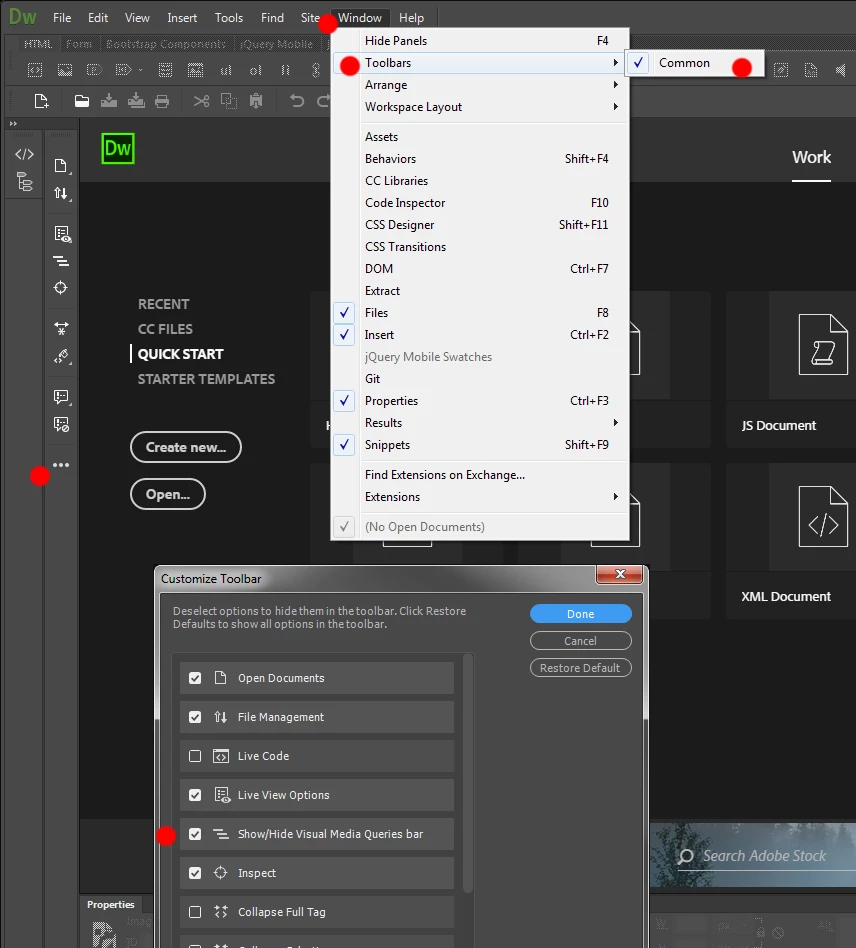
Go to Window > Toolbars and make sure Common is checked
Click the 3 dot icon on the bottom of the vertically aligned Common toolbar
Place a check next to Show/Hide Visual Media Query Bar
Click Done

From there on out, the Show/Hide VMQ Bar icon will be in the Common toolbar....


1 reply

Jon Fritz
Community Expert
Jon FritzCommunity ExpertCorrect answer
Community Expert
November 15, 2017

Go to Window > Toolbars and make sure Common is checked
Click the 3 dot icon on the bottom of the vertically aligned Common toolbar
Place a check next to Show/Hide Visual Media Query Bar
Click Done

From there on out, the Show/Hide VMQ Bar icon will be in the Common toolbar....


adamwcareington
Participant
November 15, 2017

Thank you! My problem was I have my toolbar dragged onto a second monitor so I didn't see the 3 dot icon, I was looking at the top near the file name, etc.

Thank you again.