
artw42732994
Participant
March 6, 2017
Answered

Acrobat DC package fails to install

  • March 6, 2017
  • 2 replies
  • 1463 views

I have created a Creative Cloud Teams package to Acrobat DC 64bit.  We have created other packages for other products and have not had any problems.  However, every time we try to run the Acrobat DC package .msi file it starts the installation but then flashed something very quickly on the screen that you can't see and ends.  No other errors are indicated.  Any help as to where to look to see what is causing the problem or possible solutions would be greatly appreciated.

Thanks in advance,

Art W

[Here is the list of all Adobe forums... https://forums.adobe.com/welcome]

[Moved from generic Cloud/Setup forum to specific Program forum... Mod]
    This topic has been closed for replies.
    Correct answer alisterblack

    Hi,

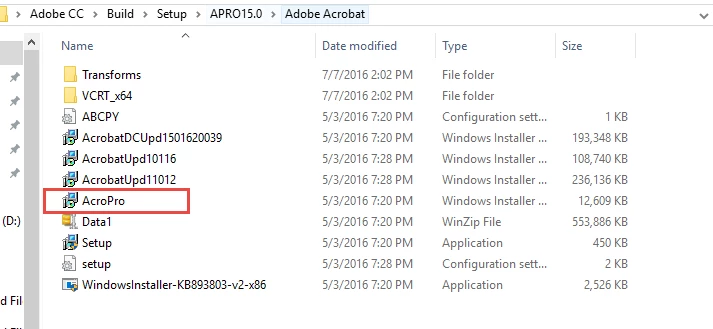
    Acrobat has its own msi file. Please go to the APRO15.0 folder as shown below.

    For further details see Deploy Adobe Acrobat XI or DC

    We normally recommend to use the setup.exe to install Acrobat as this installs Acrobat and any other applications in the package in one step.

    2 replies

    alisterblack
    Community Manager
    alisterblackCommunity ManagerCorrect answer
    Community Manager
    March 7, 2017

    Hi,

    Acrobat has its own msi file. Please go to the APRO15.0 folder as shown below.

    For further details see Deploy Adobe Acrobat XI or DC

    We normally recommend to use the setup.exe to install Acrobat as this installs Acrobat and any other applications in the package in one step.

    John T Smith
    Community Expert
    Community Expert
    March 6, 2017