
Participating Frequently
June 16, 2011
Question

Acrobat Pro 10.1 AIP Install Problem

  • June 16, 2011
  • 2 replies
  • 2273 views

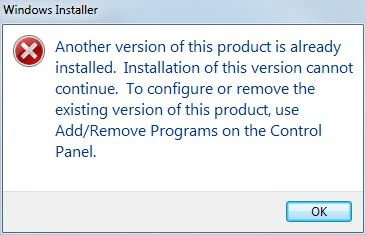
I have been pushing out Acrobat Pro to my users via Group Policy. I started with 10.0 and went to 10.0.1 and then 10.0.2 using the .msp patch files with no problem. I created a new AIP for 10.1 where I started with 10.0 and then applied the 10.1 patch. The problem is that on machines that already have the prior 10.0.2 AIP install, they get the error shown below. On an system that has never had Acrobat Pro installed from the original 10.0.2 AIP it works fine. Anyone else having the same problem?
This topic has been closed for replies.

2 replies

Inspiring
June 20, 2011

We are facing the same problem now with 10.1.0 , and i still don't get the logic behind the new patching system. We are using SCCM to deploy the software to clients, so just linking to new sources is no option. This is also no-go because of the uninstall routines for the software.

And why the heck do i have to start over from the beginning every 3 month, when a quarterly patch is being released?

For version 9 i can patch the AIP with all regular patches in a row and update my distribution points, so new installations are on a good patch level. Security patches are installed through a seperate task sequence. This works like a charm.

The only way i see is always to use the base 10.0.0 msi and streamline it with the latest quarterly patch, followed by security updates, during installation.

Shame on you Adobe, this ain't a  step forward but 2 backward. Patching Acrobat Products was never fun, but now it bacame a punishment.

Quarterly updates are always cumulative? Now really? Have you guys realized that the patches get blown up more and more every time? How big are they going to be in let's say 2 years? About 500 MB? This is what i call wasting ressources.

They got bashed for the patch orgies for home users during new installations, and came up with a home user solution for everyone. Cangrats Adobe, well done! (not)

Adobe Employee
June 17, 2011

Hi,

Whenever Acrobat or Reader AIP is used for installation then one thing to be ensured is that - No previous version of the same product is installed on the machine.

Here is what you should do- (Here I am taking Acrobat as an example )

1. First of all make sure client machine has no version of Acrobat installed.

2. Now let's say Acrobat 10.0.3 is avaliable.

3. Create Acrobat 10.0.3 AIP and deploy via GPO.

4. On client you now have 10.0.3 Acrobat installed.

5. Now let's say Acrobat 10.1 patch is avaliable.

6. Create New Acrobat 10.1 AIP

7. On your server, go to Group Policy management console and delink the earlier AIP from the OU. Example: Delink the Acrobat 10.0.3 AIP

8. Link the newly created Acrobat 10.1 AIP

9. Restart the client

(Step 7 is important!)

Since you have delinked the last deployed AIP, so on client restart, first Acrobat 10.0.3 would be uninstalled followed by the installation of Acrobat 10.1 So effectively you are installing Acrobat 10.1 from an AIP on  a clean machine.

Hope, it helps.

Regards,

Subrato

Participating Frequently
June 17, 2011

According to the installation instruction section at

http://www.adobe.com/support/downloads/detail.jsp?ftpID=5135, you should be able to upgrade from 10.0, 10.0.1, 10.0.2, or 10.0.3 to 10.1 without a problem. Has it been your experience that you can only upgrade from 10.0.3 to 10.1 when using AIPs?

Adobe Employee
June 17, 2011

Hi,

The mentioned URL, http://www.adobe.com/support/downloads/detail.jsp?ftpID=5135 talks about patching acrobat for an individual user and not for AIP installation.

Moreover, I had taken 10.0.3 patch for illustration purpose only. You can have any versions, 10.0, 10.0.1, 10.0.2 or 10.0.3 deployed via GPO in order to deploy 10.1 on that machine.

Am reiterating the fact that, you must delink the earlier AIP from the OU. i.e. On your server, you must go to Group Policy management console and delink the earlier AIP from the OU.

Regards,

Subrato