
Participating Frequently
February 28, 2018
Question

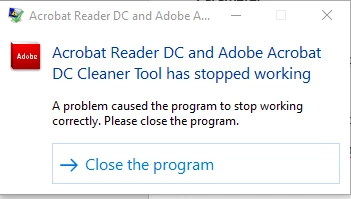
Acrobat Reader DC and Adobe Acrobat DC Cleaner Tool has stopped working...

  • February 28, 2018
  • 1 reply
  • 19930 views

I am in the process configuring an uninstaller for Adobe Reader in case we have failed installation within our company.  I found your cleaner tool, which is exactly what I needed!

However, after the tool completes the uninstall process (logs have finished being written), it crashes.  I have tested this on multiple computers.  Even if I run the tool without any adobe software installed, whenever it completes and you hit "Finish", it crashes.  If I run it silently, it crashes.

My machine is a Precision 3520 with Windows 10 1709.  However, this happened with a VM running 1709 as well.

Has anyone else experienced this?
This topic has been closed for replies.

1 reply

EnterpriseHelp
Inspiring
February 28, 2018

What are the product versions you are trying to remove?

Participating Frequently
February 28, 2018

I have been testing the tool by removing 18.011.20035.

The removal appears to be successful and the logging ends.

Like I mentioned before, even if I run the tool when NO adobe product is installed, it still crashes at the end once you click "Finish."

.

Participating Frequently
February 28, 2018

Can you provide the product name, track, and major version rather than the build number?


Here are the error details from the Application logs...

Faulting application name: AdobeAcroCleaner_DC2015.exe, version: 4.0.0.15957, time stamp: 0x5595f7a4

Faulting module name: ntdll.dll, version: 10.0.16299.192, time stamp: 0x16e7ff7f

Exception code: 0xc0000374

Fault offset: 0x000da8b9

Faulting process id: 0x6080

Faulting application start time: 0x01d3b0cb50c6709a

Faulting application path: C:\Users\________\Desktop\AdobeAcroCleaner_DC2015.exe

Faulting module path: C:\WINDOWS\SYSTEM32\ntdll.dll

Report Id: 4b4d5a13-9b15-4817-8749-9ff86c275b86

Faulting package full name:

Faulting package-relative application ID: